Best USB-C Speaker Dock: Top All‑In‑One Hubs for Productivity
Finding a single USB-C dock that adds robust speaker output while delivering seamless charging, expansion ports, and reliable display options can simplify a modern workstation. The following selections combine USB-C connectivity with audio capability, offering multiport versatility for laptops, tablets, and desktops. Each pick is chosen for its balance of connectivity, build quality, and audio performance, helping you stay focused during meetings, multimedia, and everyday tasks.
style=”display:none;”>Summary Table
| Product | Brand | Key Perks | Ports & Display |
|---|---|---|---|
| USB C Laptop Docking Station 14 in 1 | VVB | Ultra-wide connectivity, 4K outputs, SD/TF, 100W PD | 2x HDMI, DP, USB-C PD, Ethernet, 4 USB A/C ports, SD/TF, audio |
| Microsoft Modern USB-C Speaker | Microsoft | Certified for Teams, built-in microphone, compact | USB-C audio, mic array, Teams controls |
| Philips 34E1C5600HE UltraWide | Philips Computer Monitors | Built-in webcam, noise-canceling mic, USB-C dock | 34″ UltraWide, USB-C docking, built-in speakers |
| Logitech Logi Dock | Logitech | All-in-one docking, calendar sync, multiple mics | HDMI, USB-C, periphery ports, speakerphone |
| XKX Computer Speakers | XKX | USB plug-in, compact, strong bass | USB-C/USB, 3.5mm audio, external speaker |
VVB USB C Docking Station 14 in 1

This 14‑in‑1 USB-C docking station expands a single USB-C or Thunderbolt port into an array of ports designed for productivity. It delivers dual 4K display options via HDMI, a DisplayPort option, 100W PD charging, Ethernet, USB-C and USB-A data ports, SD/TF card readers, and a 3.5mm audio channel. It supports 4K output for compatible devices and offers a broad compatibility range. Note: Some USB-C devices may not display via HDMI/DP if limitations exist with the host device.
Microsoft Modern USB-C Speaker
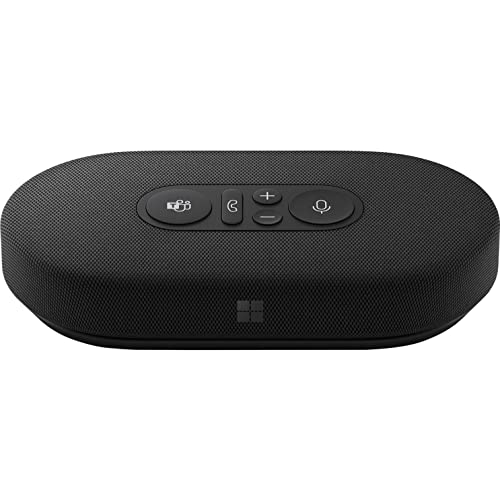
Designed for Teams and day-long collaboration, this compact USB‑C speaker focuses on clear voice capture and intelligible playback. It features a noise-reducing microphone array and a dedicated Teams certification for streamlined meeting integration. Physical controls simplify call management, and the device is optimized for office environments where clear conferencing audio matters as much as general computer sound.
Philips 34E1C5600HE UltraWide Monitor with USB‑C Dock

This 34‑inch UltraWide monitor pairs expansive real estate with built-in webcam and noise-canceling microphone. It doubles as a USB‑C docking hub, letting you connect peripherals, power delivery, and audio peripherals through a single cable. The curved VA panel and color accuracy are suited for productivity and multimedia tasks, while the integrated speakers provide additional audio without external devices.
Cable Matters 14‑in‑1 Thunderbolt Dock

With Thunderbolt 4 compatibility, this dock supports dual 4K displays, gigabit Ethernet, SD card readers, and a wide selection of USB ports. It emphasizes high bandwidth for data transfer and display performance, while offering 100W charging to power a connected laptop. It suits users who require professional-grade connectivity for demanding workflows, including video editing and design tasks.
Logitech Logi Dock

The Logi Dock is an all‑in‑one USB‑C laptop dock designed to simplify home or office desks. It supports multiple USB peripherals and two external monitors, with built‑in speakerphone mics for conferencing. Calendar sync via Logi Tune helps manage meetings, while the integrated design reduces desk clutter and streamlines daily workflows.
XKX USB Desktop Speakers with USB-C

These USB speakers provide straightforward plug‑and‑play desktop audio for laptops and desktops. They support USB-C and USB connections, with a compact form factor and enhanced bass. A convenient choice when you want good, simple external audio without the need for a large speaker system, especially in tight workspaces or setups that demand minimal clutter.
Buying Guide: Key Considerations for a USB‑C Speaker Dock
- Audio quality and mic capabilities: If conferencing is central, prioritize devices with noise‑cancelling mics, beamforming arrays, or dedicated speakerphone features. For casual music, ensure the speakers offer clear mids and solid bass without distortion at typical desk volumes.
- Display and data versatility: Look for docks that support multiple 4K displays or DP/HDMI configurations if you use external monitors. USB‑C data transfer speeds (USB 3.x, USB‑C Gen 2) affect file transfer and peripheral responsiveness.
- Power delivery and charging: A high wattage PD port (60W–100W) enables charging while you work. Check compatibility with your laptop’s charging needs to avoid bottlenecks.
- Connectivity breadth: SD/microSD card readers, Ethernet, multiple USB-A/USB-C ports, and audio jacks expand workflow options. Ensure the dock’s port layout matches your peripherals.
- Device compatibility: Some docks perform best with Windows, macOS, or specific devices like the latest Macs or Surface laptops. Confirm host compatibility for HDMI/DP outputs and audio streaming.
- Dock form factor and mounting: Consider desk space, cable management, and whether you need a compact form factor or a larger dock with a dedicated stand or integrated speakers.
- Reliability and support: Favor products from trusted brands with clear warranty terms and robust software support for drivers, especially on Teams or collaboration platforms.
In evaluating the options, you’re balancing docking versatility with audio performance. If your primary need is enhanced conferencing, prioritize models with strong mic arrays and Teams/Zoom certification. If you require robust display support and fast data transfer, focus on Thunderbolt 4 or USB‑C docks with dual 4K output. For compact workstations, a dedicated USB speaker accessory paired with a simple USB‑C docking station can deliver the best of both worlds without overwhelming your setup.