
Best USB-C to Optical Audio Cables for Crisp Digital Sound
If you need a reliable USB-C to Toslink/ SPDIF adapter, you’re looking for a cable that delivers clean, lossless digital audio. The right cable makes sense for users pairing USB-C devices with soundbars, AV receivers, DACs, or home theater systems. This guide focuses on five well-matched options and explains who each is best for, plus practical buying tips and a quick FAQ.
Summary table of selected products:
| Product | Best For | Key Benefit |
|---|---|---|
| QIMIAOUS USB C to Toslink | Gamers and movie lovers on USB-C laptops | Low-latency, high-resolution audio |
| XMSJSIY USB C to TOSLINK | General USB-C devices to home audio | Wide compatibility, high-resolution PCM |
| DOREWINAUD USB-C to Toslink 6.6 ft | Flexible room layouts | Long reach, sturdy build |
| Cubilux USB C to SPDIF | MacBooks and desktops needing clear stereo | Dedicated SPDIF transmitter |
| Adoreen Unidirectional USB C to Toslink | Budget-friendly setups | Solid build, clear PCM output |
QIMIAOUS USB C To Toslink Optical Cable
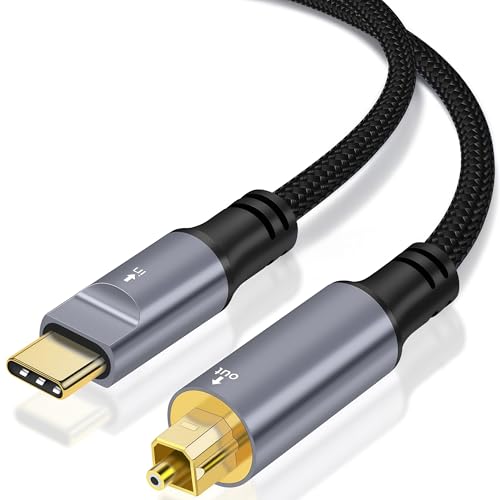
The QIMIAOUS cable provides unidirectional USB-C to SPDIF output, ideal for transferring digital audio from a USB-C port to an optical input. It’s designed for smartphones, tablets, laptops, TV soundbars, Sony PS5, and home theater systems. The emphasis is on lossless, high-speed transmission with 16-bit/96KHz support for a faithful stereo PCM signal. This makes it well suited for immersive movie soundtracks and precise gaming audio.
Best for: users who need reliable, lossless digital audio from USB-C devices to optical-enabled receivers, especially in multimedia setups that prioritize surround-sound clarity. A potential limitation is compatibility with legacy non-USB-C sources.
Why chosen: strong emphasis on high-resolution audio, low-latency transmission, and a broad USB-C device target range. The included chip supports stable, clean digital output, reducing electrical noise in typical home theater environments.
XMSJSIY USB C to TOSLINK Optical Cable

The XMSJSIY option emphasizes unidirectional transmission from USB-C devices to TOSLINK receivers. It supports PCM audio across multiple sampling rates and is designed for wide compatibility with USB-C devices like phones, tablets, laptops, and AV gear. The result is clear, interference-free sound suitable for general listening and home theater use.
Best for: users who want broad compatibility and dependable PCM audio via a simple USB-C to optical link. Limitation: it’s focused on PCM and may not natively handle certain advanced surround formats beyond standard PCM.
Why chosen: straightforward plug-and-play operation, with a clear focus on minimizing signal interference and delivering stable high-resolution audio for everyday media consumption.
DOREWINAUD USB-C To Toslink Optical Cable 6.6 ft
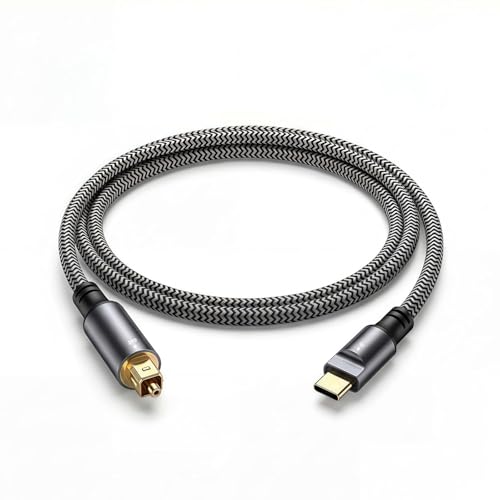
This unidirectional cable offers a 6.6-foot length for flexible placements between a USB-C device and an optical input. It’s built with an aluminum housing and braided cable to reduce EMI/RF interference and preserve signal integrity. It’s compatible with many USB-C devices including mobile and desktop systems, and supports a clean PCM output for home theaters, soundbars, and speakers that rely on optical input.
Best for: setups needing extra cable length without sacrificing signal stability. Caution: longer length can introduce a slight delay in some configurations; ensure your receiver settings accommodate any timing differences.
Why chosen: the robust construction and longer reach make it a practical choice for larger rooms or setups where the source and display are apart.
Cubilux USB C To SPDIF Transmitter

The Cubilux transmitter is a dedicated USB-C to SPDIF transmitter. It focuses on sending USB-C optical output to soundbars, amplifiers, or DACs with Toslink ports. It supports 5.1 and stereo audio through PCM formats. It’s best when the source is a modern USB-C device and the destination accepts optical input.
Best for: users who need a straightforward, single-direction transfer from USB-C to SPDIF optical, particularly for enhancing home theater audio. Limitation: it cannot receive SPDIF from a DAC or amplifier, only transmit.
Why chosen: clear delineation of output direction helps avoid misconfigurations and ensures a simple, reliable path for digital audio to a Toslink input.
DOREWINAUD USB-C To Toslink Optical Audio Cable 3.3 ft
This shorter cable offers plug-and-play simplicity with a 3.3-foot length, suitable for tighter setups. It’s designed for easy connection from USB-C devices to optical-enabled receivers, ensuring the correct optical output is selected. Build includes durable housing and braided cable to reduce interference.
Best for: compact spaces where cable length needs trimming without compromising audio quality. Caution: shorter length may limit placement options in larger rooms.
Why chosen: a compact form factor for desk setups, gaming consoles, and small home theaters where space is at a premium.
Buying Guide: Key Considerations For USB-C To Optical Audio Cables
- Directionality: Most cables are unidirectional (USB-C to Toslink). Ensure the direction matches your source and destination devices to avoid compatibility issues.
- Sampling Rate And Bit Depth: Look for cables that support high-resolution audio (e.g., 16-bit/44.1kHz up to 96kHz). This affects how faithfully audio is preserved from source to receiver.
- Length And Flexibility: Choose length based on room layout. Longer cables should maintain signal integrity; braided jackets help reduce wear and EMI.
- Build Quality: Aluminum or metal housings, quality connectors, and strain relief improve durability and reduce signal loss over time.
- Compatibility: Confirm that your USB-C device outputs audio and that the destination has an optical input (Toslink). Some devices may require system settings adjustments for audio output.
- Latency Considerations: For gaming or real-time use, low-latency designs help minimize audio delay relative to video.
- Practical Limitations: Some adapters cannot convert signals in both directions (not SPDIF to USB-C). Check the data sheet for constraints mentioned in the features.
Frequently Asked Questions
- Can any USB-C device output audio through USB-C to Toslink?
Most USB-C devices that support audio output can send digital audio to a Toslink receiver when using a compatible adapter. Always verify device capabilities and your operating system’s audio settings. - Is unidirectional USB-C to Toslink compatible with 7.1 surround sound?
These adapters typically support PCM stereo and some 5.1 configurations. 7.1 support depends on the source’s output and the receiver’s decoding capabilities. - Do I need drivers for these adapters?
No. Most USB-C to Toslink adapters are plug-and-play and do not require external power or drivers. - Will longer cables affect audio quality?
Longer cables can introduce signal degradation if the build quality is poor. Choose higher-quality cables with proper shielding for longer runs. - Can I use these to connect a laptop to a soundbar?
Yes. If the soundbar has a Toslink input, these adapters can transmit digital audio from a USB-C laptop to the soundbar. - What should I consider when choosing between 3.3 ft and 6.6 ft cables?
Consider your room layout and seating position. Longer cables offer flexible placement but should maintain signal integrity with quality construction.