
Best USB C to Toslink Adapters for High-Quality Digital Audio
Answering the need for reliable USB-C to Toslink (SPDIF) conversions, this guide highlights top adapters for PC, laptop, phone, and gaming consoles. These picks are best for audiophiles seeking lossless digital audio, budget-conscious buyers needing simple plug-and-play solutions, and gamers wanting low-latency performance. The table below helps compare key options at a glance.
| Product | Best For | Key Benefit | Limitations |
|---|---|---|---|
| QIMIAOUS USB C to Toslink Optical Audio Cable | Desktop and laptop users with USB-C | Lossless PCM up to 96 kHz/16-bit | Unidirectional only |
| Cubilux USB C to SPDIF Transmitter | PCs to soundbars or DACs | Supports 5.1 via 5.1-capable setups | Output only, not for input |
| Adoreen Unidirectional USB C to Toslink Cable | Home theater and gaming setups | Hi-Fi 96 kHz/16-bit, low latency | One-way transmission |
| XMSJSIY USB C to TOSLINK Cable | USB-C devices to AV systems | Supports up to 192 kHz/24-bit | One-direction only |
| DOREWINAUD USB-C to Toslink Cable 3.3 ft | Compact setups for PS5/PC | Durable, braided, compact length | Short length varies by use |
QIMIAOUS USB C to Toslink Optical Audio Cable
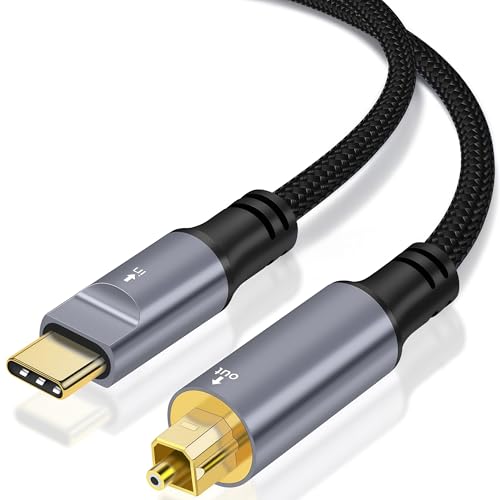
Best for: Computers, laptops, and gaming devices with USB-C outputs that need to feed a soundbar or home theater system. This unidirectional cable converts USB-C digital audio to optical SPDIF for lossless stereo PCM output. It supports 16-bit/96 kHz high-resolution audio and uses a high-performance chip for low-latency transmission, suitable for music, games, movies, and TV. The product notes emphasize compatibility with common USB-C devices and optical inputs on speakers or DACs.
Why chosen: It provides straightforward USB-C to Toslink conversion with emphasis on preserving audio fidelity and reducing electrical noise, making it a strong all-around option for mixed-use rooms. Best for those who want plug-and-play setup without drivers.
Caution: It is unidirectional (USB-C to SPDIF) and does not accept input from SPDIF sources.
Cubilux USB C to SPDIF Transmitter

Best for: Computer users who want to send digital audio to sound systems with optical inputs, including external DACs or home theater receivers. This device is a dedicated SPDIF transmitter (output only) and supports 5.1-channel capability when paired with compatible decoders. It communicates clearly via a high-quality USB-C interface and aims to minimize latency for gaming and multimedia.
Why chosen: The product is designed specifically for transmitting from USB-C to SPDIF, making it a good pick when the goal is to enable existing soundbars or receivers to decode digital PCM audio without analog conversion.
Limitation: It cannot receive SPDIF signals from a source device (no reverse direction), so you cannot use it as an SPDIF input converter.
Adoreen Unidirectional USB C to Toslink Cable

Best for: Home theater setups and gamers needing a compact, durable USB-C to Toslink adapter. It emphasizes metal housing, gold-plated connectors, and a braided jacket to resist wear and EMI/RF interference. It also notes capacitor-like characteristics to provide stable audio transfer at 16-bit/96 kHz and 32 kHz to 96 kHz sampling rates.
Why chosen: This option highlights build quality and practical features like protective caps on both ends and a clear one-way direction, which helps prevent misconnection in dense entertainment centers.
Caution: It is specifically unidirectional (USB-C to SPDIF) and may require confirmation that the USB-C port supports audio output on the host device.
XMSJSIY USB C to TOSLINK Optical Audio Cable

Best for: USB-C devices seeking high-resolution optical audio output to AV receivers, DACs, or speakers with Toslink inputs. It supports wide compatibility across phones, tablets, and laptops and promises lossless sound with formats up to 192 kHz/24-bit. This makes it suitable for critical listening in home theaters or studio-like setups.
Why chosen: The emphasis on high sampling rates and stable signal transmission helps ensure users can enjoy clearer audio with fewer artifacts, especially in music or cinema environments.
Limitation: It provides one-way transmission only, so it cannot receive SPDIF signals back from the receiver to the source device.
DOREWINAUD USB-C to Toslink Optical Audio Cable 3.3 ft
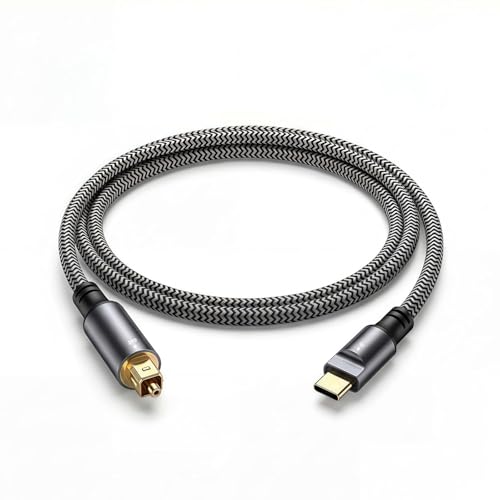
Best for: Short-distance connections in compact setups, including PS5, laptops, and desktop PCs. It emphasizes a durable aluminum housing with a braided jacket to minimize EMI/RF interference while delivering 16-bit/96 kHz audio with lossless PCM output.
Why chosen: The shorter length and rugged construction suit desks or entertainment centers with tight space, providing reliable signal integrity in a compact form factor.
Limitation: The short length may not fit larger rooms where the source and receiver are separated by a significant distance.
Buying Guide: Key Considerations For USB C To Toslink Adapters
- Directionality: Most cables here are unidirectional (USB-C to Toslink). Confirm the direction matches your setup to avoid compatibility issues.
- Audio Quality: Look for 16-bit/48 kHz baseline, with options supporting 96 kHz or higher for better fidelity. Some adapters advertise 192 kHz/24-bit support; use those when pairing with high-end DACs or receivers.
- Compatibility: Ensure your USB-C device (phone, laptop, console) supports digital audio output over USB-C and that your Toslink-enabled device can decode the signal properly.
- Build And Durability: Aluminum housings, gold-plated connectors, and braided cables improve longevity and reduce interference, especially in busy entertainment setups.
- Latency: For gaming and video, choose models that advertise low-latency transmission to minimize audio-video sync issues.
- Length Options: Short cables are portable and tidy; longer cables offer placement flexibility but may add modest signal loss if quality is lower.
- Additional Features: Some adapters are strict transmitters only; others may include protective caps or emphasize EMI shielding. Pick features that match your environment.
Frequently Asked Questions
- Can USB-C to Toslink adapters carry 5.1 surround sound?
Yes, some adapters claim 5.1 compatibility when paired with a compatible receiver or decoding setup; however, always verify with your specific devices. - Are these cables unidirectional or bidirectional?
Most listed options are unidirectional, from USB-C to Toslink. They do not receive SPDIF signals back to USB-C. - Do I need drivers for these adapters?
No drivers are typically required; these are plug-and-play and rely on the host device’s audio output settings. - Will these work with iPhones or iPads?
Some USB-C devices (like newer iPads with USB-C) may output digital audio; verify compatibility with your device’s specifications. - What should I consider when choosing length?
Longer cables offer more placement flexibility, but higher quality connectors and shielding help maintain signal integrity over distance. - What is Toslink compatibility in home theaters?
Toslink inputs on AV receivers and soundbars accept PCM audio from USB-C to optical adapters, enabling clean digital transmission without analog conversion.