
Quick Overview: Choosing the right cable for a soundbar depends on the soundbar’s input (USB, USB-A, or HDMI ARC/eARC). Below is a summary table of the products reviewed in this guide to help you compare key specs at a glance.
| Product | Type / Length | Key Feature |
|---|---|---|
| Ruaeoda USB 3.0 Cable 6 ft | USB A-to-A, 6 ft | 5 Gbps, braided, aluminum connectors |
| Jelly Tang USB 3.0 Male to Male 3Ft | USB A-to-A, 3 ft | 5 Gbps, plug-and-play |
| AINOPE USB 3.0 A to A 3.3Ft | USB A-to-A, 3.3 ft | Nylon braided, reinforced strain relief |
| Silkland HDMI eARC/ARC Cable 6.6FT | HDMI eARC/ARC, 6.6 ft | eARC support, 48 Gbps, 8K capable |
| UGREEN USB 3.0 3.3 FT | USB A-to-A, 3.3 ft | 5 Gbps, braided shield, durable |
Silkland HDMI eARC/ARC Cable For Soundbar

Features: Supports ARC/eARC, 48Gbps bandwidth, 8K capability, 24K gold-plated connectors, zinc-alloy shell, HDR and HDCP 2.2 compatibility. This cable is designed to pass high-bitrate audio formats (DTS Master, DTS:X) and full eARC features for modern soundbars and AV receivers.
Relevance To Soundbars: Many modern soundbars use HDMI ARC/eARC to receive full-resolution multi-channel audio from TVs. This cable supports eARC, which provides enhanced audio bandwidth and low-latency audio transfer compared to optical or basic HDMI, making it the most complete option for full audio feature set.
UGREEN USB To USB, 5 Gbps USB 3.0 Cable 3.3 FT

Features: 5 Gbps USB 3.0, braided shield, aluminum alloy connectors, backward compatibility with USB 2.0/1.1, tested bending durability. Intended for fast data transfer to devices with USB-A ports.
Relevance To Soundbars: Some soundbars accept USB-A inputs for firmware updates, music playback from USB drives, or connecting USB audio devices. A USB 3.0 A-to-A cable like this ensures reliable data throughput and durable construction for regular use.
AINOPE USB To USB Cable A To A 3.3Ft

Features: USB A-to-A (USB 3.0 compatibility), reinforced SR anti-breaking design, nylon braided jacket, 20,000+ bend tests, compatible with external drives and TVs. Note the cable does not support data transfer between two PCs or video output.
Relevance To Soundbars: Useful where the soundbar or TV has a USB-A host or accessory port. The reinforced design reduces breakage risk when cables are connected behind furniture or moved frequently.
Ruaeoda USB 3.0 Cable 6 Ft Male To Male

Features: Up To 5 Gbps SuperSpeed, braided shield, aluminum alloy connectors, multi-layer shielding to minimize interference, backwards compatible to USB 2.0/1.1, 6 ft length for flexible placement.
Relevance To Soundbars: The longer 6 ft length is practical for installations where the TV and soundbar or USB source are not immediately adjacent. The shielding and build quality help preserve signal integrity for media playback or firmware transfers.
Jelly Tang USB 3.0 Male To Male Cable 3Ft
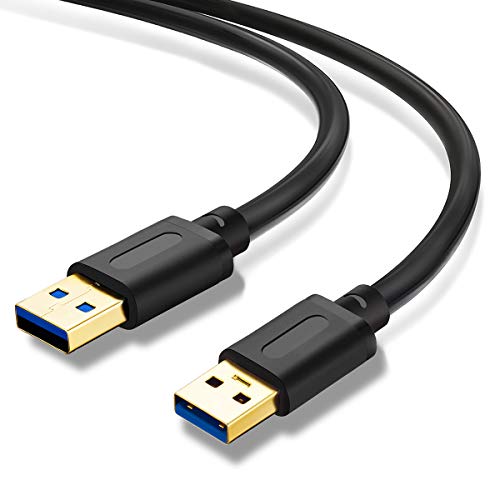
Features: 5 Gbps SuperSpeed, plug-and-play, gold-plated connectors. Manufacturer notes: not for video transfer, not for charging, and not for direct PC-to-PC file transfer.
Relevance To Soundbars: When using a USB host for music playback or updating a soundbar, a compact 3 ft cable can reduce clutter. Ensure your soundbar accepts USB-A devices and that the cable’s limitations (no video/charging) match your intended use.
Buying Guide: Choosing The Right Cable For Your Soundbar
Identify The Soundbar Input: Check whether your soundbar uses HDMI ARC/eARC, optical (TOSLINK), or a USB-A host/port. HDMI eARC is the primary method for high-resolution audio; USB-A is typically for file playback or firmware updates.
When To Use HDMI eARC: Choose an eARC-capable HDMI cable if you want full multi-channel lossless formats (Dolby TrueHD, DTS-HD MA) and highest audio fidelity. HDMI also supports CEC control in many setups.
When USB A-to-A Is Appropriate: Use USB A-to-A cables for soundbars that accept USB drives or USB audio devices. These cables are data-only (usually not for charging or video) so verify the soundbar’s manual for intended USB functions.
Bandwidth And Specification: For USB, prioritize USB 3.0 (5 Gbps) if you need higher throughput or future compatibility. For HDMI, look for High Speed / Ultra High Speed (48 Gbps) with eARC support for best audio performance.
Build Quality & Durability: Look for braided jackets, gold-plated or aluminum alloy connectors, and reinforced strain relief. These features increase longevity where cables are repeatedly plugged/unplugged or routed behind equipment.
Length And Flexibility: Measure the distance between devices before buying. Longer USB cables (6 ft) provide flexibility but can add clutter; shorter cables reduce tangling but require closer device placement. Avoid excess length to reduce potential signal degradation.
Compatibility Notes: Many A-to-A USB cables do not support direct PC-to-PC transfers, charging, or video output. HDMI eARC cables require TV and soundbar eARC/ARC support for full functionality. Always check device specs.
Audio Use-Cases:
- High-Fidelity Multi-Channel Audio: Prefer HDMI eARC cable.
- USB Playback Or Firmware Updates: USB 3.0 A-to-A cable is commonly used.
- Simple Stereo From TV Optical Output: Use optical cable (not covered in this list).
Multiple Comparison Perspectives: Evaluate cables by (1) connection type (HDMI vs USB), (2) bandwidth (48Gbps for HDMI, 5Gbps for USB 3.0), (3) build quality (braided, shielded), and (4) length. Matching the cable’s specification to the soundbar’s supported inputs yields the most reliable audio and feature compatibility.