Best USB CD/DVD Player Options for Laptops and Desktops
Discover top USB CD/DVD players that offer plug-and-play functionality, fast data transfer, and wide compatibility for Windows, macOS, and Linux. The selections below cover slim, portable drives and feature-rich options ideal for data backup, media playback, or software installation.
| Product | Brand | Key Benefit | Interface | Drive Type |
|---|---|---|---|---|
| Amicool External DVD Drive | Amicool | Dual USB 3.0 & Type-C, broad OS support | USB 3.0 / Type-C | External DVD±RW |
| Rioddas External CD/DVD Drive | Rioddas | Plug & Play, reliable performance | USB 3.0 | External CD/DVD±RW |
| ORIGBELIE External CD DVD Drive | ORIGBELIE | High-speed USB 3.0 with wide compatibility | USB 3.0 / USB-C | External CD/DVD±RW |
| BPAKDU External CD/DVD Drive | BPAKDU | 8-in-1 with USB hub and card readers | USB 3.0 | External CD/DVD±RW |
| ROOFULL External CD DVD Drive | ROOFULL | Dual connectors, reliable read/write | USB 3.0 / USB-C | External CD/DVD±RW |
Note: All products listed support common disc formats and are designed for use with laptops and desktops lacking built-in optical drives. Always verify compatibility with your operating system and hardware setup before purchase.
Amicool External DVD Drive USB 3.0 USB C

The Amicool external DVD drive features dual data interfaces—USB 3.0 and Type-C—allowing fast transfer speeds up to 5 Gbps. It supports multiple disc formats, including DVD and CD varieties, with read speeds up to 8x for DVDs and 24x for CDs. The unit is plug & play, requiring no extra drivers or power supply, and is compatible with Windows, macOS, and Linux systems. It is designed for laptops and desktops without built-in optical drives and notes compatibility with a wide range of brands. Users should be aware that it is not intended for TVs, tablets, Chromebooks, or car entertainment systems.
Rioddas External CD/DVD Drive for Laptop

The Rioddas drive emphasizes plug & play convenience powered by USB, with automatic detection upon connection. It is backward compatible with USB 2.0 and delivers fast data transfer speeds up to 5 Gbps on USB 3.0. A physical eject button provides safety if the host computer fails to recognize the drive, and copper mesh technology supports stable data transmission, reducing freezes and errors during playback and burning. It is suitable for both laptops and desktops and is intended to streamline media reading and writing tasks without complex setup.
ORIGBELIE External CD DVD Drive

This ORIGBELIE model emphasizes plug & play simplicity with USB 3.0 high-speed performance and backward compatibility with USB 2.0/1.0. It supports max 8x DVD read/write speeds and 24x CD read/write speeds, delivering data transfer rates up to 5 Gbps. It lists broad compatibility across Windows, macOS, and Linux, with explicit desktop power considerations to avoid power shortages. The drive is suitable for reading, writing, and archiving across multiple devices, though Mac usage notes that the drive icon may appear only after a disc is successfully read.
BPAKDU External CD/DVD Drive

The BPAKDU drive markets an 8-in-1 approach, serving as a CD/DVD reader and burner while also functioning as a USB hub with multiple USB ports and SD/TF card slots. It offers USB 3.0 connectivity and requires no internal drivers, though some Windows setups may require an additional power cable if the device is not recognized due to power constraints. The product emphasizes ease of use and expanded peripheral functionality, with troubleshooting guidance available and a support channel for driver-related issues.
ROOFULL External CD DVD Drive
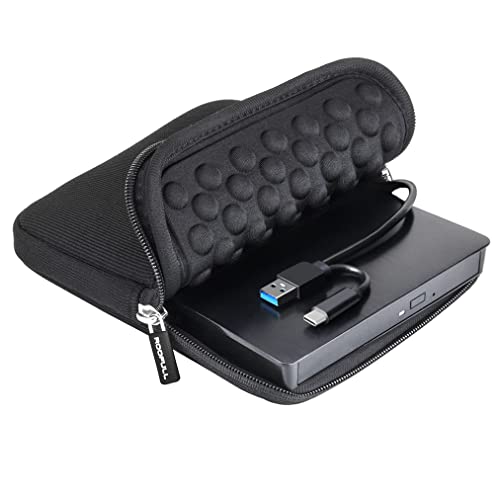
The ROOFULL drive showcases dual connectors (USB 3.0 and USB-C) with high-speed data transfer up to 5 Gbps and supports 8x DVD and 24x CD read/write speeds. It includes a carrying case for portability and has a history of broad adoption since its 2017 release. The simple plug-and-play setup requires no driver installation, and the drive is compatible with Windows, macOS, and Linux. It emphasizes durability and user-friendly operation for movie playback, data backup, and software installations.
Buying Guide
- Compatibility: Verify operating system support (Windows, macOS, Linux) and ensure the drive supports your laptop or desktop’s USB ports (USB-A, USB-C, or both).
- Interface and speed: Look for USB 3.0 or USB-C interfaces offering up to 5 Gbps transfer rates. Dual connectors can improve compatibility with newer devices.
- Read/write speeds: For DVDs, seek up to 8x read speeds; for CDs, up to 24x. Real-world performance varies by media and host system.
- Power requirements: Most drives are bus-powered; some models may require an external power source for stable operation on desktops or power-constrained laptops.
- Durability and extra features: Consider models with built-in eject buttons, error correction, shock resistance, and, in some cases, additional USB hubs or card readers.
- Portability vs. capacity: Slim, lightweight drives are ideal for travel; larger drives may offer more robust build quality and additional features.
- Software presence: Some drives rely on bundled software for digital rights management, ripping, or backup; check if software is included or if you’ll need third-party options.
- Limitations: Optical drives cannot read Blu-ray discs reliably, and some devices may not support certain formats or DRM-protected discs. Consider alternatives if you primarily use Blu-ray or streaming.