
Best USB to MIDI Interfaces for Home Studios
For musicians and producers, a reliable USB to MIDI interface can be the bridge between a computer and hardware keyboards, controllers, and synths. This guide highlights five practical options, each suited to different setups—from beginners building a home studio to pros needing versatile connectivity. The top picks emphasize ease of use, compatibility, and clear LED/status indicators to help you start recording quickly and stay productive.
Buyer note: This selection covers USB-to-MIDI cables and interfaces that work with Windows, Mac, and iOS environments. The best pick depends on your device type (USB-B or USB-C, Type-A/B), the number of MIDI channels you need, and whether you prefer plug-and-play or additional features like mapping, LED indicators, or multi-channel support.
| Product | Brand | Key Benefit |
|---|---|---|
| TENINYU USB to MIDI Cable Converter | TENINYU | 16-channel input/output with straightforward PC-to-synth workflow |
| FORE MIDI to USB Interface | FORE | Plug-and-play, multi-channel, strong LED indicators |
| MeloAudio USB C MIDI Cable | MeloAudio | Type-C to USB-B compatibility for modern laptops and tablets |
| UGREEN USB-B to USB-C Cable | UGREEN | Versatile USB-B to USB-C for printers and MIDI devices |
| CME U2MIDI Pro | CME | High-speed, plug-and-play with mapping and wide OS support |
Best All-Around USB MIDI Cable with 16 Channels

The TENINYU USB to MIDI Cable Converter supports up to sixteen input and sixteen output channels, making it suitable for keyboards, synthesizers, drum machines, and multi-instrument setups. It turns a PC into a music studio by enabling direct MIDI communication with compatible software. Best for home studios that need multi-channel MIDI routing and simple setup. Caution: Some setups require both MIDI plugs connected for full operation.
- Best for multi-instrument rigs and basic recording workflows
- LED indicators help monitor power and signal status
- USB interface compatible with Windows and Mac computers
Best USB-B Cable For MIDI+Printer Style Use
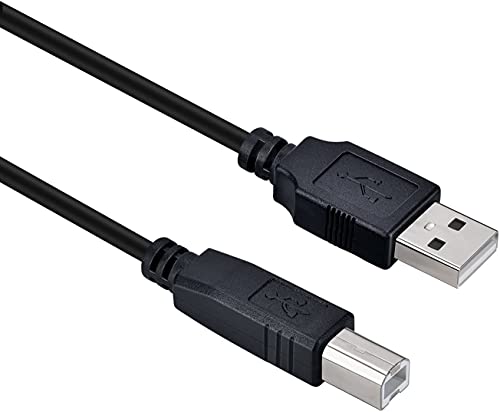
The Storel USB 2.0 Type-A to Type-B cable is a versatile option for devices that use USB-B ports, including MIDI keyboards and audio interfaces. It supports up to 480 Mbps data transfer, making it a solid choice when you need a reliable data path between your computer and MIDI gear. Best for users who already rely on USB-B connections for multiple devices. Caution: This is a general USB-B cable; ensure your device supports USB 2.0 B ports for MIDI data.
- Good for general USB-B based MIDI connections
- Backwards compatible with USB 1.1/1.0
Best Low-Latency USB MIDI Interface

The FORE MIDI to USB Interface offers 1-in/1-out MIDI capability with LED indicators and a compact plug-and-play design. It targets users who want straightforward USB MIDI without drivers. Best for direct keyboard or synth connections to a computer for quick tracking. Limitation: It emphasizes core MIDI functions; advanced routing or multi-channel needs may require alternative products.
- Best for simple, reliable one-to-one MIDI connections
- Built-in LED indicators for quick status checks
Best USB-C MIDI Cable For Modern Laptops

The MeloAudio USB C MIDI Cable connects USB-C devices to USB-B MIDI peripherals, supporting data transfer up to 480 Mbps. It is ideal for MacBook Pro, MacBook Air, and other USB-C equipped laptops when pairing with legacy MIDI hardware. Best for newer devices with USB-C ports. Caution: Power delivery is limited; not suited for high-power peripherals beyond MIDI data needs.
- Best for USB-C equipped laptops and tablets
- Reversible USB-C connector for easy use
Best USB-C/MIDI Cable For Modern Setups

The UGREEN USB-B to USB-C Cable combines USB-B MIDI compatibility with USB-C devices, supporting Type-C laptops and tablets. It emphasizes plug-and-play use with wide compatibility. Best for users who want a single cable solution across multiple devices. Caution: Some devices may require adapters depending on the exact USB-C port specification.
- Best for cross-compatibility between USB-C and USB-B MIDI devices
- Simple plug-and-play with no drivers needed
Best USB-C To USB-B MIDI/Printer Cable (6.6 ft)

The CableCreation USB C to USB B 2.0 cable is designed for USB-C devices to connect to USB-B peripherals like MIDI controllers and printers. It supports high-speed 480 Mbps transfers and is suitable for MIDI controller connections or legacy peripherals in a studio setup. Best for users needing a longer, reliable USB-C to USB-B link. Caution: Confirm the target device has a USB-B female port and is USB 2.0 compatible.
- Best for longer USB-C to USB-B connections in a studio
- Straightforward, driver-free operation for many MIDI devices
Buying Guide: What to Consider When Choosing a USB MIDI Interface
- Channel requirements: Do you need 1-in/1-out or multi-channel (e.g., 16×16) routing? Pick a model that matches your MIDI device count and project complexity.
- Port type compatibility: Check USB-C vs USB-B vs USB-A. Ensure your computer and MIDI gear ports align, or plan for adapters where needed.
- Plug-and-play vs driver support: Some interfaces claim driver-free operation, while others rely on installed drivers for optimal performance. Consider your OS version and DAW compatibility.
- LED indicators and status: Visual indicators help verify power, signal, and connection states during sessions, reducing setup time.
- Latency and stability: While many entry-level interfaces provide solid performance, a device with stable data transmission is essential for real-time recording and monitoring.
- Cable length and build quality: Longer cables may introduce slight latency or noise if not well shielded. Choose durable, shielded options for studio reliability.
- Future-proofing: If you anticipate expanding your rig, a multi-channel or USB-C compatible option may simplify upgrades later.
FAQ
Do I need drivers for USB MIDI interfaces?
Most modern USB MIDI interfaces are plug-and-play and require no drivers on Windows, macOS, iOS, or Linux. Some advanced models may offer optional drivers or software for mapping and routing.
Can USB-C MIDI cables work with older USB-B devices?
Yes, many USB-C to USB-B cables are designed to connect USB-C hosts to USB-B peripherals, enabling MIDI devices to work with newer laptops.
What’s the difference between a MIDI cable and a USB MIDI interface?
A MIDI cable is a physical MIDI connection, typically 5-pin DIN. A USB MIDI interface handles digital transfer between a computer and MIDI gear over USB, often with multiple MIDI ports and drivers. Some cables act as adapters to simplify the connection.
Is 16-channel MIDI over USB common for home studios?
Yes, multi-channel interfaces are common in home studios, allowing multiple controllers, keyboards, and devices to communicate simultaneously with a DAW.
Will these cables affect audio latency?
USB MIDI data generally has low latency, but actual latency depends on your computer, DAW, and audio interface settings. Using dedicated drivers or firmware and setting buffer sizes appropriately helps minimize latency.
Can I use these with iOS devices?
Some interfaces support macOS, Windows, Android, and Linux, and others may pair with iOS via compatible adapters. Check the product’s supported operating systems before purchase.