Best Usb Media Player for TV: Top 5 Picks for 4K, 1080p and More
Finding a reliable USB media player for your TV can simplify how you watch videos, listen to music, and view photos from external drives. The following selections offer broad compatibility with USB drives and microSD cards, support for common video formats, and easy auto-play or resume features. This guide highlights five strong options to help you choose a model that fits your setup, whether you want 4K playback, simple signage capabilities, or compact portability.
| Product | Brand | Key Benefit |
|---|---|---|
| Micca 4K Ultra-HD Digital Media Player | Micca | 4K HDMI playback from USB/microSD with resume |
| 4K HD Digital Media Player | fnetic | Advanced H.265 decoding and dual USB ports |
| 4K Ultra HD Media Player & HDD Enclosure 2-in-1 | JLZNLC | Play from USB/SD and support for 2″/2.5″/3″ HDDs |
| HDMI Media Player | AGPTEK | Compact, 1080p playback with HDMI and AV outputs |
| Micca G3 2K Quad-HD Media Player | Micca | 2K upscaling to UHD and USB/SD card support |
These picks focus on devices that connect easily to a standard television, provide straightforward navigation, and can handle media from USB drives or SD cards. They’re suitable for living rooms, classrooms, small business signage, or dorm setups where a simple plug-and-play solution is preferred. The product descriptions below summarize each device’s core capabilities, aiding side-by-side comparisons.
Micca 4K Ultra-HD Digital Media Player

The Micca 4K Ultra-HD Digital Media Player serves as a compact upgrade to basic TVs, enabling video, music, and photo slideshows from USB drives or MicroSD cards. It supports 4K UHD content up to 4096×2304 at 30fps over HDMI, while also delivering compatibility for 1080p displays. The device includes a composite AV output for older TVs and stereo systems, broadening its usability. A notable feature is its dual USB and microSD reader that accommodates large drives (up to 8TB USB and up to 1TB microSD) and file systems such as FAT, exFAT, and NTFS. Wireless air mouse compatibility helps with non-line-of-sight control, allowing the player to be tucked away while still being operable.
Key considerations: 4K support is a strong benefit for newer TVs, but ensure your USB drive is formatted correctly for optimal playback. For environments needing a discreet setup, the optional air mouse remote offers convenient control without direct line-of-sight access.
4K HD Digital Media Player For USB Drive
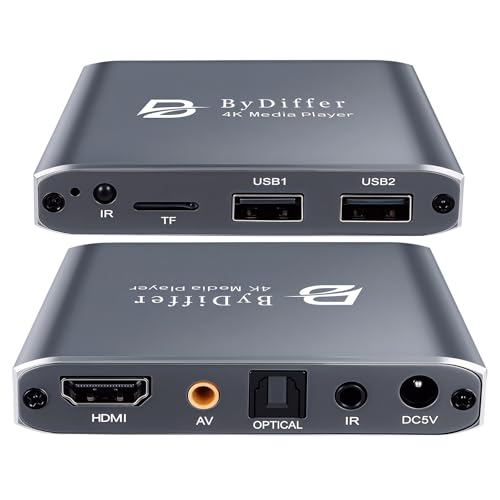
This 4K HD media player emphasizes 4K playback via HDMI, supporting H.265/HEVC decoding for efficient streaming at up to 200Mbps. It’s designed to read from USB drives and microSD cards, with dual USB ports provided for multiple media sources. The unit supports common file systems such as FAT32, exFAT, and NTFS, though MAC-formatted drives may require reformatting. It also provides an optical output option for high-quality audio connections to sound systems. The device aims to deliver crisp 4K visuals with smoother playback and less buffering, making it suitable for home theaters and classrooms where signage or media playback is frequent.
Considerations: If you plan to use two drives simultaneously, note that the device typically reads from one drive at a time. Verify your storage devices are formatted for compatibility to avoid playback issues.
4K Ultra HD Media Player & HDD Enclosure 2-in-1

The JLZNLC 2-in-1 design combines a 4K media player with an HDD enclosure, expanding storage alongside USB/SD card playback. It supports high-efficiency formats like H.265/HEVC with VGA output up to 4096×2304 resolution and offers auto playback, looping, and resume capabilities. The device targets digital signage and multimedia playback in public or commercial spaces, where continuous display loops are essential. It supports a broad array of video formats, subtitles, and music, with the option to rotate video output in multiple directions to fit display layouts.
Considerations: This model is especially valuable when signage or continuous loops are needed, but it may be more complex for casual home use. Ensure you have compatible SATA drives and that the enclosure height/width fits your setup.
AGPTEK HDMI Media Player

The AGPTEK HDMI Media Player is a compact, travel-friendly option designed for 1080p Full HD playback. It supports a wide range of formats via HDMI output and provides an AV output for compatibility with older TVs. Dual USB ports allow connection of different media sources, albeit typically reading one drive at a time. The device is marketed toward simple, plug-and-play usage, making it a practical choice for quick media playback in homes or small offices. It supports common video formats and can drive external audio setups through its digital/analog outputs.
Considerations: If you frequently use large 4K video files, you may need a higher-tier player. For basic 1080p needs, this model offers straightforward operation and broad compatibility with legacy displays.
Micca G3 2K Quad-HD Media Player

The Micca G3 extends the basic USB/SD media player concept with 2K Quad-HD playback and upscaling to UHD 4K/60Hz via HDMI. It preserves the dual USB/microSD reader and supports drives up to 8TB with FAT, exFAT, and NTFS file systems. Like the 4K Micca option, the G3 supports auto play, resume, and a simple interface, making it ideal for households aiming to maximize older TVs or projectors with enhanced media capabilities. The G3’s upscaling and broad format support help bridge older content to modern displays without needing a streaming device.
Considerations: While upscaling can improve perceived sharpness, actual 4K output is not guaranteed on all content. This model is well-suited for mixed-resolution libraries and signage uses where 2K content persists.
Buying Guide: Key Purchase Considerations
When evaluating USB media players for TV use, consider the following factors to ensure the right fit for your setup:
- Resolution and upscaling: Look for devices that support 4K/60Hz or 2K/4K upscaling if you own a higher-resolution display. If most content is 1080p or lower, a 1080p device may suffice.
- Input options: Check the availability of HDMI for modern TVs and AV outputs for older sets. If you plan to connect to a sound system, an optical or digital audio output can be beneficial.
- Storage compatibility: Ensure the player reads USB drives up to large capacities and supports microSD cards. Confirm supported file systems (FAT32, exFAT, NTFS) and note any exclusions like Mac-formatted drives.
- Autoplay and resume: For signage or queue-based viewing, a player with auto playback, looping, and resume features reduces manual interactions.
- Ease of use: A compact design, remote control compatibility, and optional air mouse can improve ease of operation, especially in shared spaces.
- Durability and form factor: If the device will be placed in public or semi-public areas, consider a robust enclosure and a compact footprint for minimal space use.
- Signage readiness: For digital signage, look for looping, schedule-based playback, and easy content management from USB or SD sources without extra software.
In choosing among these options, weigh your primary use case: casual home viewing, signage and kiosk deployments, or multi-TV household setups. If 4K playback is a priority, select a model with solid 4K/HEVC support and reliable USB drive handling. For simple, plug-and-play needs with older displays, a compact 1080p model that offers broad compatibility can be ideal. All five options above provide plug-and-play functionality, USB/SD card support, and a straightforward user experience designed for American households seeking convenient media playback from physical drives.