Best USB Microphones With Headphone Jacks for Clear, Low-Latency Monitoring
When shopping for a USB microphone with a headphone jack, you want ease of use, clear sound, and reliable monitoring. The following options are well-suited for podcasters, streamers, online teachers, and content creators who need real-time audio monitoring without latency. Each pick supports straightforward plug-and-play setup, works across common devices, and includes a headphone output for live monitoring. This guide highlights five strong choices and explains who benefits most from each.
Summary of selected products
| Product | Best For | Key Benefit |
|---|---|---|
| ZealSound K66 USB Podcast Microphone | Podcasters and video creators | Noise reduction mode for cleaner voice in noisy environments |
| MRSDY Gaming Microphone | Gamers and streamers | Real-time monitor via 3.5mm output with RGB lighting |
| FIFINE AM8T USB/XLR Gaming Microphone Set | Professional streamers and gamers | USB/XLR versatility plus boom arm and mute for quick control |
| FIFINE AM8 USB/XLR Dynamic Microphone | Budget-conscious creators | USB only with mute, headphones jack, and easy setup |
| Aisryntek USB Gaming Microphone | Streaming and VO/voice-over work | 96kHz/24-bit clarity with headphone monitoring |
Note: Each product below is evaluated for clarity, ease of use, and how its headphone jack supports real-time listening. Consider your recording environment, device compatibility, and whether you prefer USB-only or USB/XLR flexibility when choosing.
ZealSound K66 USB Podcast Microphone

Best for: podcasters and content creators who need clean vocal capture in modest environments. The K66 uses a high-performance condenser capsule with a cardioid pickup to focus on your voice and reduce background noise. It supports a wide frequency range and a solid 46kHz sampling rate for natural, detailed vocal reproduction. A notable feature is Intelligent Noise Reduction Mode, activated by pressing and holding the mute button to minimize keyboard clicks, fan noise, and ambient chatter, making this mic highly suitable for noisy rooms or shared spaces.
Selected because: It offers a direct path to noise-reduced, studio-like voice recording without extra software. The built-in mute and rapid mode switching help maintain a smooth workflow during live sessions or podcasts.
Limitations: While versatile, it relies on USB connections and may require manual mode switching to optimize for your environment. For best results, pair with a quiet workspace or additional sound treatment.
MRSDY Gaming Microphone

Best for: gamers and streamers who want real-time monitoring and a vivid RGB presentation. This mic includes an integrated 3.5mm headphone output for latency-free monitoring. The dynamic RGB lighting adds a visual cue for streaming setups, while the noise cancellation helps keep voice clarity in environments with keyboard clicks or ambient chatter.
Selected because: It combines straightforward USB operation with a built-in monitoring path and a visually engaging RGB feature, appealing to streamers who value both function and aesthetics.
Caution: The product emphasizes RGB lighting; if lighting is a distraction in your setup, you may want to disable it. Ensure your recording software supports direct monitoring from the 3.5mm jack for best results.
FIFINE AM8T USB/XLR Gaming Microphone Set

Best for: creators who want both USB convenience and XLR flexibility with a complete kit. The AM8T includes a dynamic microphone, a boom arm stand, a mute button, gain control, and a headphones jack, plus RGB lighting. The kit is designed for streaming, podcasting, and vocal work, offering straightforward USB plug-and-play or XLR connection for more advanced setups.
Selected because: It provides a comprehensive package for those who may scale from USB to an XLR workflow, all while keeping a user-friendly interface for real-time monitoring and control during broadcasts.
Limitation: XLR usage requires additional equipment (audio interface or mixer) not included in the kit, which may add to the total cost for some users.
FIFINE AM8 USB/XLR Dynamic Microphone

Best for: budget-conscious creators who want solid USB performance with a built-in mute and headphones jack. The AM8 offers a strong balance of clarity and flexibility for podcasting, streaming, or VO work. The USB path keeps setup simple, while the headphones jack supports real-time monitoring during live sessions.
Selected because: It emphasizes ease of use and direct USB connectivity, making it an accessible option for beginners or creators who want reliable performance without additional equipment.
Caution: When using XLR in the future, note that some functionality (like RGB or USB-specific controls) will be inactive. Keep it simple with USB if you prefer plug-and-play reliability.
Aisryntek USB Gaming Microphone
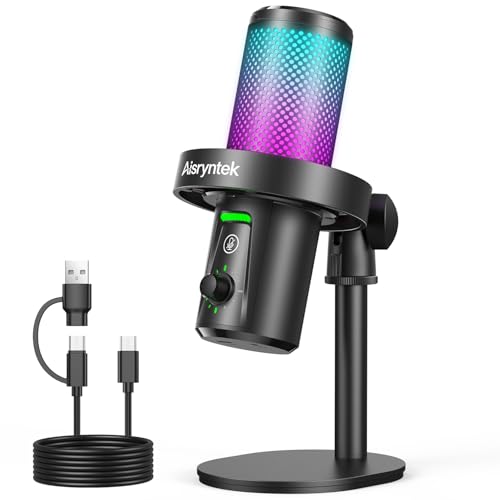
Best for: streaming and VO/voice-over work that benefits from studio-grade 96kHz/24-bit recording. The Aisryntek microphone features a cardioid pattern, a mute button, gain control, and a 3.5mm headphone jack for immediate monitoring. It is geared toward performers who require high fidelity and practical controls for live sessions.
Selected because: The high sampling rate and bit depth deliver crisp, clear voice capture, while the built-in mute and gain controls provide direct, on-mic management during broadcasts or calls.
Caution: Like many USB mics, room acoustics influence results. Consider basic sound treatment or placement to reduce reflected sound and improve clarity.
Buying Guide: How to Choose a USB Mic With Headphone Jack
- Compatibility: Ensure the microphone works with your computer, phone, or tablet. Some mics include USB-C adapters or Lightning adapters for iOS devices, widening your setup options.
- Monitoring needs: If latency-free monitoring is essential, verify the presence of a dedicated headphone jack and direct monitoring capability.
- Pickup pattern: Cardioid mics focus on your voice and reduce background noise. If you record in a noisy room, a cardioid pattern is generally preferable.
- Connectivity: USB-only mics are simple and reliable. USB/XLR kits offer future-proofing and higher flexibility for more complex sound systems, at the cost of extra gear.
- Controls: Built-in mute, gain control, and LED indicators help manage live sessions without software intervention.
- Environment: For best results, pair any mic with a treated space or a dedicated recording area to minimize echo and external noise.
FAQ
- What is a headphone jack used for on a USB microphone? – It allows you to monitor your own voice in real time, helping you adjust volume and tone without latency.
- Do USB mics with XLR options require extra equipment? – Yes, XLR connections need an audio interface or mixer, which adds cost but enables higher-end audio paths.
- Is a cardioid pickup pattern better for podcasts? – Generally yes, cardioid focuses on your voice and minimizes side noise, which is ideal for spoken content.
- Can I use these mics with phones? – Some models include adapters for iPhone/iPad or USB-C devices, enabling mobile recording and streaming.
- Should I choose USB-only or USB/XLR? – USB-only is simplest and sufficient for most creators; USB/XLR is better for future expansion into more complex audio setups.
- Which mic is best for beginners? – USB-only mics with built-in monitoring and mute controls typically offer the easiest setup and quickest results.