
Best USB Microphones for Karaoke: Top Picks for Fun, Home Parties, and Streaming
Answering the demand for simple, plug-and-play karaoke sound, these USB microphones are designed for easy setup, wide compatibility, and clear voice capture. This guide highlights five top picks, explaining who each is best for and why. Ideal buyers include casual home users, party hosts, aspiring content creators, and anyone who wants a straightforward mic for singing along with apps or games.
Summary of selected products:
| Product | Best For | Key Benefit |
|---|---|---|
| TPFOON 4M Wired USB Microphone | Families and casual gamers | Long cord and driver-free setup |
| Drimoor 2Pack 13ft Wired USB Microphone | Multi-player games and parties | Two mics, long reach for group play |
| BONAOK Wireless Bluetooth Karaoke Microphone (Q37 Rose Gold) | Smartphone karaoke on the go | Bluetooth with built-in speaker |
| BONAOK Portable Bluetooth Karaoke Mic with Disco Lights | Home parties and kids | LED lights plus dual-use mic/speaker |
| ZealSound Podcast Microphone (K66) | Podcasters and streamers | Studio-like sound with easy USB plug-and-play |
TPFOON 4M Wired USB Microphone For Rock Band

Best for: Casual gamers and home karaoke enthusiasts who want a reliable, driver-free wired microphone with a long reach. This model emphasizes compatibility with multiple gaming consoles and PCs, making it a versatile option for family game nights or party setups.
Why selected: It offers a 4-meter (13-foot) wired connection, which gives freedom to move while singing without worrying about latency or drivers. The microphone is designed to reproduce voice clearly for music games like Rock Band and Guitar Hero, aligning well with karaoke apps and party playlists. The long cord helps accommodate living rooms or larger spaces.
Limitations: Being wired, it lacks Bluetooth convenience and may require a table-ready setup to keep the cord out of the way during lively singing sessions.
Drimoor 2Pack 13ft Wired USB Microphone
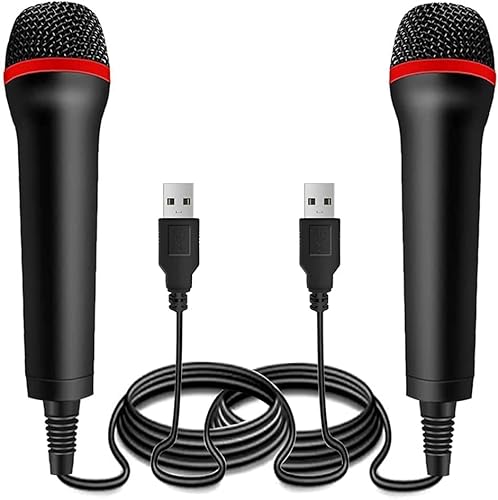
Best for: Families or groups who want a bundled option for duet singing or multiple players. The two mics support simultaneous use in party games or karaoke sessions.
Why selected: This option mirrors the TPFOON’s strengths—professional line-level customization and accurate voice reproduction—while adding a second unit for shared play. The 13-foot cord length provides ample space for movement during performances. It is easy to set up with no driver installation required.
Limitations: The data indicates a similar wired, plug-and-play experience; users seeking true wireless flexibility may prefer Bluetooth options.
BONAOK Wireless Bluetooth Karaoke Microphone (Q37 Rose Gold)

Best for: Smartphone users who want wireless convenience and a built-in speaker for on-the-go karaoke or casual singing with apps. Suitable for solo performances or small gatherings.
Why selected: The microphone integrates a built-in Bluetooth module to act as a wireless speaker and recorder, with dual connection options (Bluetooth and cable). It supports micro SD cards up to 32GB for offline playback, enabling flexible entertainment beyond live singing. Its compatibility with singing apps makes it a practical all-in-one device for mobile karaoke.
Limitations: Wireless Bluetooth connectivity may introduce occasional latency or audio lag compared with a dedicated wired mic in certain setups.
BONAOK Portable Bluetooth Karaoke Mic With Disco Lights

Best for: Home parties, kids’ karaoke sessions, and festive gatherings where a visual element enhances the experience. The disco lights add ambience while singing.
Why selected: This 4-in-1 device doubles as a Bluetooth speaker and MP3 player, with LED lights that synchronize to the beat. The design supports easy operation, making it a strong choice for family entertainment and impromptu performances. The integrated speaker can boost sound in smaller rooms without extra equipment.
Limitations: The built-in speaker may not deliver studio-level sound for critical recordings; external speakers can still improve overall playback for larger spaces.
ZealSound Podcast Microphone For PC (K66)

Best for: Content creators, podcasters, and streamers seeking studio-like clarity without complex gear. Ideal for Windows and Mac setups, with broad device compatibility.
Why selected: The K66 USB microphone emphasizes studio-quality sound with a cardioid pattern that focuses on voice and reduces ambient noise. It features a wide frequency response and high sampling rate for natural vocals, and it includes an intelligent noise reduction mode to minimize keyboard and fan noise. It is a solid choice for YouTube, podcasting, streaming, and online classes.
Limitations: While it offers noise reduction modes, environments with heavy echo or loud external noise may still require additional room treatment or a dedicated audio interface for professional results.
Buying Guide
What should you consider before buying a USB karaoke microphone?
- Wired vs. wireless: Choose wired for zero latency and stable connection, ideal for home karaoke with a fixed setup. Choose wireless for mobility and flexibility, especially when using Bluetooth with phones or tablets.
- Compatibility: Ensure the microphone works with your primary devices (PC, PS4/PS5, Switch, Android, iPhone). Look for USB-C adapters if you use modern devices with USB-C ports.
- Sound quality and noise handling: Pick mics with clear voice reproduction and minimal background noise. Cardioid patterns help isolate your voice from room noise in podcast or streaming contexts.
- Additional features: Built-in speakers or LEDs can enhance party atmosphere, while app compatibility or SD card support can broaden use cases beyond live singing.
- Use case: For casual singing with apps, a portable Bluetooth mic may suffice. For gaming or party karaoke, consider a wired mic with long reach or a dual-mic pack for group play.
How to set up a USB karaoke microphone
- Plug the microphone into the appropriate port on your device (PC, console, or phone with adapter).
- If required, select the microphone as the audio input in your app or system settings.
- Test the mic with a short recording to verify volume and clarity, adjusting gain if available.
- For wireless mics, ensure pairing is complete and test the connection range to avoid dropouts during singing.
Usage scenarios
- Family game nights with Rock Band, Guitar Hero, or Let’s Sing on consoles.
- Home karaoke parties with friends and kids, leveraging LED-light features for atmosphere.
- Content creation, including podcasts, livestreams, and YouTube videos, using high-fidelity USB mics for clear voice capture.
Maintenance tips
- Keep cables untangled and store mics in a safe place to avoid damage to connectors.
- Clean the grille periodically to minimize dust buildup and maintain voice clarity.
- Avoid exposure to moisture or extreme temperatures which can affect electronics.
FAQ
- Q: Do USB microphones require drivers? A: Most are plug-and-play and do not require drivers, making setup quick and simple.
- Q: Is a wired microphone always better for karaoke? A: Wired mics offer zero-lidelity latency and steady connections, which helps for real-time singing; wireless mics provide mobility and ease of use.
- Q: Can USB mics work with smartphones? A: Yes, with appropriate adapters (USB-C or Lightning) and compatible apps, many USB mics work with phones.
- Q: Should I buy a mic with a built-in speaker? A: Built-in speakers are convenient for small spaces or on-the-go use but may not replace external speakers for party-scale sound.
- Q: Are multiple mics needed for groups? A: For duets or group singing, a dual-mic setup can improve coordination and enjoyment.
- Q: What is a good option for beginners? A: A basic wired USB mic with a long cord and simple plug-and-play setup is typically the easiest starting point.