
Best USB Mixer With Multitrack Recording for Home Studios and Small Venues
Whether you’re recording a band, streaming live performances, or producing podcasts, a USB mixer with multitrack recording helps capture clean, professional-sounding audio. This guide highlights five versatile options suitable for different setups and budgets. Best for bands needing many inputs, best for compact setups, best for full-stage performances, best for studio-friendly workflow, and best for live versatility. The products chosen balance multi-channel capability, real-time recording, and straightforward USB connectivity to a computer or SD card.
| Product | Channels | USB/Multitrack | Best For |
|---|---|---|---|
| Mackie ProFX16v3 | 16 | USB multitrack | Medium to large bands needing many inputs |
| Mackie Onyx Series 12-Channel | 12 | USB multitrack + SD recording | Home studios and small venues |
| Mackie ProFX30v3 | 30 | USB multitrack | gigs and larger DIY setups |
| Tascam Model 24 | 24 | USB audio interface + SD | Studio-friendly live and recording |
| Yamnweo GF12 PRO | 12 | USB audio interface | Portable multi-purpose performances |
Mackie ProFX16v3 16-Channel USB Mixer
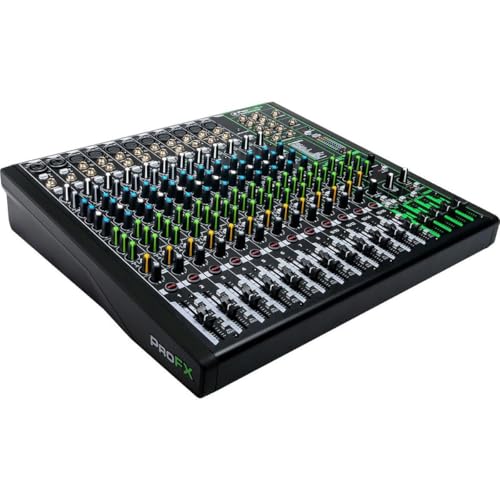
The Mackie ProFX16v3 combines a robust 16-channel analog mixer with a built-in USB recording interface. It offers Onyx Preamps with up to 60 dB of clean gain per mic input and the GigFX effects engine for live sound shaping. This model is best for bands that need a large channel strip with straightforward routing for live and multitrack recording. It’s a strong choice for venues or practice spaces that require quick setup and reliable performance without a steep learning curve.
Best for: mid-sized bands, rehearsal rooms, or small venues that want easy simultaneous live mixing and multitrack capture. Choose this if you need many inputs and a simple path to recorded tracks without venturing into complex digital menus. A potential limitation is the number of bus outputs; ensure the arrangement fits your external recorders or stage monitors.
Mackie Onyx Series 12-Channel USB Multi-Track
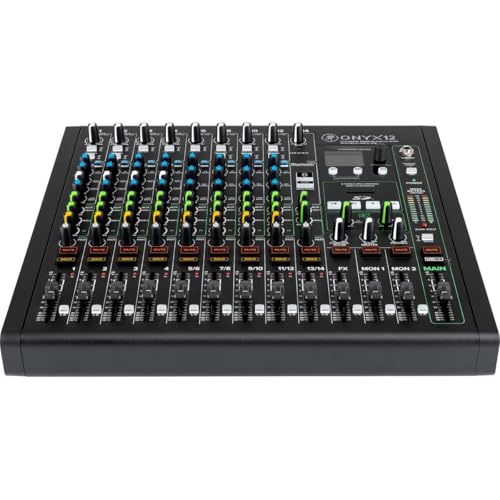
This 12-channel Onyx mixer supports high-resolution recording up to 96kHz/24-bit via USB plus SD card stereo recording and playback. The renowned Onyx preamps provide up to 60 dB of gain, and the console includes an analog EQ with sweepable mids and a robust effects engine. It’s ideal for home studios or smaller venues that want high-quality mic preamps and flexible recording options without a large footprint.
Best for: solo artists, small bands, or podcast studios that prize pristine mic gain and an easy path to multitrack USB or SD recording. Better for: users who don’t require a 30-channel setup but still want professional preamps and a strong analog feel. Limitation: fewer channels than larger mixers, which may constrain bigger live setups or complex routing.
Mackie ProFX30v3 30-Channel USB Mixer

The ProFX30v3 offers a scalable 30-channel platform with analog control and a comprehensive USB recording workflow. It features Onyx preamps for clean gain on every mic input and a powerful GigFX effects engine to shape live sound. This model suits larger bands or multi-instrument setups needing expansive routing, clear mix control, and dependable multitrack capture through USB. It’s designed for venues or home studios that want a “large desk” feel without navigating complicated digital menus.
Best for: bands expanding from smaller setups, mid-sized venues, or home studios that want extensive I/O and live-effect options. Choose this if you need more channels and a straightforward, plug-and-play multitrack path. Caution: the larger footprint may require more rack or table space and careful cable management.
Tascam Model 24 24-Track Multi-Track Studio Mixer

The Tascam Model 24 blends a 24-channel analog mixer with an integrated 24-track/48kHz digital recorder and USB audio interface. It uses familiar EQ and aux controls on the surface, reducing the need to dive into menus. Inputs and outputs are readily accessible, and it supports punching in/out on multiple tracks. This option is ideal for project studios and live settings where quick access to track recording is essential.
Best for: users who want a complete out-of-the-box recording setup with a familiar, tactile interface. Better for: those who value punch-in recording and SD-card archiving. Limitation: it emphasizes a classic analog workflow, which may feel less streamlined for users seeking pure USB-only recording paths.
Yamnweo GF12 PRO 12-Channel Mixer
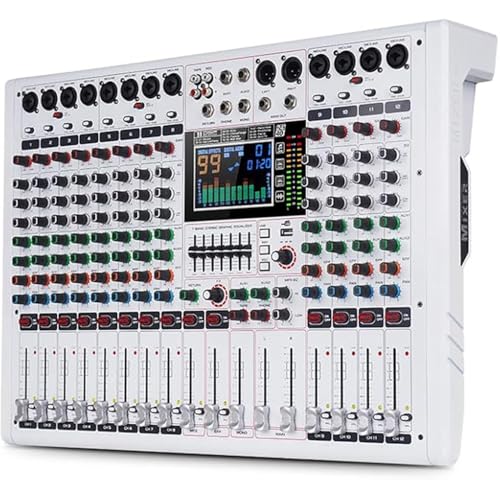
The Yamnweo GF12 PRO features 12 channels with a large LCD color screen, a built-in 7-stage equalizer, and 99 DSP effects. Independent mute, preset gains, and precise EQ control offer robust stage performance tools. It’s well-suited for mobile DJ setups, theater productions, or events needing a flexible, self-contained mixer with extensive effect options and an accessible interface.
Best for: performers and technicians who need a feature-rich, portable mixer with a wide effect library. Better for: live events and DJ shows where quick, on-the-fly sound shaping matters. Limitation: as a multi-purpose device, it may require more time to learn all DSP options compared to simpler USB-first models.
Buying Guide: Key Purchase Considerations
- Channel count and routing: Determine how many inputs you need and whether you require direct USB multitrack recording, SD card recording, or both. Higher channel counts accommodate larger bands but require more space and setup time.
- Recording format and workflow: If you primarily work with a computer, USB multitrack recording streamlines your workflow. If you prefer standalone archiving, SD recording can be convenient.
- Preamps and gain: Look for high-headroom preamps (often 60 dB or more) to avoid noise when you push mics or instruments. Onyx preamps are a common reference for clean gain.
- Effects and processing: Built-in effects can reduce the need for external gear. Consider whether you need a robust DSP engine or simple, clean EQ and dynamics.
- Size and portability: If you travel for gigs or have limited space, a compact 12-channel or 16-channel model may be better than a 30-channel desk.
- Compatibility and future-proofing: Ensure the chosen mixer integrates cleanly with your DAW and recording setup. USB compatibility with your computer OS is essential.
- Budget and expandability: Plan for future expansion. A model with more channels and flexible routing can avoid early equipment upgrades.
Frequently Asked Questions
- What is “multitrack USB recording” on a mixer? It means the mixer can record multiple individual inputs to separate tracks on a computer via USB, enabling easier editing and mixing later.
- Do I need a dedicated audio interface if I buy a USB mixer? Not always. USB mixers can function as an interface, but standalone interfaces may offer higher CPU efficiency and dedicated drivers for professional studios.
- Is SD card recording good for live events? Yes. SD recording provides a fast, portable archive of the show without needing a computer, useful for post-production or backup.
- What’s the advantage of Onyx mic preamps? Onyx preamps are known for clean gain with low noise, which helps preserve mic quality when you push levels during loud performances.
- Should I choose more channels or higher-quality preamps? It depends on your use case. If you frequently run many mics at once, prioritize channel count. If you mostly need pristine vocal tones, focus on preamp quality and headroom.
- Can these mixers work for podcast production? Yes, especially models with USB multitrack and durable preamps; they can capture guest voices cleanly and support live-streaming workflows.