
Compact USB sound bars are an easy way to upgrade desktop audio without extra power bricks. Below is a quick comparison of the selected USB-powered sound bars and speakers featured in this guide.
| Product | Key Connections | Notable Feature |
|---|---|---|
| Cyber Acoustics USB Speaker Bar (CA-2890) | USB | Clamp-On Monitor Mount & Controls |
| LENRUE A39PRO Wired USB-Powered Sound-bar | USB + 3.5mm AUX | 10W Stereo Output |
| Nylavee HiFi USB & Bluetooth Sound Bar | USB, Bluetooth, 3.5mm | 4 Speaker Units + Bass Diaphragms |
| SOULION R50 USB Powered Sound Bar | USB power, 3.5mm audio, Bluetooth | LED Lighting Modes |
| Bluedee USB/Type-C Powered Bluetooth Sound Bar | USB/Type-C, Bluetooth, 3.5mm | All-in-One USB Cable + HiFi Stereo |
Cyber Acoustics USB Speaker Bar (CA-2890) – Stereo USB Powered Speaker

The Cyber Acoustics CA-2890 is a USB-powered stereo speaker bar designed for simple desktop upgrades. It uses a single USB cable for power and audio, removing the need for separate 3.5mm and USB connections. The unit clips to the bottom of most monitors or sits on a desk, with easy-to-reach volume, mute, and play/pause controls including an LED mute indicator. The compact driver layout lifts and projects sound forward for clearer stereo imaging. This model is positioned for users who want plug-and-play convenience and an integrated clamp mount.
LENRUE Computer Speakers, Wired USB-Powered Sound-bar (A39PRO)

LENRUE’s A39PRO combines USB power with a standard 3.5mm AUX input, offering wide compatibility across PCs, laptops, tablets and phones with headphone jacks. The speaker uses dual 5W drivers (10W total) to deliver clearer sound suitable for videos, music and casual gaming. It also provides dedicated AUX ports for microphone and headphone passthrough for private listening. The wired design emphasizes straightforward plug-and-play setup and noise-reduced stereo output for desktop use.
Nylavee HiFi Sound Quality Computer Sound Bar (USB & Bluetooth)
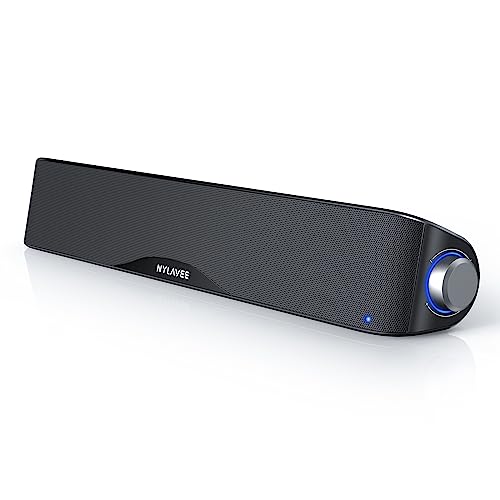
Nylavee’s sound bar presents a more full-range configuration with four speaker units and two independent bass diaphragms to boost bass response. It uses higher-grade materials like neodymium magnets and mica fiber diaphragms for improved fidelity. Connectivity includes Bluetooth and AUX wired options, and USB provides power. This model is targeted at users seeking stronger low-end and flexible connection options across desktops, consoles and mobile devices.
SOULION R50 Bluetooth Computer Speakers, USB Powered Sound Bar

The SOULION R50 uses USB for power and supports both Aux and Bluetooth audio modes selectable via its “M” key. It features four dynamic LED lighting modes—gradient, breathing, rhythm, and fixed—that can be toggled or turned off. Bluetooth pairing is supported when powered via USB, with a simple memory-clearing long-press for reconnection. This unit emphasizes visual customization alongside basic stereo performance for a visually engaging desktop setup.
Bluedee Computer Speakers, Bluetooth 5.3 USB/Type-C Powered Sound Bar

Bluedee’s sound bar offers HiFi stereo with anti-noise processing and HD full-range drivers. It uses an all-in-one USB or Type-C cable to carry both power and audio, simplifying cable management. The speaker provides Bluetooth mode when the USB connector is plugged for power, and is plug-and-play—no drivers required—making it suitable for users who want minimal setup and modern connectivity. The combination of USB/Type-C and Bluetooth 5.3 supports varied desktop devices and laptops.
Buying Guide: How To Choose A USB Powered Sound Bar
Selecting the right USB-powered sound bar for your desktop depends on several factors. Below are key considerations and comparison perspectives to help you choose.
Connections And Compatibility
- USB-only vs USB+Aux: USB-only models transmit audio over USB or use an internal USB audio device. USB+3.5mm gives broader compatibility with older devices and consoles.
- Bluetooth Support: Bluetooth-enabled bars offer wireless streaming from phones and tablets but typically still require USB power.
- Type-C Options: USB Type-C can offer a neater single-cable solution for modern laptops.
Power And Sound Output
- Watts and Driver Count: Higher wattage and multiple drivers usually mean louder, fuller sound. For small rooms, 6–12W is often adequate.
- Bass Performance: USB sound bars have limited low-frequency extension; integrated bass diaphragms or passive radiators improve perceived bass.
- Signal Processing: Anti-noise tech or DSP can improve clarity at desktop listening distances.
Form Factor And Placement
- Clamp-On Vs Desk Placement: Clamp-on bars save desk space and align sound with the monitor. Desk units often allow larger drivers.
- Size: Match bar length to your monitor width for balanced stereo separation.
Controls And Convenience
- On-Unit Controls: Physical volume, mute and play/pause buttons are convenient for quick adjustments.
- Indicator LEDs: Mute and connection indicators help confirm status at a glance.
Extra Features
- Lighting: RGB or LED modes add desk ambiance but are decorative rather than acoustic improvements.
- Passthroughs: Headphone or microphone jacks can be useful for gaming or private listening.
- Driver Materials: Neodymium magnets and reinforced diaphragms often yield better accuracy and durability.
Comparison Perspectives
- Minimalist Setup: Choose a USB-only plug-and-play model with clamp mount for a tidy workspace (e.g., compact clamp bars).
- Maximum Connectivity: Pick a model with USB/Type-C plus Bluetooth and AUX if you switch between multiple devices.
- Audio-Focused: Look for multiple drivers, bass diaphragms, or DSP if fuller sound is a priority.
- Style-Focused: Consider LED/RGB features if visual aesthetics matter for your desk lighting.
Use the comparison perspectives above to match a sound bar’s strengths to how you work, play or stream. Prioritize the connection type and placement that best fit your setup, and balance desired audio performance with desk footprint and convenience features.