
Finding the right USB speaker for your desktop or laptop can improve meetings, streaming, and casual listening without messy cables or extra power bricks. Below is a quick summary table of the five selected USB-powered desktop speakers covered in this guide.
| Product | Brand | Key Feature |
|---|---|---|
| Logitech S150 USB Speakers | Logitech | Simple USB plug-and-play with front volume control |
| Creative Pebble 2.0 USB-Powered Desktop Speakers | Creative | Far-field drivers and passive radiators with angled drivers |
| Amazon Basics USB-Powered Computer Speakers | Amazon Basics | USB-powered with on/off and volume control; 3.5mm jack |
| Cyber Acoustics USB Speaker Bar (CA-2890) | Cyber Acoustics | Clamp-on speaker bar with convenient controls and mute |
| LIELONGREN USB Computer Speaker (Upgraded) | LIELONGREN | Dual drivers with passive radiator and single USB cable |
Logitech S150 USB Speakers With Digital Sound
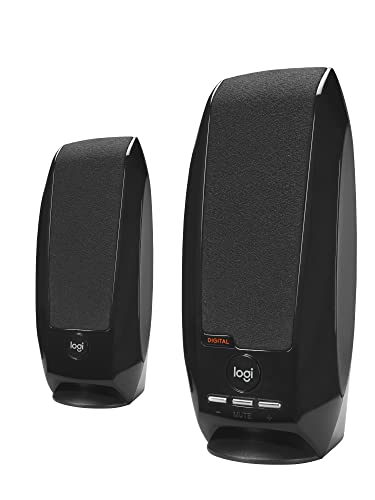
The Logitech S150 offers a plug-and-play USB-A connection and basic desktop audio suitable for conference calls, video playback, and casual music. The system provides 2 Watts Peak / 1.2 Watts RMS power and emphasizes balanced sound with some depth for small spaces.
- Power & Sound: 2W Peak/1.2W RMS for clear midrange and voice clarity.
- Connection: Single USB-A cable supplies power and audio; LED indicates power on.
- Controls: Front-mounted volume and mute for quick adjustments.
- Use Case: Best for users who want an easy setup and front-access controls for daily desktop use.
Creative Pebble 2.0 USB-Powered Desktop Speakers

The Creative Pebble 2.0 is designed for compact desks and emphasizes clear projection and enhanced bass using far-field drivers and rear passive radiators. The drivers sit at a 45° angle for better on-desk sound staging.
- Design: Simple two-piece desktop speakers with elevated drivers for improved projection.
- Connectivity: Single USB cable for power and audio—no external adapter required.
- Acoustic Features: Far-field drivers plus passive radiators provide better low-end than many tiny speakers.
- Use Case: Suitable for compact workspaces where space and stereo imaging matter.
Amazon Basics USB-Powered Computer Speakers For Desktop Or Laptop

Amazon Basics offers a straightforward USB-powered speaker set with on/standby and volume control built into the enclosure. It supports plug-and-play operation and includes a 3.5mm jack for headphone pass-through.
- Power: USB 5V power directly from the PC or laptop without separate adapter.
- Controls: Front control knob for power and volume for fast adjustments.
- Compatibility: Plug-and-play with systems that provide USB audio output and a 3.5mm jack option for headphones.
- Use Case: Good pick for users who want a no-fuss solution with a tactile volume knob and headphone support.
Cyber Acoustics USB Speaker Bar (CA-2890)

The Cyber Acoustics CA-2890 is a compact USB-powered speaker bar that attaches to the bottom of most monitors, projecting sound forward for clearer desktop listening. It provides basic media controls and a mute button with LED status.
- Mounting: Clamp attaches to monitor or can be placed on a desk for flexible positioning.
- Controls: Volume up/down, mute with LED, and play/pause control for quick media management.
- Sound: Compact stereo output designed for voice and general media playback; projects sound forward for a wider listening field.
- Use Case: Ideal for users who prefer a monitor-mounted solution to save desk space and keep sound directed toward the listener.
LIELONGREN USB Computer Speaker With Stereo Sound & Enhanced Bass
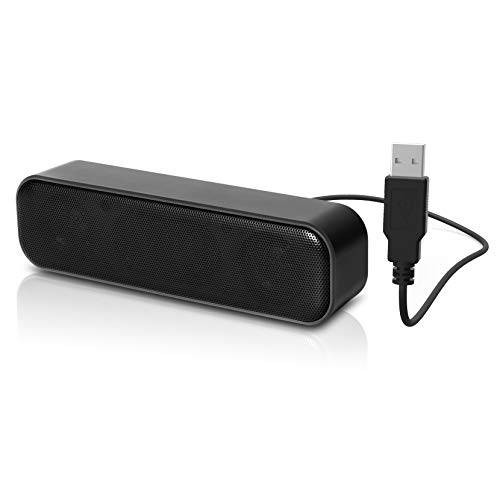
The LIELONGREN upgraded USB speaker includes dual 3W high-excursion drivers and a passive radiator to increase loudness and bass for compact enclosures. It uses a single USB cable for both power and audio, simplifying cable management.
- Drivers: Dual 3W drivers with passive radiator for more dynamic range and improved low-frequency response.
- Connectivity: Single USB connection—no separate 3.5mm jack required for typical Windows PCs.
- Controls: Software or OS volume control required as the unit lacks a dedicated physical volume knob.
- Compatibility: Designed primarily for Windows PCs and laptops; plug-and-play convenience.
Buying Guide: How To Choose The Right USB Speaker For Your Desktop
Choosing the best USB speaker depends on workspace, listening needs, and device compatibility. Below are key considerations and comparison perspectives to help you decide.
Connectivity And Compatibility
USB Type — Most listed models use USB-A for power/audio. If your device has only USB-C, check for adapters or models that include a USB-C adapter. Confirm OS compatibility, especially if you use ChromeOS, macOS, or Linux.
Power And Audio Quality
Driver Size And Passive Radiators — Larger drivers and passive radiators typically deliver better bass and dynamic range. For voice clarity and video calls, midrange focus matters more than heavy bass.
Controls And Convenience
On-Device Controls — Physical knobs and mute buttons are helpful for quick adjustments. Some compact speakers rely on system volume controls instead.
Form Factor And Mounting
Desktop Footprint — Low-profile speaker bars (clamp-on) save desk space and aim sound toward the listener. Two-piece desktop speakers can offer wider stereo separation.
Use Case Scenarios
- Video Calls & Meetings: Prioritize clarity and front-facing projection; simple plug-and-play models with mute are useful.
- Music & Streaming: Look for passive radiators, dual drivers, or slightly higher wattage for fuller sound.
- Small Desks & Laptops: Compact single-cable USB units or clamp-on bars reduce clutter.
Extras And Practical Considerations
- Headphone Jack: Useful for private listening—check whether an aux passthrough is available.
- Mounting Hardware: If you use a monitor mount, a clampable speaker bar offers convenience.
- Volume Control Method: Decide if you prefer tactile knobs or are comfortable using on-screen volume control.
- Power Source: Ensure your computer’s USB port supplies enough power; some setups may require a powered USB hub.
Use the comparison perspectives above to weigh sound performance, control convenience, and desk ergonomics when selecting a USB speaker for your desktop or laptop setup.