
Best USB to 3.5mm Audio Jack Adapters for Clear Sound Across Devices
Unsure which USB to 3.5mm adapter fits your setup? This guide compares top options for listening and talking, ideal for PCs, laptops, consoles, and car audio. Each pick targets a common buyer: gamers needing reliable mic input, office users needing simple plug‑and‑play, and travelers seeking compact, durable builds. Below is a quick summary of the featured products and their best use cases.
| Product | Best For | Key Benefit |
|---|---|---|
| MOSWAG USB to 3.5mm Jack Audio Adapter External Stereo Sound Card | Multimedia use and VOIP | Stable 16-bit/48kHz sound with noise reduction |
| UGREEN USB to 3.5mm Jack Audio Adapter Headphone DAC | Gaming and mic chats | 24bit/96kHz output; sturdy aluminum shell |
| STSAUX USB to 3.5mm Audio Adapter (2-Pack) | Office or shared PC setups | 24-bit/96kHz DAC; plug-and-play |
| MillSO USB to 3.5mm Audio Jack Adapter | Travel and minimal setups | USB bus-powered; compact 3-foot length |
| Eanetf USB to Aux Adapter 2PCS | Car audio decoding upgrades | MP3 decoding via USB drive for in-car use |
MOSWAG USB To 3.5mm Jack Audio Adapter

This USB external sound card adds a 3.5mm TRRS port for both audio out and microphone input. It uses a built-in DAC to provide stable 16-bit/48kHz audio and features noise reduction for clearer sound. Best for users needing VOIP, music, and light gaming with supported headsets. Note: the 3.5mm microphone jack does not support TS or TRS connectors. Suitable for Windows, Mac, Linux, and some game consoles.
Best for: office calls, video chats, and multimedia on laptops or desktops. Caution: microphone compatibility is limited to TRRS headsets.
UGREEN USB To 3.5mm Jack Audio Adapter Headphone DAC

UGREEN offers a 2-in-1 USB audio solution with listening and talking capabilities. It features a 24-bit/96kHz DAC, providing higher-resolution output for gaming and music. The aluminum shell adds durability, and a nylon braided design reinforces cable longevity. Note: the microphone support is limited to a single mic via TRRS.
Best for: gamers and online communicators who want crisper audio and a sturdier build. Caution: mic support may be limited to one TRRS microphone.
STSAUX USB To 3.5mm Audio Adapter (2-Pack)

STSAUX delivers a 24-bit/96kHz DAC for high-resolution output and clear microphone support. This 2-pack is ideal for shared workplaces or multimedia setups where multiple devices require quick USB-to-TRRS conversion. It is plug-and-play with Windows, Mac, Linux, Chrome OS, and Surface devices. Not compatible with TVs or iOS microphone functionality.
Best for: workplaces or gaming setups needing a spare adapter. Caution: not compatible with iOS microphone functionality or certain TVs.
MillSO USB To 3.5mm Audio Jack Adapter
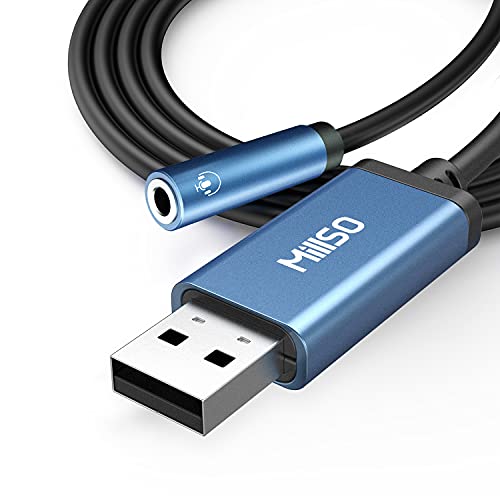
MillSO emphasizes portability with a compact 3-foot cable and USB bus-powered design. It converts a USB port into a TRRS 3.5mm port for stereo listening and mic input, supporting Windows, Mac, Linux, and Raspberry Pi. It’s a good match for travelers or compact desk setups where space matters. Caution: the USB port may be used up by other devices, limiting concurrent power needs.
Best for: on-the-go users and compact desks. Caution: small form factor may be less comfortable for long sessions.
Eanetf USB To Aux Adapter 2pcs

Eanetf offers a dual-pack option focused on car audio decoding and in-vehicle use. The product emphasizes compatibility with car audio systems that support MP3 decoding via USB. It requires that the car auxiliary port supports MP3 decoding. Best for upgrading in-car audio without replacing the head unit. Limitations include potential compatibility variance with non‑MP3 decoding ports.
Best for: car owners seeking a simple in-car audio upgrade. Caution: ensure your car’s AUX port supports MP3 decoding via USB drive.
Buying Guide
How to choose the right USB to 3.5mm adapter
- Audio quality: Look for DAC specifications (24-bit/96kHz) if you prioritize high-resolution sound.
- Microphone support: Check whether the adapter supports CTIA/TRRS for combined mic and audio and whether it handles a single mic or multiple channels.
- Compatibility: Confirm OS support (Windows, macOS, Linux, Chrome OS) and device class (laptops, desktops, consoles, or cars).
- Durability and build: Aluminum shells and braided cables tend to be more durable for daily use.
- Driver requirements: Prefer plug-and-play models that require no driver installation for broad compatibility.
- Use case: Choose based on listening-only needs, or full-duplex microphone usage in gaming or calls.
Quick comparison by use case
- Best for gaming with mic: UGREEN or STSAUX for high-res audio and reliable mic support.
- Best for travel: MillSO for compact size and plug‑and‑play simplicity.
- Best for car audio: Eanetf for MP3 decoding via USB drive.
FAQ
- Do these adapters require drivers? Most are plug-and-play and do not require drivers.
- Can I use these with USB-C laptops? Yes, via a USB-A to USB-C adapter if needed, provided the device supports USB audio.
- Will they work with smartphones? Some may work with phones that support USB audio; check device compatibility before purchase.
- Do they support both headsets and speakers at the same time? Most are single-output devices; check the product notes for microphone support.
- Is 24-bit/96kHz always better? Higher bit depth and sample rate can improve fidelity, but real-world listening depends on the entire chain and source quality.
- Can I use these for USB-C headsets? Not all models support USB-C headsets; verify compatibility with your headset type.