
Best USB to 3.5mm Converter for Easy Headphone and Microphone Expansion
If you need to add a 3.5mm audio port to a computer, laptop, or console, a USB to 3.5mm converter is a practical solution. This guide highlights five top USB-to-3.5mm adapters, explaining who each model is best for and why. Whether you want better microphone input, higher-quality audio, or plug-and-play simplicity, these picks cover common use cases for gamers, remote workers, students, and creators.
| Product | Brand |
|---|---|
| MOSWAG USB to 3.5mm Jack Audio Adapter External Stereo Sound Card | MOSWAG |
| STSAUX USB to 3.5mm Jack Audio Adapter (2-Pack) | STSAUX |
| AUXNIU USB to 3.5mm Jack Audio Adapter | AUXNIU |
| MCSPER USB to 3.5mm Jack Audio Adapter | MCSPER |
| ANDTOBO USB to Aux Audio Adapter | ANDTOBO |
Buyer note: look for a model with a built-in DAC for clearer sound, plug-and-play ease, and compatibility with your operating system. If you need both audio-out and microphone-in, choose a TRRS-enabled adapter. For occasional use, a compact, USB-powered dongle is typically the most portable option.
MOSWAG USB To 3.5mm Audio Adapter

Best for: Windows and Mac users who want a simple plug-and-play solution with integrated microphone-in and audio-out. This adapter uses a built-in DAC and supports 16-bit/48kHz audio with noise reduction for faithful sound reproduction. It works with USB-enabled devices and charts broad compatibility, including Raspberry Pi and gaming consoles in some setups. Note: The 3.5mm mic jack may not support TS or TRS connectors.
Why selected: The MOSWAG model combines a compact form with stable audio output and a recognizable DAC that improves sound quality over basic adapters. It is a good choice when you need a straightforward upgrade for headsets or headphones with a combined mic and audio port.
Caution: Microphone compatibility may vary with some headsets that use TS/TRS connectors; verify your mic type before purchase.
STSAUX USB To 3.5mm Audio Adapter (2-Pack)

Best for: Anyone who wants a dual-pack solution for multiple devices, PCs, or travel setups. This adapter uses a high-performance DAC and supports 24-bit/96kHz audio for improved fidelity in gaming, music, and conference calls.
Why selected: The 2-pack provides value and redundancy, enabling quick swaps between devices without reordering. It supports CTIA and OMTP standards, making it compatible with a wide range of headsets and microphones.
Caution: Not compatible with iOS microphone functionality on certain devices, and some TVs or car systems may have limited support for microphone input.
AUXNIU USB To 3.5mm Jack Audio Adapter
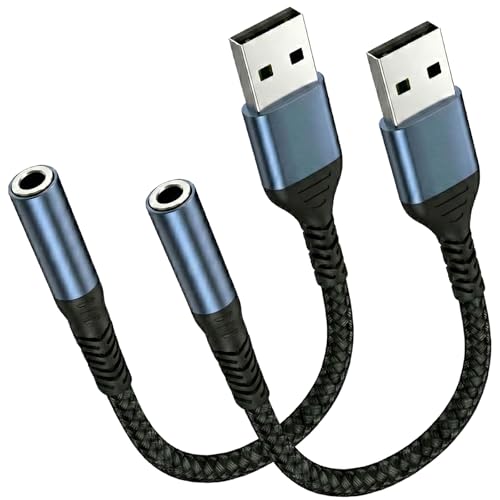
Best for: Users seeking hi-res DAC performance with clear, low-noise output for gaming, music production, or movies. It supports TRRS 4-pole connections for combined audio output and microphone-in.
Why selected: The AUXNIU model emphasizes high-resolution audio and robust noise reduction, offering a noticeable improvement over standard dongles for audio-intensive tasks. It is plug-and-play with broad system compatibility (Windows, Mac, Linux, Chrome OS, Raspberry Pi, PS4/PS5, Chromebooks).
Caution: Microphone compatibility may vary with some Apple EarPods; not all devices recognize mic input across platforms.
MCSPER USB To 3.5mm Jack Audio Adapter

Best for: People who want a consistent, compact adapter for everyday use in offices, homes, or classrooms. It supports listening and speaking through a 3.5mm TRRS port with plug-and-play recognition.
Why selected: The MCSPER unit emphasizes reliable auto-detection, minimal driver needs, and portable design, making it suitable for quick conference calls or online learning sessions.
Caution: Like many USB-to-audio adapters, it may rely on the host’s supported drivers; check your OS compatibility if you use more niche Linux builds or older hardware.
ANDTOBO USB To Aux Audio Adapter
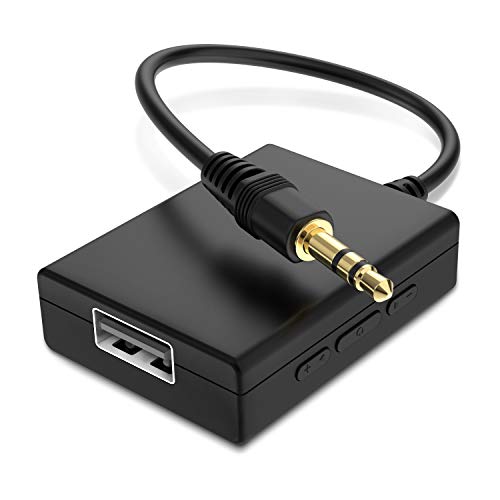
Best for: Car audio enthusiasts looking to add a 3.5mm input for MP3 playback via USB drives or to upgrade an older car stereo with a 3.5mm AUX port. It is designed for audio-only use and requires a powered USB source in the vehicle.
Why selected: ANDTOBO focuses on car audio integration, making it a practical pick when a vehicle’s internal ports are limited but MP3 decoding is available on USB drives.
Caution: It is not a universal converter for headsets or external speakers and does not support reverse operation or charging external devices.
Buying Guide: Key Considerations For Choosing A USB To 3.5mm Adapter
What to look for when selecting a USB-to-3.5mm adapter:
- Audio quality: Prioritize adapters with built-in DACs and support for high-resolution audio (24-bit/96kHz or better) if you need studio-like clarity or immersive gaming sound.
- Microphone support: If you need microphone input, choose a TRRS connector that supports both audio out and mic in. Check compatibility with your headset and device.
- Plug-and-play: For hassle-free use, pick devices labeled as plug-and-play with broad OS compatibility (Windows, macOS, Linux, Chrome OS, PS4/PS5, etc.).
- Compatibility notes: Some adapters are not compatible with certain devices (TVs, iOS devices, or specific car systems). Review the listed limitations before buying.
- Portability: If you travel or work on the go, consider a compact dongle with a robust housing to withstand daily carry.
- Number of units: A multi-pack (like a 2-pack) offers value if you need to outfit multiple devices or spare adapters for travel.
Frequently Asked Questions
- Do USB to 3.5mm adapters work with all computers?
- What is a DAC and why does it matter in these adapters?
- Can these adapters replace a faulty internal sound card?
- Will a USB-to-3.5mm adapter work with gaming headsets?
- Are there any limitations when using adapters with Macs or Chromebooks?
- Do these adapters require drivers?
Answers: USB-to-3.5mm adapters generally work with most modern computers and many gaming consoles, but compatibility can vary with certain devices. A DAC (digital-to-analog converter) improves signal quality by converting digital audio to analog with less noise, which matters for clearer sound and better microphone reception. Some adapters function as a temporary or permanent replacement for faulty internal sound cards, depending on device compatibility. Many adapters are plug-and-play and require no driver installation, though some Linux or enterprise setups may need manual configuration. Macs, Chromebooks, and certain iOS devices may have limitations on microphone input; always verify the specified compatibility and user notes from the seller.