Best USB to Optical Converter for Crisp Digital Audio
Answer: If you need to convert USB audio into a digital optical (S/PDIF) signal, these select adapters and cables deliver clear, high-fidelity sound for computers, gaming consoles, and home theater setups. This guide highlights five reliable options, clarifying who each is best for and why. Ideal buyers include PC audiophiles seeking clean digital output, gamers integrating USB audio with external DACs or sound systems, and users wanting a simple plug-and-play solution without drivers.
Summary of chosen products
| Product | Brand | Best For | Key Benefit |
|---|---|---|---|
| Cubilux USB A to TOSLINK Optical Audio Cable | Cubilux | Gamers and PC users needing a USB A to SPDIF cable | Lossless digital audio at high sample rates |
| Cubilux USB A to TOSLINK Optical Audio Adapter | Cubilux | PCs and laptops requiring a USB A to SPDIF transmitter | Plug & Play, driver-free |
| YAODEMA USB A to TOSLINK Optical Audio Adapter | YAODEMA | Desktop and laptop setups needing easy USB to SPDIF | Crystal clean hi-res sound |
| MEIRIYFA USB to Toslink Optical Audio Adapter | MEIRIYFA | USB A sources to DACs/speakers | High fidelity, low interference |
| Tackston USB to Optical Audio Adapter | Tackston | Windows/macOS/Linux users seeking simple USB to Toslink | No drivers, no external power |
Cubilux USB A To TOSLINK Optical Audio Adapter

Best for: PC users and gamers who want a straightforward USB A to SPDIF transmitter. This unidirectional adapter converts USB A sources to S/PDIF optical output for compatible sound systems, external DACs, or home theater setups. It supports lossless digital audio and native high-resolution formats up to 192 kHz/24-bit, delivering clear highs and detailed mids.
Why selected: It emphasizes plug-and-play operation with no driver or external power requirements, making it a practical option for quick, stable connections. Its 48 kHz to 192 kHz support covers most typical listening scenarios and gaming audio.
Limitations: It is a unidirectional transmitter only; if you need reverse or two-way audio, consider alternatives. Also, its compatibility focuses on USB A devices, not TVs.
Cubilux USB A To S/PDIF Optical Audio Cable
Best for: Users who prefer a cable-based solution from USB A to Toslink, offering a direct, solid connection without additional adapters. It supports 192/96/48/44.1 kHz at 24/16-bit for clean digital audio.
Why selected: The cable design helps minimize latency and interference, making it suitable for home theater integration and PC audio setups.
Limitations: Not all devices provide full 5.1/7.1 channel support; check your DAC or receiver’s capabilities before purchase.
MEIRIYFA USB To Toslink Optical Audio Adapter

Best for: Laptop and PC users wanting a compact USB A to SPDIF converter with stable digital output. It converts USB A to Toslink SPDIF and works with devices supporting SPDIF output.
Why selected: It highlights USB to Toslink digital optical conversion with low interference and no electromagnetic noise, which benefits music playback and gaming audio.
Limitations: Compatibility is focused on USB A sources; verify support for your OS and audio chain before purchase.
XMSJSIY USB To Optical SPDIF Toslink & 3.5mm

Best for: Audio setups needing both digital optical output and analog 3.5mm headphone output from a USB source. Suitable for PCs, PS5/4, and some laptops.
Why selected: Dual output versatility allows use with soundbars or DACs while still providing a 3.5mm jack for headphones or auxiliary amps, great for compact entertainment centers.
Limitations: Some users may require configuration to route 3.5mm output appropriately; verify your device’s compatibility with mixed digital/analog paths.
YAODEMA USB A To Toslink Optical Audio Adapter
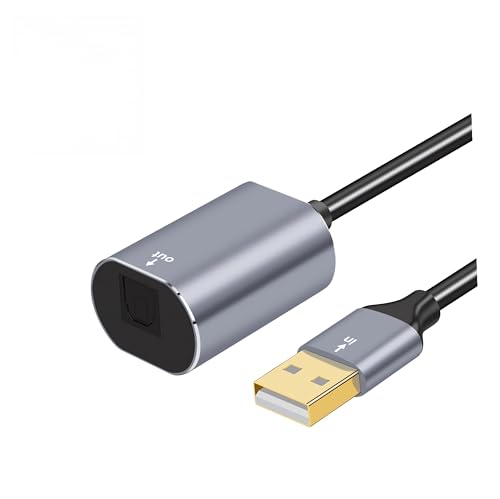
Best for: Desktop or notebook users seeking a straightforward USB A to SPDIF converter with solid hi-res output. It supports high-resolution audio up to 192 kHz/24-bit.
Why selected: Its emphasis on clean, high-resolution sound makes it a good choice for critical listening and gaming where precise detail matters.
Limitations: It is designed for USB A sources; ensure your system has a compatible USB port and that the receiving device supports Toslink input.
Buying Guide: How To Choose A USB To Optical Converter
What to consider when buying:
- Output direction: If you need to send audio from USB to an optical input, pick a unidirectional USB A to Toslink device (as many options are). If you need two-way audio, verify bidirectional support.
- Sample rates and bit depth: Look for devices supporting at least 48 kHz/24-bit; higher 96 kHz or 192 kHz options provide better fidelity for music and films.
- Device compatibility: Confirm your source device (PC, laptop, PS5/4, or USB DAC) and receiving device (soundbar, DAC, or receiver) are compatible with Toslink.
- Power and drivers: Many adapters are plug-and-play with no external power or drivers. If a unit requires power or software, ensure you can provide it.
- Build and durability: Aluminum enclosures and braided cables generally offer better durability and heat dissipation for long-term use.
- Latency and interference: Optical connections minimize electrical interference. This is especially important for gaming and home theater setups.
- Cable length: Consider whether a 1–2 meter setup suffices, or if longer cables are needed for your desk or entertainment center.
- Additional outputs: Some models add 3.5mm analog outputs. Decide if you need both digital and analog in one device.
Frequently Asked Questions
- Can USB audio be converted to digital optical without drivers? Yes, many adapters are plug-and-play and do not require drivers for Windows or macOS.
- Is a Toslink connection always higher quality than analog? Toslink provides a pure digital signal, but audio quality depends on the source, DAC, and receiving device.
- Will these work with TVs? Some adapters are designed for computers and gaming consoles; verify compatibility before use with TVs.
- Do these converters support 5.1 surround sound? Some models support 5.1 only from select sources; check product specs and your device’s capabilities.
- What is Toslink? Toslink is a standard for optical S/PDIF digital audio connections, which transmits digital audio signals via fiber optic cables.
- Are there latency concerns? Optical transmissions generally have very low latency, suitable for gaming and real-time audio/video.