
Best USB to SPDIF Converter for Audiophiles and Home Theaters
If you’re looking to extract high-quality digital audio from a USB source, these USB-to-SPDIF converters are designed to deliver clear, low-noise outputs to your sound system. They’re best for computer audio fans, gamers, and home-theater setups that want a simple, driver-free connection. This guide focuses on five solid options that balance compatibility, signal integrity, and value for money.
Summary of selected products:
| Product | Output Type | Best For | |
|---|---|---|---|
| Cubilux USB A To TOSLINK Optical Audio Adapter | TOSLINK Optical | USB A laptops/PCs seeking easy optical output | Unidirectional; not for TVs |
| Cubilux USB To Toslink & Coaxial SPDIF Adapter | TOSLINK & Coaxial SPDIF | Home theater systems needing both outputs | Requires compatible content for 5.1 |
| Cubilux UCSTR-B3 USB To SPDIF Input Output | TOSLINK SPDIF, USB | Bidirectional USB/SPDIF needs | Stereo only supported |
| DSD TECH SH-AU02A USB To TOSLINK Coaxial SPDIF | TOSLINK/Coaxial SPDIF | General digital audio with 96k/24bit support | Reliant on USB input quality |
| XMSJSIY USB To Optical SPDIF Toslink & 3.5mm | TOSLINK SPDIF & 3.5mm | Integrated digital+analog output | Aluminum case; ensure compatibility |
Cubilux USB A To TOSLINK Optical Audio Adapter

This unidirectional USB A to S/PDIF optical converter is designed to connect a USB A laptop, PC, or gaming console to a sound bar, home audio system, external DAC, or speaker via TOSLINK. It provides lossless digital audio without extra drivers or external power. Best for: computer or console users who want an easy, plug-and-play optical output. Limitation: not suitable for TVs or devices without a USB A port.
Cubilux USB To Toslink & Coaxial SPDIF Adapter

This device offers dual outputs: TOSLINK optical and coaxial SPDIF. It supports PCM up to 192kHz/24bit for home theater and Hi-Fi systems. Best for: setups needing both optical and coaxial outputs from a USB source. Better for: AV receivers that can utilize both channels. Caution: 5.1 surround may require content compatibility and proper receiver support.
Cubilux UCSTR-B3 USB To SPDIF Input Output
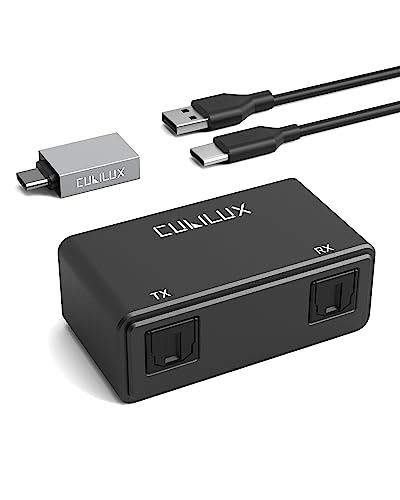
This 2-in-1 USB Optical Transmitter/Receiver supports bidirectional transfer: USB to SPDIF and SPDIF to USB. It delivers stereo audio up to 192KHz/24-bit. Best for: users who need flexible directionality for recording or streaming. Limitation: does not support 5.1 or multi-channel surround; primarily for stereo use.
DSD TECH SH-AU02A USB to TOSLINK Coaxial SPDIF

DSD TECH SH-AU02A focuses on USB-based digital audio conversion to Optical/Toslink or Coaxial SPDIF for PCs, notebooks, PS5, Switch, and other devices. It supports 96K/24Bit with a clean PSRR-limited power supply to reduce noise. Best for: users who need a compact, general-purpose USB-to-SPDIF solution. Caution: ensure the USB source and receiver support the desired format and sampling rate.
XMSJSIY USB To Optical SPDIF Toslink & 3.5mm

This converter outputs SPDIF digital audio via Toslink and provides a 3.5mm analog output. It supports audio extraction from USB-connected devices like computers and TVs. Best for: users who want both digital and analog options from a single device. Caution: aluminum housing helps durability but may require careful handling to avoid cosmetic wear.
USB A To TOSLINK Optical Audio Adapter (ESWN DNXB)

USB A to S/PDIF Optical Converter enables quick connection from USB A devices to a home audio system, sound bar, or external DAC. It delivers high-resolution sound at 48K/24-bit up to 192K/24-bit. Best for: users who want straightforward USB-to-optical with plug-and-play setup. Caution: ensure your device outputs PCM/LPCM to use with this converter for proper stereo or simple surround setups.
Buying Guide
What to consider when choosing a USB-to-SPDIF converter:
- Output options: Do you need only optical (TOSLINK), coaxial, or both? Dual-output models provide more flexibility for different receivers.
- Sampling rate and bit depth: Look for supports up to 192kHz/24-bit for high-fidelity audio.
- Directionality: Some devices are unidirectional (USB to SPDIF), others bidirectional (USB to SPDIF and SPDIF to USB). Pick based on whether you need recording or two-way audio.
- Driver and power requirements: Most modern adapters are plug-and-play with driver-free operation. If power is required, ensure it matches your setup to avoid noise.
- Build and shielding: Aluminum housings reduce EMI and improve durability, particularly in busy AV racks.
- Delay and jitter: Some users notice timing differences; for gaming or lip-sync-sensitive content, test for latency.
FAQ
- Is a USB-to-SPDIF adapter necessary for my computer? It’s useful when your computer’s built-in audio outputs do not include a dedicated SPDIF, or you need a cleaner, high-resolution digital connection to an external DAC or receiver.
- Will this work with a TV? Some adapters are not compatible with TVs. Check whether the device is unidirectional and supports PC/console USB inputs rather than TV USB hubs.
- Can I use an adapter for surround sound? Dual-output adapters can support 5.1 pass-through when used with compatible content and receivers, but some units are stereo-only.
- Do I need drivers? Most current adapters are plug-and-play and do not require drivers on Windows or Mac OS.
- Which is best for gaming? Look for models with stable S/PDIF output and low jitter; optical outputs often suit gaming consoles and PCs via DACs. Bidirectional models are helpful if you need reverse audio flow.
- What should I avoid? Avoid adapters that require external power if your setup lacks a suitable power source; ensure the device’s sample rate compatibility matches your audio chain.