
Best USB Wireless Computer Speakers for Clear, Desk-Friendly Audio
Looking for USB-powered computer speakers that deliver clear sound without complicated setup? This guide highlights five solid options that cover Bluetooth-enabled, USB-C ready, and wired configurations. Each pick suits different needs—perfect for small desks, monitor mounting, or PC setups requiring tight cabling. The table below compares the essentials to help you pick quickly.
| Product | Connection Type | Best For | Notes |
|---|---|---|---|
| Amazon Basics Bluetooth Computer Speakers | Bluetooth/USB/Aux | Bluetooth-enabled desks, multi-device use | USB-powered, no internal battery |
| XKX USB-C Desktop Speakers | USB-C / USB-A / 3.5mm | USB-C devices and classic PCs | Adaptable with built-in USB-C adapter |
| TAOTOSUNE USB-A Wired Speakers | USB-A / 3.5mm | Basic PC setups, no Bluetooth | No light switch, blue LED stays on |
| Creative Pebble V3 | USB-C (to USB-C) / USB-A adapter | Minimal cabling, modern USB-C ports | Excellent compact USB-C option |
| Logitech S150 | USB-A | Simple, steady desk audio | Low power, easy controls |
Amazon Basics Bluetooth Computer Speakers with USB 3.0

Best for: Buyers who want a compact, budget-friendly pair with Bluetooth and USB audio in one package. These speakers are powered entirely by USB and come as a set of two, making them ideal for laptops, desktops, and even TV setups where USB audio is supported. The larger 1.75-inch full-range drivers and tuned passives aim to deliver clear sound for everyday listening, video calls, and casual gaming. A key limitation is reliance on the USB power source; unplugging the USB cord powers them off, so plan your cable routing accordingly. Bluetooth 5.3 compatibility offers wireless flexibility, while a 3.5mm AUX input provides a wired option when Bluetooth isn’t available.
XKX USB-C Desktop Speakers With Built-In Adapter

Best for: PC users who want broad compatibility, including USB-C devices like newer MacBooks or Android laptops, without dongles. The built-in USB-C to USB adapter enables operation on systems that only have USB-C ports. The speakers feature dual ultra-magnetic drivers and dual passive radiators, delivering a louder, richer stereo sound with noticeable bass for their size. A caution: the lack of Bluetooth means wired use only; this is a strength for stability, but not ideal if you want wireless flexibility.
TAOTOSUNE Computer Speakers, USB-A Powered
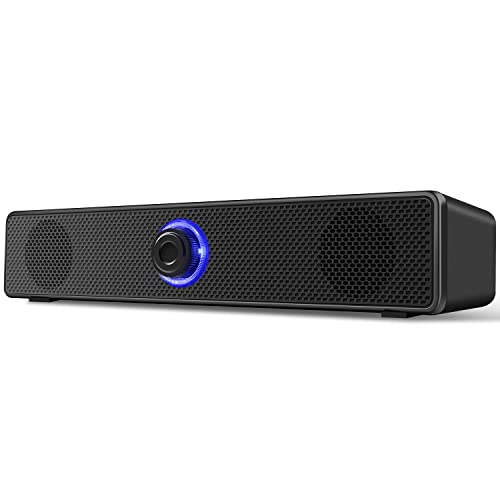
Best for: Budget-focused users who want a straightforward wired setup with no Bluetooth. These 6W drivers aim to deliver immersive stereo sound with deep bass, suitable for movies, music, and casual gaming. The kit notes a few compatibility caveats; it’s important to connect via USB-A for power and a 3.5mm jack for audio. A limitation is the lack of a dedicated light switch, so the blue LED remains on whenever the PC is on. If you need a simple, reliable wired option, this is a solid pick.
Creative Pebble V3, USB-C Desktop Speakers

Best for: Desk setups that benefit from minimal cables and USB-C power. The Pebble V3 uses a larger 2.25″ full-range driver and built-in gain switch for boosted output up to 16W peak, delivering louder and clearer sound with enhanced bass. It excels in living rooms, home offices, or dorm rooms where clean lines and reduced clutter matter. A note: while the USB-C connection is convenient, ensure your computer’s USB-C port can supply enough power to maximize performance.
Logitech S150 USB Speakers with Digital Sound

Best for: Users seeking a simple, low-cost USB-A powered pair with straightforward controls. The S150 delivers balanced sound with 2 Watts peak and 1.2 Watts RMS, suitable for chat, video, and light media consumption. An orange LED indicator shows when power is on, and front-panel controls let you adjust volume or mute easily. This option is best when space is tight and you want dependable, no-frills performance.
[Upgraded] LIELONGREN USB Computer Speaker

Best for: Windows and mixed-OS users who want plug-and-play simplicity with broad OS compatibility. The kit emphasizes quick setup: plug into USB, select USB2.0 device as playback, and the speaker is ready. It supports Windows, macOS, Linux, and Chrome OS—useful for students, home offices, or shared devices. A potential limitation is that performance can depend on the host computer’s USB power and driver support, so verify compatibility with your system before buying.
Cyber Acoustics CA-2890 USB Speaker Bar

Best for: Monitor-mount setups where desk space is premium. The CA-2890 uses a clip-on monitor design that attaches to the bottom of most monitors, serving as a compact speaker bar or standalone desktop speaker. It runs off a single USB cable for power and offers simple volume and mute controls with a visible LED. Ideal for clean, clutter-free desks, but note its compact form means it won’t deliver deep bass like larger two-piece systems.
Buying Guide: What to Consider When Choosing USB Computer Speakers
- Connection flexibility: Do you need Bluetooth, USB-C, or a wired 3.5mm option? USB-C can simplify power and data on modern devices, while Bluetooth adds wireless convenience.
- Power and placement: USB-powered speakers are convenient but ensure your USB port provides sufficient power. Clip-on or monitor-mounted designs save desk space, but may limit bass output.
- Driver size and sound profile: Larger drivers generally produce fuller bass and higher volume. If you prioritize clarity for video calls, look for Clear Dialog processing or similar features.
- Compatibility: If you use a mix of Windows, macOS, Linux, or ChromeOS, choose models noted as broadly compatible. USB-A and USB-C differences can affect plug-and-play ease.
- Controls and ease of use: Front-panel volume, mute, and power indicators help quick adjustments during work or study sessions.
- Design and space: Consider whether you prefer a two-speaker setup for stereo balance or a compact soundbar/clip-on option for minimal clutter.
Frequently Asked Questions
- What is the main difference between USB-powered and Bluetooth speakers?
– USB-powered speakers draw power from the computer and usually offer plug-and-play audio via USB or 3.5mm, while Bluetooth speakers connect wirelessly to devices and may require pairing. - Can USB-C speakers work with older computers?
– Some models include USB-C adapters or dual USB-C/USB-A compatibility, but check the product specifics to ensure compatibility with older ports. - Are monitor-mounted speaker bars better for small desks?
– Yes, monitor-mounted designs save desk space and reduce cable clutter, but may limit bass response compared to larger desktop setups. - Do I need special drivers for USB computer speakers?
– Most USB speakers are plug-and-play and do not require separate drivers, though some systems may benefit from driver updates for full compatibility. - Is it better to choose 2.0 or 2.1 speaker setups for PCs?
– A 2.0 (two drivers) setup is sufficient for general tasks and music, while 2.1 (two drivers plus a subwoofer) provides deeper bass for movies and gaming. Your space and budget influence the choice.