
Best USB Wireless Earbuds for Computer Use: Clear, Low-Latency Audio for Work and Gaming
Answering the search for reliable USB wireless earbuds for computer use, this guide highlights five top picks optimized for PC, laptop, and desk setups. Each option supports USB dongle or Bluetooth, prioritizing low latency, clear mic performance, and comfortable all-day wear. This is ideal for gamers, remote workers, or students who need strong synchronization between audio and on-screen action. Below is a compact buying table summarizing the selected models and their strongest use cases.
| Product | ||||
|---|---|---|---|---|
| FEDIKER SW4 Pro | Gaming and work calls on PC | 2.4G dongle + Bluetooth | 20 ms | Dual connection, 10mm drivers |
| Ngsod Bluetooth Headset V5.4 | Office calls in busy environments | USB dongle + Bluetooth 5.4 | Not specified (stable connection) | Enhanced noise cancellation mic |
| RYR Wireless Gaming Earbuds | Multiplatform gaming and calls | 2.4G dongle + Bluetooth | Under 20 ms | Dual built-in mics with noise reduction |
| Middle Rabbit SW4 Pro USB Wireless Earbuds | Professional meetings and calls | 2.4G dongle + Bluetooth | 20 ms | Four mics, clear voice capture |
| ONIKUMA T27 (New Version) | Immersive gaming and VR use | 2.4G USB-C dongle + Bluetooth 5.3 | 20 ms | Dual-mode, game and music optimization |
The following sections present each product with its key strengths, best-use scenarios, and any notable limitations. Use this structured format to compare latency, microphone quality, and compatibility across PC, consoles, and mobile devices.
FEDIKER SW4 Pro Wireless Earbuds for PC/Computer
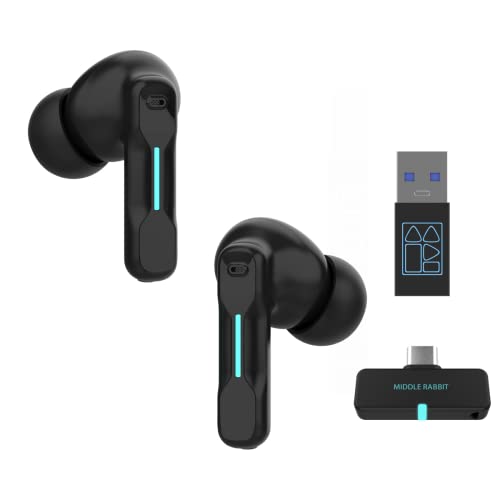
The FEDIKER SW4 Pro supports both a plug-and-play USB dongle and Bluetooth, enabling quick setup on non-Bluetooth PCs as well as mobile devices. It offers ultra-low 20 ms latency via 2.4G wireless for lag-free audio syncing, making it a strong option for gaming and real-time collaboration. The 10 mm drivers deliver clear treble, smooth mids, and deep bass for an immersive soundstage. Best for PC gamers and desk workers who need dependable, low-latency audio with flexible connectivity. Caution: performance may vary with older USB ports or non-standard dongles.
Ngsod Bluetooth Headset V5.4 with USB Dongle

Built with Bluetooth 5.4 for fast, stable pairing with computers, phones, and tablets. The upgraded noise-canceling microphone filters out up to 90% of background noise, ideal for noisy work environments or remote calls. The USB adapter supports stable connections in low-Bluetooth areas, making it reliable for daily use and meetings. Best for office settings where clear voice transmission is essential. Limitation: some users may prefer devices with longer battery life for all-day wear.
RYR Wireless Gaming Earbuds with Noise Cancelling Mic
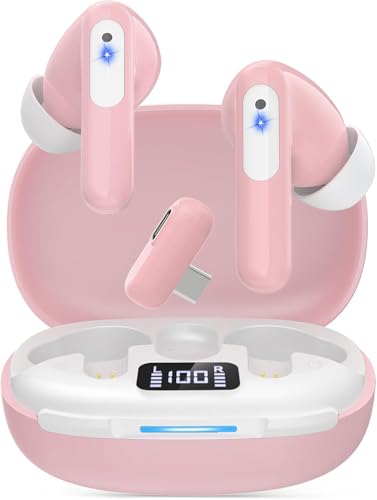
RYR Neo100 delivers ultra-low latency under 20 ms via 2.4G USB-C dongle, supporting seamless cross-play across PC, VR, PS5, and more. It supports dual connections with Bluetooth for calls without pausing gameplay and uses 12 mm drivers for strong bass and clear highs. Best for gamers who also need reliable everyday listening and quick cross-platform switching. Caution: Bluetooth pairing may occasionally require re-pairing after long idle periods.
Middle Rabbit SW5 Wireless Gaming Earbuds

Middle Rabbit SW5 provides dual-device connectivity with 2.4G dongle and Bluetooth 5.4. It features four built-in microphones and AI-enhanced HD mic for clearer calls, alongside 10 mm drivers for robust sound. This makes it well-suited for meetings, calls, and gaming with minimal lag. Best for multitaskers who need stable multi-device use. Limitation: audio tuning favors gaming and calls, which may slightly bias music playback.
Middle Rabbit SW4 Pro USB Wireless Earbuds for PC

Middle Rabbit SW4 Pro combines a USB dongle with Bluetooth, delivering lag-free audio via 2.4G for PC use. It emphasizes clear communication with two mics per earpiece and four total mics across the set for clearer calls and meetings. Best for professionals who need reliable conferencing and work-focused sound. Caution: ensure dongle is included in your PC package to maximize compatibility.
Middle Rabbit Rampage 2 Wireless Gaming Earbuds

Rampage 2 offers 2.4 GHz dongle plus Bluetooth dual-mode for cross-platform use. The 20 ms latency helps keep audio in sync with action, beneficial for FPS and action games on PlayStation, PC, Switch, and more. Best for gamers who need easy mode switching between gaming and mobile listening. Limitation: battery life and comfort may vary with long gaming sessions.
ONIKUMA T27 New Version Wireless Gaming Earbuds

ONIKUMA T27 combines 2.4 GHz wireless with Bluetooth 5.3 for near-zero 20 ms latency. It supports dual-device smart switching, enabling use with a phone and console simultaneously. The device offers optimized game and music modes for better directional cues and high-fidelity sound. Best for gamers who want quick device switching and VR compatibility. Caution: some users may find the fit tighter than other brands with longer wear.
Buying Guide
What should you look for in USB wireless earbuds for computer use?
- Latency: Prioritize models offering around 20 ms or lower on the 2.4G dongle for synchronized audio with video and gameplay.
- Connectivity: Check for dual-mode options (2.4G dongle plus Bluetooth) to ensure compatibility with PCs, laptops, consoles, and mobile devices.
- Microphone quality: Look for multiple mics or AI-enhanced mics for clear voice capture during calls and meetings.
- Comfort and fit: Choose ergonomic designs with lightweight builds for extended wear.
- Durability and portability: Consider cases or compact designs for commuting or desk use.
What platforms are supported?
Most models in this guide offer compatibility with Windows PCs, Mac computers, PlayStation, Nintendo Switch, VR headsets, and mobile devices via Bluetooth. When possible, use the USB-C or USB-A dongle for the lowest latency on PC or console.
Which option is best for meetings vs. gaming?
- Best for meetings: Ngsod and Middle Rabbit SW4 Pro often emphasize clear microphones and comfortable wear for long sessions.
- Best for gaming: FEDIKER SW4 Pro, RYR, ONIKUMA T27, and Rampage 2 focus on ultra-low latency and strong audio cues.
How to avoid common issues?
- Keep firmware and drivers up to date to maintain stable Bluetooth or 2.4G connections.
- Ensure the dongle is properly inserted and recognized by the PC before pairing.
- Test mic gain and background noise suppression in conferencing software to optimize clarity.
FAQ
- Do USB wireless earbuds require Bluetooth to work on a PC?
- Is latency the same across all models?
- Can I use these earbuds for calls and meetings?
- Are these earbuds suitable for VR and consoles?
- Do all come with a charging case?
No. Some models provide both a USB dongle and Bluetooth, which allows plug-and-play on non-Bluetooth PCs and wireless use on Bluetooth devices.
Latency varies. Most focus on around 20 ms with 2.4G dongles; Bluetooth latency can be higher depending on the device and codec.
Yes. Many models feature multiple mics and noise suppression designed for clear voice transmission in meetings.
Several models advertise compatibility with consoles like PS5, PS4, and Switch via dongle, and some support VR devices for synchronized audio.
Not all include a listed charging case; check product pages for case availability and charging options.