
Best USB With Headphone Jack Adapters for Clear Audio on All Your Devices
Find the right USB-to-headphone adapter to add a reliable 3.5mm audio path to laptops, PCs, consoles, and more. This guide highlights five versatile options best suited for gamers, remote workers, students, and media enthusiasts who need easy plug-and-play sound with clear mic input. Each option supports common CTIA headsets and works across major operating systems. The summary table below helps you compare at a glance.
| Product | Best For | |
|---|---|---|
| All‑around daily use; mixed USB devices | 16-bit/48kHz audio with DAC | |
| Gaming and calls on multiple devices | 24-bit/96kHz high-resolution output | |
| Windows, Mac, Linux users needing easy setup | Two jacks: stereo output and mono mic input | |
| High‑fidelity listening with mic support | Integrated microphone-in and noise shielding | |
| Plug‑and‑play versatility across platforms | Another reliable USB to TRRS option with universal compatibility |
MOSWAG USB to 3.5mm Jack Audio Adapter

MOSWAG offers a USB external sound card that adds a 3.5mm TRRS port for both audio out and microphone in. This makes it suitable for laptops, PCs, and gaming consoles needing a dedicated mic path. The built‑in DAC supports 16-bit/48kHz output with noise reduction to preserve original sound clarity. It supports CTIA and OMTP compatible headphones and broad OS compatibility, including Windows, Mac, Linux, Chrome OS, and Raspberry Pi. Best for users who want a simple, low‑latency USB audio upgrade without driver installs. Caution: the microjack may not support all TS/TRS combinations; verify your microphone is compatible.
DUKABEL USB Headphone Adapter
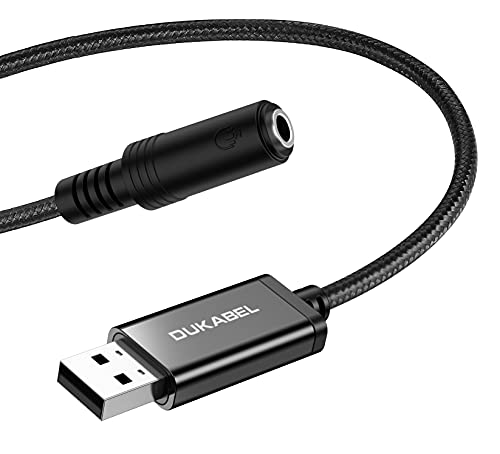
DUKABEL provides a 2-in-1 USB audio solution that adds a 3.5mm TRRS aux port for both listening and speaking. It’s designed for PC, PS4, PS5, laptops, desktops, and more, with plug‑and‑play setup and automatic recognition. It supports CTIA standards for headsets and microphones and works across Windows, Mac OS X, Linux, and many single-board computers. Best for users who want a reliable, driver‑free option and broad compatibility. Limitation: not recommended for TVs, cars, or certain consoles with specific audio configurations.
STSAUX USB to 3.5mm Audio Adapter (2-Pack)

STSAUX equips a USB-A to 3.5mm TRRS adapter with a high‑performance DAC delivering 24-bit/96kHz audio output and enhanced noise reduction. It serves as an easy upgrade for damaged laptop or desktop audio ports and supports plug-and-play on Windows 10/11, Mac OS, Linux, Chrome OS, and Surface Pro. Best for multimedia fans who want higher resolution sound and reliable microphone functionality. Limitation: not compatible with televisions or iOS devices for microphone input; audio output only on those platforms.
SABRENT USB External Stereo Sound Card Adapter

SABRENT’s plug‑and‑play AU-MMSA adapter provides a separate 3.5mm stereo output and 3.5mm mono microphone input. It’s driverless and class‑compliant, working across Windows, Mac, and Linux without software. The device is bus-powered and recognized as a standard USB audio interface. Best for users who need a straightforward, no‑frills audio solution with clear separation of output and input. Caution: it does not support 4-pole headsets on a single plug or provide surround sound.
Buying Guide: Key Factors To Consider
What should you look for when choosing a USB to 3.5mm adapter? Start with compatibility: verify operating systems and devices you plan to use. Consider driver needs; many options are plug‑and‑play, but some may require specific drivers for full functionality. Assess audio quality and microphone support: higher DAC specs (like 24-bit/96kHz) generally yield clearer sound and better noise reduction. Decide on output and input needs: whether you require a dedicated mic input, separate jacks, or a single combo jack will influence choice. Also check form factor and portability for travel or desk setups.
Comparison At A Glance
- Best for wide compatibility and DAC quality: MOSWAG and STSAUX models.
- Best for driverless simplicity and primary microphone input: SABRENT.
- Best for high-resolution audio with integrated shielding: Fidioto.
- Best for multi-device use with easy setup: DUKABEL.
FAQ
- Do these adapters require software? Most listed options are plug‑and‑play and do not require drivers, but STSAUX emphasizes higher resolution audio that may benefit from compatible software on some systems.
- Will they work with gaming consoles? Some models support PS4/PS5 and other devices; check each product’s compatibility notes for console support.
- Can I use these with a headset that has a single 3.5mm jack? Some adapters support CTIA headsets with separate mic and audio jacks; others are designed for dual‑jack setups. Verify your headset configuration.
- Is a higher bit depth and sample rate always better? Generally yes, but the real-world benefit depends on your playback source and listening environment. Higher specs reduce noise and improve fidelity on compatible content.
- Are these good for laptops with damaged headphone jacks? Yes, several options provide a reliable external path for both audio output and microphone input, extending device usability.
- Do these adapters power active speakers? Most are bus-powered and designed for headsets or small speakers; check the product notes for power considerations if you plan to drive larger audio gear.