
Looking For A Virtual Surround Sound Bar? This guide covers five top sound bars that deliver virtual surround effects, immersive audio processing, and flexible connectivity for American living rooms. Below is a quick comparison of the selected models and their standout features.
| Product | Channels / Key Feature | Connectivity / Special Tech |
|---|---|---|
| ULTIMEA Aura A40 | 7.1ch Virtual Surround | App Control, Optical/AUX/Bluetooth |
| TCL S55H S Class | 2.1ch Dolby Atmos / DTS Virtual:X | HDMI eARC, Wireless Subwoofer |
| ULTIMEA Poseidon D50 (5.1) | 5.1ch Virtual Surround | Bluetooth 5.3, Wired Rear Speakers |
| Amazon Fire TV Soundbar (Newest) | 2.0 DTS Virtual:X | HDMI eARC/ARC, Bluetooth |
| Samsung HW-C450 | 2.1ch DTS Virtual:X | Bluetooth, Wireless Surround Compatible |
ULTIMEA Aura A40 7.1ch Virtual Surround Sound Bar

The ULTIMEA Aura A40 offers a 7.1 virtual surround configuration with three main channels and four surround speakers to simulate a detailed sound field. SurroundX technology and AI optimization work to coordinate speaker output for simulated movement and precision. The package includes wired front and rear surround speaker connections; the rear-right speaker pairs wirelessly with the bar after power/pairing steps. Users can adjust surround levels across 13 settings to tailor spatial effects.
TCL S55H S Class 2.1 Channel Sound Bar

The TCL S55H S Class is a 2.1-channel sound bar that uses Dolby Atmos and DTS Virtual:X to create overhead and behind-the-listener spatial cues from a compact package. It includes a wireless subwoofer for extended bass and supports HDMI eARC for simplified TV integration. Auto room calibration helps tune output to the listening space, and Bluetooth streaming provides convenient source playback.
ULTIMEA Poseidon D50 5.1 Virtual Surround Sound Bar

The Poseidon D50 provides a dedicated 5.1 virtual surround setup with two wired rear speakers and a wireless subwoofer. SurroundX Technology converts stereo sources into a 5.1-like field while aerospace-grade magnets aim for clearer transients. The rear speakers use a provided long cable for placement flexibility, and the subwoofer includes adjustable bass via the manufacturer’s BassMX tech. Bluetooth 5.3 enables low-latency streaming.
Amazon Fire TV Soundbar (Newest Model)

The Amazon Fire TV Soundbar is a compact 2.0 solution that leverages DTS Virtual:X and Dolby Audio to present a virtual surround impression from two speakers. It connects via HDMI eARC/ARC for lip-sync accuracy and easy setup with Fire TV devices. Bluetooth connectivity allows external streaming, and the form factor is designed to fit small to medium living rooms where space is limited.
Samsung HW-C450 2.1ch Soundbar With Subwoofer
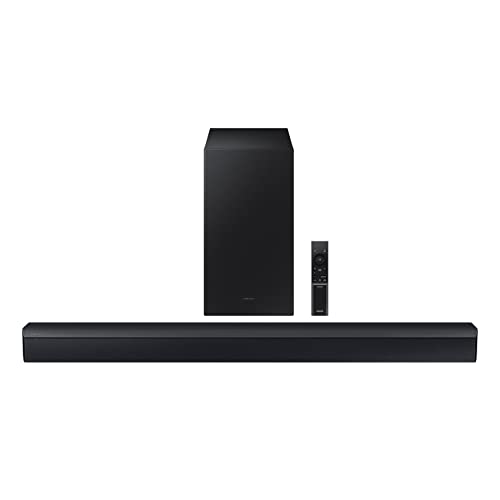
The Samsung HW-C450 combines DTS Virtual:X processing with an included subwoofer to expand perceived soundstage and bass response. Features such as Adaptive Sound Lite and a dedicated Bass Boost control aim to optimize dialogue clarity and low-frequency impact. Bluetooth streaming and wireless surround compatibility allow future expansion with compatible Samsung rear speakers.
Buying Guide: How To Choose A Virtual Surround Sound Bar
Choosing a virtual surround sound bar depends on room size, source material, connectivity, and the level of immersion you want. Below are key considerations and comparison perspectives to help match a model to your needs.
Sound Processing And Channels
- Virtual Surround Technologies: Names like DTS Virtual:X, Dolby Atmos virtualization, and vendor-specific systems (SurroundX) indicate how the bar simulates height and lateral effects.
- Channel Count vs. Processing: Higher “channel” counts (5.1, 7.1) in virtual systems suggest more discrete drivers or simulated zones; actual perceived separation depends on processing and speaker placement.
Speakers And Subwoofer
- Included Subwoofer: A dedicated subwoofer improves bass depth for movies and games. Wireless subs simplify placement.
- Rear/Surround Modules: Models with wired or wireless rear speakers (5.1/7.1 kits) can produce better lateral effects than virtualization alone but require more setup and cables.
Connectivity And Compatibility
- HDMI eARC/ARC: Preferred for highest-quality audio and lip-sync. Essential if you use a TV as the central hub.
- Optical/AUX/Bluetooth: Useful for legacy devices or phone streaming; optical limits advanced codecs, while Bluetooth convenience may come with compression.
- App Control & Calibration: Apps and auto room calibration can simplify tuning and updates.
Room Size And Placement
- Small Rooms: Compact 2.0 or 2.1 bars with virtualization often suffice and avoid overpowering the space.
- Medium To Large Rooms: Consider 5.1 or 7.1 virtual systems with separate subwoofers and rear speakers for fuller immersion.
- Speaker Placement: Rear speaker cable lengths and wireless pairing options affect placement flexibility.
Use Case Comparisons
- Movies And TV: Prioritize bars with strong dialogue clarity, subwoofer presence, and Dolby/DTS virtualization.
- Gaming: Low-latency connections, punchy subwoofers, and clear directional cues matter for in-game positional awareness.
- Music: Stereo imaging and frequency balance are more important than simulated height effects for listening sessions.
Expandability And Future-Proofing
- Wireless Surround Compatibility: If you expect to add rear speakers later, choose models that support expansion.
- Firmware/OTA Updates: Brands providing app control and updates can add features or improve performance over time.
Use these considerations to weigh the five options above: choose compact virtualizers for simplicity, 2.1 bars with strong subs for bass-focused setups, or multi-speaker kits for more convincing surround impressions in larger rooms.