
Best Volume Controls for Headphones: In-Line and Extension Options
Answering the common buyer question: which headphone volume control should I choose? This article highlights five practical options that fit most setups, from inline knobs on a cable to extension cords with built-in controls. Ideal for: casual listeners, gamers, travelers, and anyone needing on-the-fly volume without reaching for the device. The top picks balance ease of use, compatibility with 3.5mm jacks, and simple, lossless audio control.
| Product | Type | Best For | Why Selected |
|---|---|---|---|
| Koss 155954 VC20 | Inline volume control, 39-inch cord | Phone users and headphone listeners on the go | Compact in-line control with wide compatibility for 3.5mm plugs |
| Cubilux 3.5mm Stereo Volume Controller | Inline knob, aluminum housing | Close-range listening and precise tuning | Stepless control, high-quality signal, mute function |
| Volbox Inline Audio Volume Control | Inline attenuator | Desktop or portable use with precise tactile control | Passive design with clean signal and universal 3.5mm compatibility |
| Cubilux 3.5mm TRRS Volume Attenuator Cable | Inline cable with volume control | Headphones with extra mic or line-in | Stepless control, interference isolation, supports mono/stereo |
| PChero 2 Packs 3.5mm Extension Cables with Volume Control | Extension plus inline volume | Gaming and voice chat setups | Longer reach, mic support, inline volume, caution: volume boost not supported |
Koss 155954 VC20 Volume Control
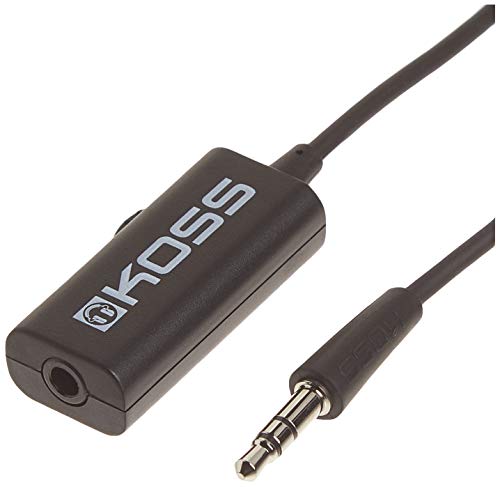
Product type: inline volume control on a 39-inch cord. Best for users who want quick access to adjust volume without touching the source device. It connects to any standard 3.5mm plug, making it suitable for most headphones and mobile devices. Best for travelers and commuters who value compact, on-cable control.
Who it’s best for: users seeking a simple, reliable inline control for headphones and smartphones. Why selected: compact design and broad compatibility support easy integration with existing gear. Limitation: length is fixed; may not suit setups requiring long reach.
Cubilux 3.5mm Stereo Volume Controller

Product type: inline, aluminum-encased volume knob. Best for precise, fine-tuned listening with full control over stereo or mono modes. It preserves audio quality with an emphasis on low distortion. Best for audiophiles who want clear, lossless signal through inline control.
Who it’s best for: listeners who prioritize granular volume adjustments and clean signal. Why selected: stepless knob allows smooth increments; mute function offers quick silence. Limitation: aluminum housing may add weight on portable setups.
Volbox Inline Audio Volume Control

Product type: passive inline attenuator with a tactile volume knob. Best for users who want accurate physical control over sound levels without relying on the source device. It delivers a clean, distortion-free signal and universal 3.5mm compatibility for headphones, headsets, and portable speakers.
Who it’s best for: desktop or travel use where a dedicated volume control is preferred. Why selected: zero distortion and no extra power requirements. Limitation: may not boost volume beyond current device output.
Cubilux 3.5mm TRRS Volume Attenuator Cable

Product type: inline cable with volume control for TRRS connections. Best for headphones with built-in mic or devices that support four-conductor jacks. It supports both stereo and mono listening with a steady, stepless control. Best for quiet environments or when you need to mute quickly.
Who it’s best for: users needing inline control with mic-enabled devices. Why selected: crystal-clear signal with gold-plated connectors; compatible with digital button volume control. Limitation: may require compatible TRRS devices for full mic passthrough.
PChero 2 Packs 3.5mm Extension Cables with Volume Control

Product type: extension cables with inline volume control and microphone support. Best for gaming and voice chat setups where you need more reach and mic compatibility. It supports 3.5mm stereo audio and four-pole connections for headsets.
Who it’s best for: multi-device users who require longer cable reach and mic-enabled extensions. Why selected: longer reach and mic support; caution: volume control may not boost beyond current device output, and it advises careful use for micro-communicative tasks.
Buying Guide: Key Considerations For Choosing Headphone Volume Controls
Inline vs. extension: Inline controls sit on the cable near the headphones, ideal for quick adjustments. Extension cables with volume control add length and mic support when needed. Consider your typical listening setup and where you want control access.
Compatibility: Ensure 3.5mm (1/8 inch) compatibility with your devices. Some TRRS cables support microphones; verify that your headset or adapter matches your needs.
Control type: Stepless knobs provide fine-grained adjustments; some models offer discrete steps or mute functions. Decide if you need mute, stereo vs. mono support, or both.
Audio quality: Passive attenuators preserve the original signal without extra power. Look for gold-plated connectors and high-quality conductors to minimize distortion.
Durability and form factor: Aluminum housings, braided cables, and robust connectors improve longevity for portable use. Weight and length should fit your use case.
Use cases: Travel, gaming, music listening, or professional monitoring each benefit from different features such as mic support, layout, and reach. Choose based on your primary activity.
Frequently Asked Questions
- Can inline volume controls boost headphone volume beyond what the device outputs?
- No. Inline and passive volume controls cannot increase signal beyond the device’s maximum output. They adjust what you hear, not the source level.
- Will a 3.5mm volume control work with all devices?
- Most do, as long as the device uses a standard 3.5mm jack or TRRS configuration. Check compatibility for mic support if needed.
- Do I need a TRRS control or just a TRS control?
- TRRS is needed if you require microphone support with the headset; TRS is for stereo audio only.
- Is a wired volume control better than software volume control?
- Wired controls offer immediate tactile feedback and do not require software changes, which can be advantageous in gaming or live-use scenarios.
- Can I use these with wireless headphones?
- Yes, as long as the wireless headphones have a 3.5mm jack or you use a wired adapter; ensure the inline control can physically connect to the device.