Best Webcam Speaker Microphone Combos for Clear Online Meetings
In today’s hybrid work and streaming landscape, all-in-one webcam solutions with built-in microphones and speakers can simplify setup and improve communication. The selections below highlight five top-performing USB webcams that pair high-quality video with integrated audio, noise reduction, and smart features for meetings, teaching, and collaboration. Each option is evaluated for clarity, ease of use, and compatibility with common video platforms.
| Product | Brand | Key Features |
|---|---|---|
| EMEET 3 in 1 Webcam | EMEET | 1080P video, 4 mics, 2 speakers, noise cancellation, auto low light |
| 3-in-1 4K Webcam | TONGVEO | 4K video, AI framing, voice tracking, remote control |
| CofunKool Full 1080P | CofunKool | 1080P, 4 mics, 3W speaker, privacy cover, mute |
| AIRHUG 3 in 1 1080P | AIRHUG | 1080P, built-in mic & speaker, 5W speaker, noise reduction |
| ROCWARE RC08 2K | ROCWARE | 2K, 3A mic, Harman speaker, privacy cover, auto-focus |
Note: All products below are tied to their official Amazon listings for easy access. Images and features are drawn from the product descriptions to help compare core capabilities across options.
EMEET 3 in 1 Webcam Pro

The EMEET 3 in 1 Webcam combines full HD 1080P video with built-in 4 omnidirectional microphones and 2 speakers. The setup supports conference calls, streaming, and gaming without external audio devices. It emphasizes a professional-looking image and integrated sound for small to medium rooms.
Key features include active noise reduction and echo cancellation, helping reduce background noise in open offices or cafes. The camera offers a wide yet adjustable field of view (60°-98°) and automatic low-light correction to maintain clarity in dim environments. A privacy cover is included to guard against unintended capture.
3-in-1 4K Webcam With AI Framing

The TongVEO 4K webcam delivers up to 3840×2160 resolution at 30fps with a built-in dual microphone array and 3W speakers. It supports AI auto-framing and voice tracking to center participants automatically, along with a remote for quick camera control. Field-of-view options and 5x digital zoom let you tailor the shot for meetings, teaching, or streaming.
Designed for professional conferences and live streaming, it emphasizes high image fidelity and clear audio in varied environments. The device commonly supports Teams, Zoom, and other major platforms via USB connectivity.
CofunKool Full 1080P Camera with Speaker
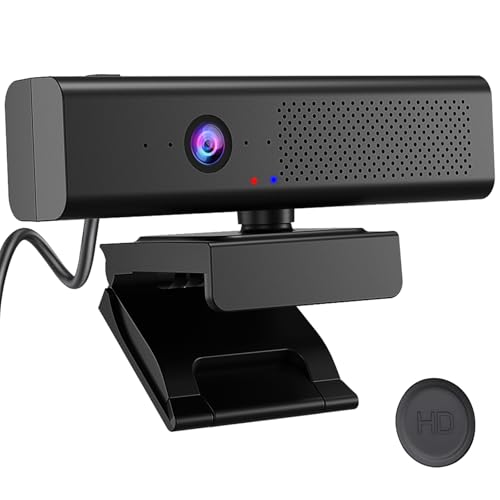
This 3-in-1 setup fuses a 1080P HD camera with a built-in microphone and a 3W stereo speaker. It features a magnetic privacy shield and a left-top mute button for quick privacy control. The quad-mic AI noise reduction reduces ambient noise to improve voice clarity during conferences and online classes.
Privacy controls and a compact, all-in-one design make it a practical choice for classrooms, webinars, or home offices. It’s well-suited for platforms like Zoom, Teams, and other web-based meeting services.
AIRHUG 3 in 1 1080P Conference Cam

The AIRHUG 3 in 1 webcam combines 1080P video with built-in microphone and 5W speaker. It targets small-to-medium group meetings, delivering clear sound and video for hybrid settings. The device emphasizes ease of use with an integrated audio system for effective communication in meetings and online classes.
With built-in noise reduction and automatic adjustments for lighting, it helps users maintain professional appearance and audibility during calls, especially in rooms with variable acoustics or lighting conditions.
ROCWARE RC08 2K Webcam With Speaker

The ROCWARE RC08 offers 2K video with a Harman-tuned built-in speaker and a 3A noise-canceling microphone array. It features ultra-quick 0.2-second auto-focus and a privacy cover for protection and privacy. It supports both landscape and portrait modes to suit different platforms and layouts.
Designed for professional video calls and streaming, it maintains strong audio pickup and clear output in typical office environments. The RC08 is compatible with common conferencing software, providing a balanced all-in-one solution for small teams and individual presenters.
Buying Guide
What to look for when choosing a webcam with built-in microphone and speaker
Video quality matters: prioritize resolutions of 1080P or higher and consider the frame rate (30fps is common; higher is better for fast-paced content). A wider field of view can help capture more participants, but a very wide angle may distort faces in close-up scenes.
Audio quality and noise handling: look for multiple microphones, noise reduction, and echo cancellation. Built-in speakers should offer sufficient volume for small rooms and clear mid-range voice reproduction without distortion.
Privacy features: a physical shutter or magnet-based privacy cover provides reassurance when the camera isn’t in use. A privacy feature is especially important for home offices and shared spaces.
Ease of setup and compatibility:USB connectivity with plug-and-play drivers is ideal. Confirm compatibility with your primary platforms (Zoom, Teams, Meet, etc.) and operating systems (Windows/macOS/ChromeOS).
Adjustability and software: autofocus, auto-framing, and exposure adjustments help maintain consistent visuals in changing lighting. Some models include remote controls or mobile app features for quick adjustments during calls.
Room acoustics and space: in small rooms, integrated speakers may suffice, but larger rooms might benefit from external audio or a dedicated microphone. The right model balances video quality with audible, intelligible sound.
Privacy and security: ensure the device supports hardware-based privacy features, secure drivers, and reliable firmware updates to protect against vulnerabilities.
Budget and use-case: for corporate meetings, remote teaching, or streaming, choose a model that offers your preferred balance of video detail, audio clarity, and ease of use. Consider whether you need AI features like auto framing or voice tracking for your typical workflow.
Mix and match: if you need the best possible video while keeping audio simple, you might pair a high-resolution webcam with a separate microphone and speaker. Conversely, an all-in-one device can minimize clutter and setup time for quick deployments.