Best Wireless Earbuds for Laptop and PC Users: Clear Calls and Great Sound on the Go
Looking for wireless earbuds that pair easily with a laptop or computer, offer low latency, and deliver solid call quality? This guide highlights five top options that are well-suited for laptop use, whether you’re teaching, attending meetings, or enjoying multimedia. Each pick emphasizes easy connectivity, good mic performance, and long battery life. If you’re a remote worker, student, or casual gamer, you’ll find a fitting choice below with practical reasons to buy and a clear note on potential limitations.
Buyer-friendly overview of top picks. The table below helps compare key strengths and who each product suits best. Use it to quickly decide which model aligns with your laptop setup and daily workflow.
| Product | Best For | ||
|---|---|---|---|
| TAGRY X08 | Athletes, daily commuters | 60H total playtime with wireless charging | IPX5 waterproof is fine for sweat; not a formal waterproof rating |
| FEDIKER SW4 Pro | PC/gaming on desktop | 20ms low latency with dongle | Bulky case may not fit in pocket |
| Soundcore P20i | Office use, long calls | 30H total playtime, app EQ | Requires app for full customization |
| Soundcore P30i | Travel and commuting | Advanced ANC and 2-in-1 stand | ANC may affect call clarity in some rooms |
| PocBuds | Heavy media users | 80H total playtime, digital display | Over-ear fit may be less secure for small ears |
TAGRY X08 Bluetooth Earbuds Review

Best for long listening sessions and workouts, the TAGRY X08 deliver 60 hours of total playback with a 470mAh charging case. The LED power display shows case and earbud levels, and the case supports wireless charging for convenience in desk setups. The earbuds offer IPX5 waterproofing, which helps during workouts or in light rain. One-step pairing makes setup quick after first connection, and touch controls support music, calls, and voice assistants. This model suits laptop users who value endurance and simple reuse between devices. A caveat is the IPX5 rating; it’s not a full water protection class for immersion.
Who it’s best for: remote workers or students who need long sessions on laptop plus portable charging while commuting. Why selected: standout battery life, wireless charging, and straightforward pairing.
Limitations to note: While IPX5 offers sweat resistance, avoid heavy water exposure. Touch controls are responsive but can be mis-touched during workouts.
FEDIKER SW4 Pro: Low Latency for PC Gaming
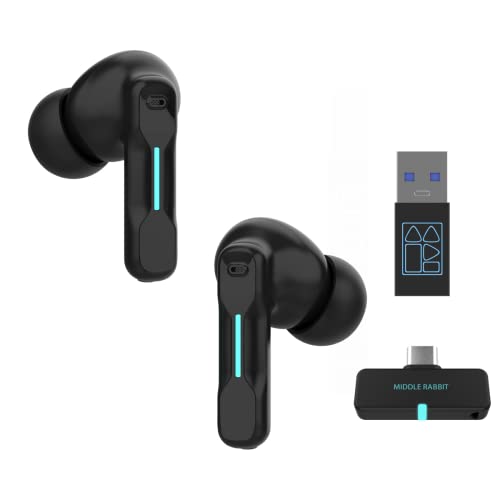
The FEDIKER SW4 Pro is designed for computer and gaming use with a plug-and-play USB dongle option and Bluetooth connectivity. It advertises ultra-low latency at 20ms for lag-free audio, which is appealing for PC gamers and video calls where timing matters. The 10mm drivers aim to deliver clear highs and strong bass, supporting immersive sound during work and play. Best for: laptop or desktop users who need stable wireless performance and minimal delay for voice conversations or gaming. Caution: reliance on a dongle can reduce convenience on non-PCS devices if you forget it.
Soundcore P20i True Wireless Earbuds

Soundcore P20i focuses on a personalized listening experience with 22 EQ presets via the app and Find My Earbuds for locating a missing bud. It offers up to 30 hours of total playtime (10 hours per charge, case extends to 20–30 hours with charging). This makes it suitable for all-day laptop use, video conferencing, and commuting. The app-based customization and long battery life are advantages for power users. A limit: full optimization requires using the mobile app, which may be an extra step for some users.
Soundcore P30i Noise Cancelling Earbuds

Soundcore P30i blends strong noise cancellation with smart features and a 2-in-1 charging case and stand. The ANC can reduce external noise by up to 42dB, which helps when focused in a busy environment or in an open-plan home office. Transparency mode lets ambient sound in when needed, helpful during library or office settings. The P30i is well-suited for travelers and remote workers who value quiet audio and hands-free device interaction. Potential drawback: some users might find ANC adjustments more subtle in very quiet rooms, where pass-through is less necessary.
PocBuds Bluetooth Earbuds for 80 Hours

PocBuds emphasize extraordinary playtime with up to 80 hours total when alternated between ear tips and charging case. The dual LED digital display shows real-time battery status, aiding planning for long laptop sessions or travel. Drivers deliver Hi-Fi sound with a focus on deep bass and clear vocals. The one-button control simplifies operation, and auto on/connect streamlines quick use with laptops and other devices. Best for: users who need extended listening time during long workdays. Limitation: some users may prefer a more compact case or tighter fit in smaller ears.
Buying Guide: Key Purchase Considerations
What to look for when choosing wireless earbuds for a laptop:
- Connectivity and latency: If you plan to game or attend frequent video calls, prioritize models with low-latency options or a dedicated dongle.
- Battery life: Look for at least 20–30 hours of combined listening time for daily workdays and travel.
- Microphone quality: For clear calls, consider earbuds with multiple mics and noise reduction features.
- App features and EQ: An accompanying app can customize sound and controls and provide Find My Earbuds.
- Water and sweat resistance: IP ratings help for workouts or spill-prone desks, but assess if you need full immersion protection.
- Case charging method: Wireless charging adds convenience in a laptop or desk setup; USB-C charging is common and practical.
- Fit and seal: Comfort and passive noise isolation matter for long meetings and study sessions.
- Device compatibility: Confirm the earbuds pair smoothly with your laptop’s OS and Bluetooth version.
Frequently Asked Questions
- Are wireless earbuds with laptop compatibility different from phone-focused models?
– Yes. Laptop workflows benefit from low latency, stable dongles, and clear microphones suitable for calls and meetings. - Do all earbuds support wireless charging?
– Many do, but verify the case supports wireless charging if that feature is important to you. - Can I use these earbuds with a desktop PC without Bluetooth?
– Some models include a USB dongle for plug-and-play Bluetooth replacement; others require Bluetooth on the PC. - Is ANC necessary for laptop use?
– Not essential for all, but ANC helps in noisy environments and improves focus during calls or concentration tasks. - Which feature most improves long-term comfort?
– A secure fit with multiple ear tip sizes and a light case reduces fatigue during long sessions. - Do I need an app to get the best sound?
– Apps offer EQ presets and Find My Earbuds; basic use works well without them, but app features enhance customization.