Best Wireless Microphones for Video Conferencing and Streaming
Looking for the best wireless microphone to improve your video conferences, live streams, or online interviews? This guide highlights five reliable options that pair well with phones, laptops, and cameras. Each pick is suitable for a specific use case, from solo presenters to collaborative sessions. Read on to compare who each mic is best for, along with practical strengths and limitations to help you decide fast.
| Product | Best For | Key Benefit |
|---|---|---|
| MAYBESTA Wireless Mini Microphone (2 Pack) | Content creators and educators | Wide compatibility and easy automatic connection |
| Hollyland Lark A1 | Premium mobile video and live streaming | High-quality 48kHz/24-bit audio and strong noise cancellation |
| CZOCPOS Wireless Lavalier Microphone (2 Pack) | Interviews and multi-person shoots | Plug-and-play with USB-C and iOS adapters |
| KUKIHO 2 Pack Wireless Lavalier | Dual-person recordings | Automatic pairing and long-range transmission |
| Pufeng Dual Wireless Lavalier | Video conferencing and teaching | Dual mics for two speakers and easy setup |
The following sections describe each product in more detail. Each entry explains who it’s best for and why it stands out for video conferencing, with a practical note on any limitation to consider before you buy.
MAYBESTA Wireless Mini Microphone (2 Pack)

Best for budget-conscious creators who need two mics for side-by-side discussion or dual interviews. This pair is designed for broad device compatibility, including Android, iPhone, iPad, and many laptops or tablets. It removes the need for adapters in most setups and emphasizes quick pairing and dependable operation. The extended receiver helps you work around phone cases during filming, which is convenient for on-the-go filming and classroom use.
Limitations: While convenient for many devices, the system relies on a straightforward wireless connection, which may be sensitive to interference in busy indoor spaces. If you rely on extremely high-fidelity studio-level audio, you might compare with higher-end systems.
Hollyland Lark A1 Wireless Microphone

Best for creators who want studio-like audio without Bluetooth dropouts. The Lark A1 delivers true 48kHz/24-bit recording with 120dB SPL handling and intelligent 3-level noise cancellation. It’s a plug-and-play option for iPhone and Android via USB-C or Lightning, making it ideal for mobile livestreams and Zoom calls on the go. Its wind protection helps in outdoor shoots as well.
Limitations: Requires USB-C or Lightning connection to your device. If you primarily need a wired setup or a non-mobile conference room, you may prefer a desktop microphone system with broader room pickup.
Dual Wireless Lavalier Microphone for iPhone and iPad
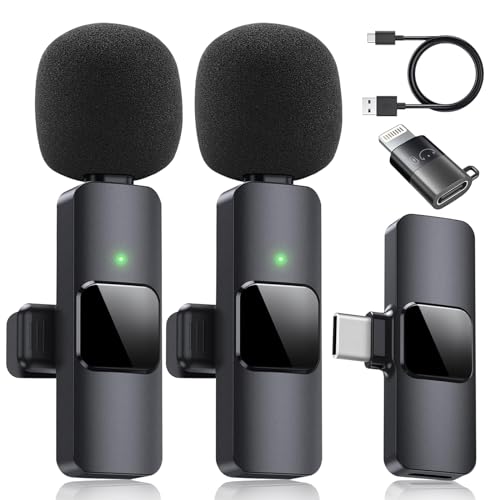
Best for two-speaker meetings, panel interviews, or teaching setups. This dual-lavalier system is designed for iPhone and iPad users, with a simple plug-and-play approach and a long battery life promise. It features a dual-mic design and a noise-reduction chip to keep speech clear in typical office or classroom environments.
Limitation: Some Android users may need OTG or adapter support, so verify your device ports before purchase. If you only need a single speaker solution, a 1-pack option might be more cost-effective.
KUKIHO 2 Pack Wireless Lavalier Microphone

Best for content creators who need a compact, portable solution with straightforward pairing. The KUKIHO system emphasizes wide compatibility and automatic pairing, making it suitable for quick interviews, vlogs, and online meetings. It provides stable transmission within typical indoor settings and is easy to pack for travel.
Limitations: Range can vary by environment; performance may dip in dense wireless spaces. If you record in large, open spaces, consider a higher-range option or add an expansion mic depending on your room size.
CZOCPOS Wireless Lavalier Microphone (2 Pack)

Best for multi-user recordings and professional interviews where plug-and-play simplicity is valued. This 2-pack offers auto-pairing, USB-C and iOS adapters, and a noise-reduction feature to minimize background sound. It supports a wide range of devices—from iPhones and iPads to Windows PCs and Mac computers—making it a flexible choice for mixed-device setups.
Caution: Android users should check OTG functionality on their device for optimal operation. If you primarily use one device type, you might focus on that ecosystem for easier workflow integration.
Buying Guide: Key Considerations For Choosing A Wireless Mic System
What device do you primarily use?
Choose a system that natively supports your main device ecosystem. USB-C and Lightning connections offer the easiest plug-and-play experience with minimal adapters.
How many speakers will you record with?
If you frequently record two people, consider a dual-lavalier setup. It ensures balanced audio for conversations or panel discussions and reduces the need to pass a single mic between speakers.
What environment will you record in?
Outdoor shoots benefit from wind protection and stronger noise suppression. If you’re in a bustling office or city street, look for good windshields and 3-level noise cancellation.
What is your acceptable latency?
Most consumer wireless mic systems offer near-zero latency for video conferencing. If latency is critical for your workflow, verify low-latency specs and test compatibility with your conferencing software.
Portability versus range
Compact mics are easy to carry and clip onto clothing, but some setups trade range for form factor. If you travel often or shoot in large rooms, prioritize higher-range devices or a system with robust antenna design.
Compatibility and ease of setup
Most listed options are plug-and-play, with automatic pairing to reduce setup time. If you require broad device compatibility across multiple brands, verify USB-C, iOS adapters, and any OTG requirements in advance.
FAQ
- Q: Do wireless lavalier mics work with Zoom and Teams? A: Yes, most listed systems connect via USB-C or lightning receivers and work with common conferencing apps when selected device input is used.
- Q: Is two-pack better than a single mic for meetings? A: For two presenters, a dual-lavalier setup ensures clear, balanced audio without passing a single mic.
- Q: Are there compatibility issues with phones with newer USB-C ports? A: Many mics offer USB-C or adapter options; confirm compatibility with your specific model before purchasing.
- Q: What about wind noise outdoors? A: Look for mics with windshields or wind noise suppression to maintain speech clarity in outdoor environments.
- Q: Can these mics replace a conference room microphone system? A: They’re ideal for personal or small group use, but large conference rooms may still benefit from a dedicated room microphone system.
In summary, your best choice depends on your device ecosystem, how many speakers you need to capture, and whether you record indoors or outdoors. The MAYBESTA, Hollyland Lark A1, CZOCPOS, KUKIHO, and Pufeng options provide a range of features to fit most common video conferencing and content-creation scenarios without complicating setup or workflow.