
Quick Summary: This guide compares five top wireless sound bars designed to improve TV audio, focusing on dialogue clarity, wireless connectivity, and room-filling sound. Use the table to scan core features and click product links for full details.
| Product | Key Features |
|---|---|
| Bose TV Speaker | Designed for dialogue clarity, 2 angled full-range drivers, Bluetooth, HDMI-ARC |
| Roku TV Wireless Soundbar | Made for Roku TV, enhanced stereo, voice boost, simple wireless setup |
| Polk Audio Signa S2 | VoiceAdjust tech, wireless subwoofer included, HDMI & optical |
| Amazon Fire TV Soundbar | DTS Virtual:X, Dolby Audio, HDMI eARC/ARC, Bluetooth |
| VIZIO 5.1 Soundbar SE | Wireless subwoofer, surround speakers, Dolby Atmos & DTS:X support |
Bose TV Speaker – Soundbar for TV with Bluetooth and HDMI-ARC Connectivity

The Bose TV Speaker targets users who want clearer dialogue and a compact solution. It uses two angled full-range drivers to create a more natural stereo image from a small cabinet. The design emphasizes vocal clarity, helping with pronunciation and speech in TV shows and movies. Connectivity includes Bluetooth and HDMI-ARC, plus a simple remote for control. The speaker is compact and intended as a straightforward upgrade for TVs that lack rich midrange and dialogue presence.
Roku TV Wireless Soundbar, Exclusively For Roku TV

The Roku TV Wireless Soundbar is designed to integrate seamlessly with Roku TV sets. It provides enhanced stereo sound, improved voice clarity, and boosted volume. Built-in settings simplify common issues like loud commercials and night listening. The wireless setup is intended to be straightforward for Roku users, and automatic sound profiles help keep dialog intelligible without complex tuning.
Polk Audio Signa S2 Sound Bar & Wireless Subwoofer
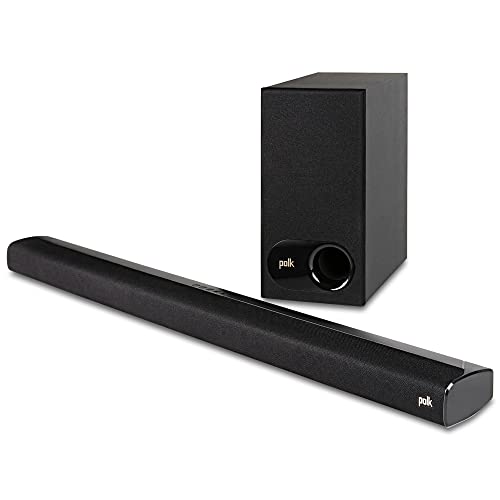
The Polk Audio Signa S2 pairs an ultra-slim soundbar with a wireless subwoofer. It features VoiceAdjust technology to raise spoken dialogue independently of background effects. The bar supports HD and 4K TV setups and offers HDMI ARC, optical, and AUX connections. Its low-profile design intends not to block TV sensors and suits users seeking a compact bar plus deeper bass from the included subwoofer.
Amazon Fire TV Soundbar (Newest Model) With DTS Virtual:X

The Amazon Fire TV Soundbar combines TV streaming and audio in a compact bar that supports DTS Virtual:X and Dolby Audio for a virtualized surround experience. It includes a simple HDMI eARC/ARC hookup and Bluetooth for mobile streaming. The design emphasizes fuller sound and clearer dialogue compared to built-in TV speakers while keeping setup straightforward for users of Fire TV devices.
VIZIO 5.1 Soundbar SE With Wireless Subwoofer

The VIZIO 5.1 Soundbar SE is a multi-piece system with a soundbar, wireless subwoofer, and surround speakers. It supports Dolby Atmos and DTS:X and places three full-range drivers in the bar for clearer stereo imaging. This kit aims to deliver higher SPL and immersive audio for medium to large rooms and includes mobile app support to adjust advanced settings. Note that the remote for the soundbar may be sold separately.
Buying Guide: How To Choose A Wireless Sound Bar For TV
Choosing the right sound bar depends on room size, content type, TV compatibility, and connectivity. Below are key factors to compare across models.
1. Dialogue Clarity And Voice Modes
- Why It Matters: Clear speech ensures you understand shows without cranking volume.
- Look For: Voice enhancement, dedicated dialogue modes, or VoiceAdjust-style features found in Polk and Bose models.
2. Connectivity And Setup
- HDMI-eARC/ARC: Best for lip-sync and high-quality audio passthrough.
- Bluetooth: Useful for music streaming; newer Bluetooth versions offer stability.
- Optical/AUX: Good fallback for older TVs.
3. Wireless Subwoofer And Surrounds
- Subwoofers add low-frequency impact. Systems like VIZIO’s 5.1 include dedicated surround channels for immersive sound.
- Consider room size: small rooms may not need a large subwoofer, while large rooms benefit from separate sub and surround speakers.
4. Soundbar Size And Placement
- Low-profile bars sit under TVs without blocking the IR sensor; ultra-slim models like the Polk Signa S2 are designed for this.
- Detachable or vertical options offer flexible placement against walls or on tables.
5. Sound Profile And EQ Modes
- Many models include presets (movie, music, news) to optimize tonal balance.
- Check whether manual EQ or app-based tuning is available for personalization.
6. Room Size And Power Output
- Higher wattage and additional drivers typically yield more headroom and dynamic impact. VIZIO’s multi-driver approach aims at larger rooms, while compact options serve small to medium rooms.
7. Compatibility With Smart TVs And Ecosystems
- Certain bars (Roku, Fire TV) have tighter integrations for setup and sound controls when paired with the same-brand TV ecosystem.
- Cross-platform compatibility remains important if you switch devices.
8. Ease Of Use And Remote Control
- Automatic leveling features help with loud commercials and night listening.
- Check whether the sound bar can be controlled via your TV remote or requires a dedicated remote or app.
9. Features To Prioritize By Use Case
- For Dialog-Centric Viewing: Prioritize voice enhancement and clear midrange drivers.
- For Movies/Gaming: Look for subwoofer support, surround capability, and low-latency HDMI connections.
- For Music: Seek wider stereo imaging, richer bass, and Bluetooth streaming quality.
10. Comparison Perspectives
- Value: Compare included subwoofers and app control (Polk and VIZIO offer strong packages).
- Integration: Roku and Fire TV soundbars simplify setup for their respective ecosystems.
- Compactness vs. Immersion: Bose and Polk target compact clarity; VIZIO aims for more immersive multi-channel sound.