Best Wireless Speaker for Laptop: A Comprehensive Guide to Pick the Right Computer Audio
Choosing the best wireless speaker for a laptop involves balancing sound quality, connectivity, and convenience. This guide highlights five reliable options that pair well with laptops, desktops, and portable setups. Each pick offers strong compatibility, easy setup, and features designed for desk or travel use. Explore concise product overviews, key specs, and a buying guide to help you decide which speaker fits your workspace and listening needs.
| Product | Brand | Primary Benefit |
|---|---|---|
| Anker Soundcore 2 | Anker | Long battery life, rugged and waterproof |
| Nylavee Computer Speakers | Nylavee | Stereo sound with dual connection options |
| EMEET M0 Plus | EMEET | Four AI mics for clear conference audio |
| XKX Computer Speakers | XKX | USB-powered with ambient monitor clipping |
| LIELONGREN USB Computer Speaker | LIELONGREN | USB-C powered, compact desktop audio |
Anker Soundcore 2 Portable Bluetooth Speaker
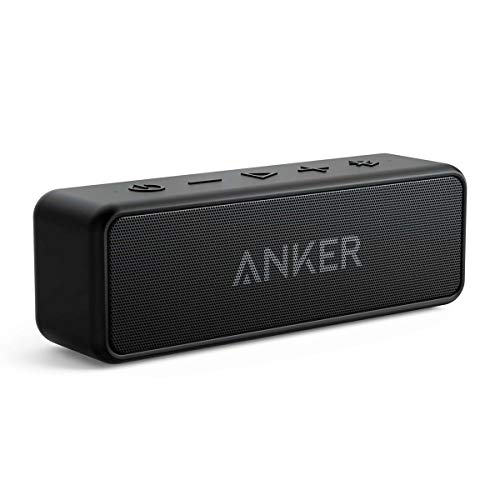
The Anker Soundcore 2 combines portability with long battery life and solid sound performance. It features IPX7 waterproof protection, making it suitable for desks near windows or casual use outdoors. The built-in 5200mAh battery supports up to 24 hours of playback, and the 12W driver system with enhanced bass delivers clear audio with minimal distortion at moderate to high volumes. This model supports wireless stereo pairing for larger rooms or outdoor gatherings and pairs quickly with most laptops via Bluetooth.
Nylavee Computer Speakers, HiFi Sound Bar
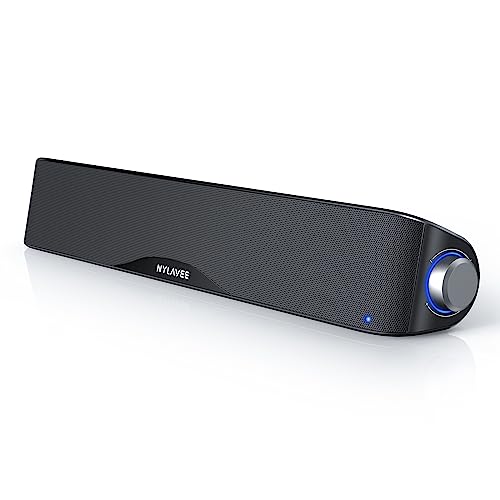
The Nylavee sound bar emphasizes stereo clarity with four speaker units and two bass diaphragms for robust highs and deep lows. It features both Bluetooth and AUX wired connectivity, increasing compatibility with laptops, desktops, consoles, and mobile devices. The dual magnet and mica fiber diaphragm construction supports strong overall performance with comfortable volume levels for work or entertainment at a desk.
EMEET Conference Speakerphone M0 Plus

The EMEET M0 Plus focuses on conferencing rather than multimedia playback. It features four AI microphones with 360° voice pickup and noise reduction for clearer remote calls. Full duplex audio supports natural conversations, and the device can be daisy-chained with other EMEET units to accommodate larger meetings. This makes it a strong choice for remote work, team calls, and virtual collaboration from a laptop setup.
XKX Computer Speakers for Desktop PC Monitor

The XKX USB-powered computer soundbar provides a compact, clip-on option for space-saving desks. It emphasizes loud, clear audio with dual drivers and a passive radiator setup to improve bass without a bulky footprint. The soundbar supports convenient USB power and audio input, reducing cable clutter, and is geared toward laptop and desktop users who want simple plug-and-play operation.
KEiiD Bluetooth Computer Speakers with Wireless Touch Control

The KEiiD KD-C02 system pairs wireless convenience with a control pod that resembles a mouse, allowing touch-based control from anywhere in the room. It delivers 12W of bass-equipped power and features four EQ modes to tailor sound for music, movies, or gaming. The design emphasizes aesthetics and a modern workspace while delivering a balanced and immersive audio experience from a desktop setup.
Buying Guide: Key Purchase Considerations
- Connection options: Prioritize Bluetooth and/or USB with easy pairing to laptops. AUX inputs remain useful for older devices or gaming consoles.
- Power and portability: If you move between rooms or travel, consider battery-powered devices with long playback times. For stationary desks, USB-powered models simplify wiring.
- Sound quality vs. space: Smaller desk speakers offer clarity and decent bass, but larger compact soundbars often provide fuller frequency response. Look for drivers, passive radiators, and EQ options.
- Water resistance and durability: Anker Soundcore 2’s IPX7 rating is beneficial for desks near outdoor spaces or casual environments where spills occur.
- Microphones and conferencing: For meetings, models with multiple mics and noise suppression (like EMEET M0 Plus) help reduce background noise and echo.
- Monitors and mounting: Clip-on or monitor-side speakers save desk space. Clip sizes and mounting options should match your monitor edge dimensions.
- Controls and usability: Touch controls, magnetic bases, and wireless remotes can improve day-to-day use, especially in busy workspaces.
- Price-to-performance: A mid-range option can often deliver most users’ needs without unnecessary extras; prioritize features that matter most to your use case.