
Bluetooth Speaker Battery Life: Why Real Playtime Varies
An “up to” number comes with conditions. Read the volume, audio, operating mode, and charging details, then plan your own listening day with a useful margin.
In this guide
- Treat the headline as a qualified claim
- Volume is a condition you can actually compare
- The playlist and selected features also belong in the notes
- Read the operating and charging ranges separately
- Check the charger, cable, and playback-while-charging behavior
- Track your own useful playtime without pretending it's a lab test
- Investigate a persistent decline using the right comparisons
- Plan the day with a margin and a defined fallback
Treat the headline as a qualified claim 1
A portable speaker's advertised battery life describes a result under particular conditions, not a guaranteed duration for every playlist and volume. Look for the footnotes and operating mode before planning a day around the largest number on the product page.
JBL's Charge 6 specification sheet, for example, distinguishes normal playtime from additional Playtime Boost and says the duration depends on volume and audio content. That makes the mode and conditions part of the claim rather than optional small print.
Write down how you'll actually use the speaker: usual level, setting, session length, and any extra functions. A quiet desk routine and a louder outdoor gathering can ask different things of the same battery-powered product.
Volume is a condition you can actually compare 2
Sony's SRS-XB100 charging guide lists different playtime examples at two stated volume levels using its specified music source. That gives a concrete example of why a runtime comparison needs its operating conditions attached.
Those volume-control values belong to that model and aren't a percentage scale you should copy to another speaker. Use your own device's ordinary listening routine and keep the setting consistent when comparing one session with another.
If you often turn the speaker up to reach a distant listening area, include that situation in the plan. A runtime that is adequate close to a chair may not describe the way you use it across a noisy patio.
Don't run an unnecessarily loud maximum-volume session to verify a marketing claim. You can track useful playtime at a comfortable level and determine whether the speaker serves your normal day without making the experiment unpleasant for you or others nearby.
The playlist and selected features also belong in the notes 1
Different music and operating modes can change the conditions behind a battery-life claim. Keep the playlist or type of audio reasonably similar when making an informal comparison, instead of comparing spoken audio at one level with a bass-heavy gathering at another.
If a product offers a battery-extending mode, read what it changes before adding its hours to your expectation. JBL describes Playtime Boost as a distinct function for the Charge 6, so its additional claim should be kept separate from the normal-playback figure.
Other features may have their own documented effects or requirements, such as lighting, phone charging, or linked-speaker modes. Use the exact model's instructions and avoid assuming every optional function has the same effect on every speaker.
Record the mode that actually stayed enabled through your session, not just the one you selected at the beginning. That helps you explain a result if the product changes state or the app reconnects to a different preset later.
Read the operating and charging ranges separately 3
Temperature limits are product-specific, and the supported range for charging deserves its own check. Sony's SRS-XB100 specifications list operating and charging conditions, illustrating why the device's manual is a better guide than a generic assumption about all rechargeable speakers.
Avoid leaving the speaker in an excessively hot car or another location outside its documented conditions. If a protection function changes playback or charging, follow the manufacturer's instructions rather than repeatedly forcing the device to continue in the same environment.
Water resistance also doesn't settle the charging question. Check the port and accessory requirements, keeping the charging area and contacts in the condition the manual requires before connecting power.
For outdoor plans, choose a usable location and charging arrangement before the session begins. A practical plan includes the environment and supported accessories as well as the nominal capacity printed beside the battery icon.
Check the charger, cable, and playback-while-charging behavior 2
Use the charger and cable specifications stated for the exact speaker, and identify whether the chosen connection supplies the required power. A cable fitting the USB-C socket doesn't establish the charger or port's capability.
If you listen while charging, read the manufacturer's description of that arrangement. Sony notes that its cited model can charge during playback but may take longer, and some loud-use conditions can still reduce the remaining battery despite a connected power source.
That isn't a universal behavior to assign to every speaker, but it shows why “plugged in” and “battery increasing” are different observations. Check the actual charging indication and the supported routine rather than assuming the cable eliminates every power limitation.
If charging is unexpectedly slow, compare the documented cable and power source before concluding the battery has failed. Keep the speaker within its required conditions, and contact support if a known-supported arrangement continues to behave incorrectly.
Track your own useful playtime without pretending it's a lab test
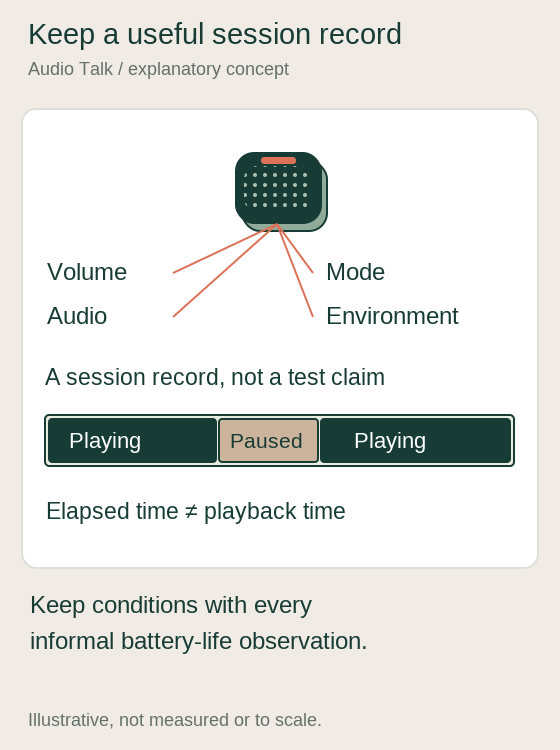
Start from the charge state specified in the manual and record the source, mode, approximate setting, environment, and session start. Use your normal comfortable playback rather than trying to reproduce a claim with conditions the manufacturer hasn't fully published.
Note when you paused, changed level, used an extra function, or stopped for the day. Your result can help plan a routine, but it should be described as an informal usage record rather than a standardized battery measurement.
A battery percentage or phone display can be useful as a reference without being perfectly precise. Sony explicitly qualifies the phone's remaining-power indication for its model, so don't treat every displayed point as a calibrated measure of energy consumption.
Repeat the ordinary routine when needed to understand an unexpectedly short session, keeping the meaningful conditions similar. One unusual afternoon is a reason to investigate, not proof that every product-page claim is false or that the battery must be replaced.
Separate elapsed time from actual playback time when you record a session. A speaker that sits paused for part of an afternoon has followed a different routine from continuous music, so note those breaks instead of counting every wall-clock hour as equivalent playback.
Investigate a persistent decline using the right comparisons
Compare a shortened session with your own previous routine before comparing it with a marketing maximum. Check whether the level, mode, environment, source, or charging arrangement changed enough to explain why the two days aren't equivalent.
Review the manufacturer's storage and maintenance instructions if the speaker has been unused for a long time. Follow the requirements for the exact model rather than applying a universal full-discharge or charging schedule from an unrelated device.
If supported use continues to produce a substantial unexplained decline, contact the manufacturer with the model and usage record. Include charging behavior and any warnings or unexpected shutdowns so support can evaluate a defined symptom.
Use a documented replacement or service procedure if the battery needs attention. Don't open a sealed device simply because another model advertises a user-replaceable battery; that is a product-specific feature with its own instructions.
Plan the day with a margin and a defined fallback
Choose a speaker whose documented routine comfortably covers your intended session, while allowing for the conditions that differ from its advertised test. An exact match between the headline hours and your planned time leaves little room for louder use or a changed mode.
Bring a compatible charging option only where the speaker's instructions and environment make that practical. For a wet or outdoor setting, a supported second speaker or a shorter listening plan may be more useful than leaving an unsuitable charging connection exposed.
Before a purchase, compare normal-playback claims separately from boost-mode claims and note which conditions the manufacturers disclose. If one product omits those details, keep the uncertainty in the comparison rather than ranking its larger number as guaranteed endurance.
The useful question is whether the speaker lasts through your actual listening day. Keeping the conditions attached lets you plan with confidence and decide when a change needs troubleshooting instead of treating every hour figure as a promise without context.
Sources & how this guide was prepared
Audio Talk Editorial checked these primary sources on October 14, 2026. This is a research-based guide with original practical examples; it does not report our own equipment tests.
- JBL Charge 6 specification sheet
- Sony SRS-XB100: charging and battery-life conditions
- Sony SRS-XB100 specifications
Manufacturer instructions for your exact model take priority. Read our editorial method · Photo and illustration credits