
Do You Need a DAC or Headphone Amp? Start With These Checks
Check the connection, usable volume, and noise first. A separate DAC or amp is most useful when it solves a specific problem your existing setup cannot.
In this guide
- Can your current setup do the everyday job?
- The DAC converts a digital signal to an analog one
- The headphone amp has a different job
- If the level is insufficient, check the existing controls first
- If noise is the problem, find which connection changes it
- If the connector is missing, buy the function you need
- Read specifications as answers to particular questions
- Borrow or try an accessory with a clear return plan
- Finish with a one-sentence reason for the device
Can your current setup do the everyday job?
If your headphones connect properly, reach a comfortable listening level, and play without a troublesome noise problem, you may not need another box. Begin with that practical question rather than assuming every wired headphone purchase also requires a separate DAC and amplifier.
Use the recordings and applications you actually listen to, at an ordinary level in a quiet setting. A system that works for music but doesn't support the microphone or connection you need for calls still has a practical limitation worth identifying.
Write down the specific problem if something isn't working: missing connector, insufficient usable level, hiss, or unreliable controls. That gives a possible accessory a defined job instead of a vague promise to make every sound more “audiophile.”
The DAC converts a digital signal to an analog one 1
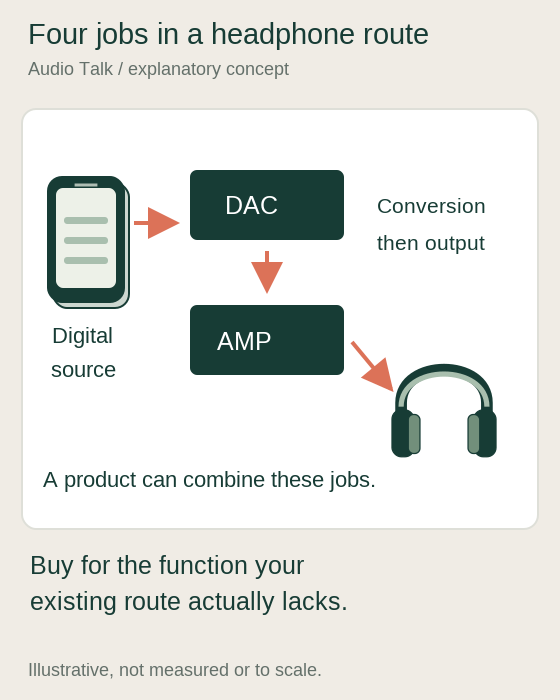
A DAC is a digital-to-analog converter, which provides an analog audio signal from digital information. Cambridge Audio's explanation of CD transports distinguishes a digital-only source from a player with its own conversion and analog output.
That function can already be inside a computer, phone adapter, USB headphone, or powered speaker system. A separate enclosure is one way to provide conversion, but its absence from the desk doesn't mean the system has somehow been playing digital data directly through an ordinary analog headphone driver.
If your headphones plug into an existing analog output, some conversion has already happened along that route. Identify where it takes place before adding a second device, particularly when your source and speakers already include the input functions you need.
The headphone amp has a different job 2 3
A headphone amplifier supplies the output used to drive a compatible headphone load. It can be part of the same product as a DAC, but amplification and digital conversion remain separate functions when you're planning a connection.
FiiO's KA11 documentation describes a combined USB DAC and headphone amplifier, illustrating how one accessory can provide both. iFi's hip-dac 3 documentation likewise separates its digital input, headphone outputs, and charging arrangement rather than treating every port as interchangeable.
Read the exact product's outputs before deciding it belongs in your route. A device with only a line output isn't automatically a complete headphone solution, and a standalone analog headphone amplifier doesn't necessarily accept a USB signal from a computer.
If the level is insufficient, check the existing controls first
Confirm that you're using the intended output and that the player, operating system, and any physical volume control aren't unexpectedly reduced. Do this at a modest playback level, increasing cautiously only as needed rather than using a maximum-volume test.
Check whether a negative EQ preamp or another processing setting is reducing the signal, and compare the saved baseline if appropriate. That can explain a change in usable level without establishing that your headphone suddenly requires a stronger amplifier.
If the problem remains, read the headphone's impedance and sensitivity specifications together with the source's documented headphone output. The numbers need their units and test conditions, so don't treat impedance alone as a universal calculator for how loud any combination will be.
Look for the manufacturer's intended headphone range or compatibility guidance rather than copying a recommendation for a different model. If the available specifications don't answer the question, send support the actual headphone and source model names before buying an accessory to solve it.
If noise is the problem, find which connection changes it
Listen for whether the noise follows one headphone, one source, or one connection arrangement. Compare a different existing compatible headphone or source if available, keeping the changes small enough that you can explain what altered the symptom.
Notice whether the noise changes with charging, another connected device, or the source's volume control. Those observations help separate a connection-related problem from a claim that every built-in DAC is inherently unsuitable for listening.
A new digital connection may change an analog noise path, but it isn't a guaranteed cure for every hum or hiss. Investigate the full route and follow the equipment's grounding instructions rather than using an accessory purchase as a substitute for troubleshooting.
If an external device still shares the same troublesome power or audio arrangement, the noise may remain. Choose a product only after you can describe the input, output, and connection change you expect it to provide.
If the connector is missing, buy the function you need
A phone without a compatible analog headphone socket may need an appropriate digital audio adapter for wired headphones. Confirm the phone's supported audio route and the adapter's exact compatibility, rather than assuming a matching USB-C shape settles the question.
Check whether you need microphone input, inline controls, charging during listening, or compatibility with more than one device. A simple playback adapter can be perfectly useful while still failing a call-related requirement you didn't include in the purchase plan.
For a computer, consider its available ports and whether a hub is part of the route. A compact DAC/amp that requires an adapter, separate power, and extra cables may be less convenient than it appears in a photograph of the device alone.
Plan the headphone connector too, including any documented adapter needed for its plug size or wiring. A physically fitting connector doesn't prove balanced and single-ended outputs can be interchanged safely, so follow the headphone and amplifier instructions for that connection.
Read specifications as answers to particular questions 4
Output power should include the headphone load and other stated conditions, not only an impressive milliwatt number. FiiO's official KA11 output graphic provides an example of a power figure tied to an impedance, which is more informative than comparing unrelated headline values.
Likewise, supported sample rates describe accepted digital formats rather than proving an audible improvement for your music. Your recordings, application settings, and entire playback route determine whether a high-resolution capability is even being used.
Avoid inferring better listening results from a chip name, a large number, or a product's price alone. Use those details where they answer a compatibility question, and keep untested sound-quality claims separate from the documented functions you can verify.
Check volume controls and the intended range for your headphones as carefully as the digital-input list. A powerful device can still be an inconvenient choice if it provides too little practical control over the low listening levels you prefer.
Borrow or try an accessory with a clear return plan
If you can borrow a compatible device, compare it using the same recordings and similar comfortable loudness. Include the ordinary applications and controls you need, because a short music demonstration doesn't exercise the complete daily routine.
Write down whether the original problem improved before describing any general sound preference. “The hum disappeared with this documented connection” is useful evidence about your setup, while “everything is better” gives you little to evaluate later.
Check the retailer's actual return policy before buying something for an unresolved compatibility question. Keep the packaging and avoid assuming that a personal preference or informal experiment establishes a defect in the equipment you already own.
If the accessory adds no useful function and you can't identify a reliable benefit at similar levels, keeping the simpler setup is a reasonable outcome. You don't need to manufacture a difference to justify the time spent comparing it.
Finish with a one-sentence reason for the device
Your reason might be a supported wired connection, a suitable headphone output, a specific input your current system lacks, or a connection change that addressed a verified problem. That is a much better shopping brief than “I heard everyone needs a DAC.”
Choose the device whose documented functions satisfy that brief, then check its power, cables, controls, and support terms. A combined DAC/amp may be convenient, but a separate amplifier or a simple adapter could fit a different existing route more naturally.
Keep a short sketch showing where conversion and amplification happen after the purchase. Understanding those jobs makes future troubleshooting easier and prevents another unnecessary box from appearing just because the next headphone has a different label.
If your current setup already does the job, enjoy it and revisit the question when something changes. An accessory is worthwhile when you can explain what it adds to your listening routine, not when it merely makes the desk look more complicated.
Sources & how this guide was prepared
Audio Talk Editorial checked these primary sources on October 14, 2026. This is a research-based guide with original practical examples; it does not report our own equipment tests.
- Cambridge Audio: what is a CD transport?
- FiiO: KA11 combined DAC and headphone amplifier
- iFi hip-dac 3: documented inputs and outputs
- FiiO KA11: output rating with stated load

Manufacturer instructions for your exact model take priority. Read our editorial method · Photo and illustration credits