Best Digital Signage Network Players for Modern Businesses and Institutions
Choosing a reliable digital signage network player is essential for smooth, unattended content delivery across screens. This guide highlights five versatile options, covering 4K capability, CMS compatibility, remote management, and cost-friendly solutions. Each entry includes a quick overview, key features, and practical considerations to help you match a device to your signage goals.
| Product | Brand | Core Strength |
|---|---|---|
| Amazon Signage Stick – Professional Digital Signage 4K Media Player | Amazon | Unattended kiosk mode with CMS integration |
| OptiSigns OptiStick Digital Signage Player | OptiSigns | Android-based 4K, remote management |
| EZ AD TV Digital Signage Player | EZ-AD | Cloud control and large content library |
| LIGHTNING ADS Digital Signage Player for Restaurants | LIGHTNING ADS | Plug-and-play with free upload and scheduling |
| NovaStar Taurus TB40 Multimedia Player | AzarPixel | High-end LED display and video wall support |
Introduction: This article focuses on five capable digital signage players that fit typical business environments, from retail to hospitality and corporate lobbies. Each product supports content scheduling, remote management, and compatible CMS options. We assess setup simplicity, video quality, connectivity, and scalability to help you compare real-world usefulness for your signage network.
Amazon Signage Stick: Flexible 4K Signage

The Amazon Signage Stick is designed for businesses of all sizes seeking unattended operation with an emphasis on kiosk-mode readiness. It auto-launches your CMS to keep screens displaying content without manual intervention, which is ideal for busy storefronts or events. Setup is described as straightforward, with the free Amazon Signage app enabling the management of one or multiple sticks. CMS compatibility is highlighted, though a CMS subscription may be required for full features.
Key considerations: If your signage strategy relies on hands-off presentation across multiple displays, this device delivers a streamlined workflow. The kiosk mode helps maintain a consistent user experience, and CMS compatibility ensures content remains synchronized with your chosen platform. Consider the level of CMS integration your setup requires and whether you need on-site or remote management stability for wall-mounted or remote displays.
OptiSigns OptiStick Digital Signage Player

OptiSigns OptiStick is an Android-based 4K UHD HDMI stick designed for flexible digital signage. It runs on a quad-core platform with WiFi and Ethernet options, and it emphasizes remote screen management through the OptiSigns portal or Admin app. The device ships pre-installed with OptiSigns Player, so deployment can be quick, and it includes a broad ecosystem of integrations with 160+ apps to enrich signage content capabilities.
Key considerations: This option shines when you want robust app support and centralized control from a cloud portal. If your network signage relies on diverse integrations or mobile management, OptiSigns provides strong coverage. Evaluate your network reliability and whether you need wired Ethernet in addition to WiFi for stable playback, particularly in high-traffic environments.
EZ AD TV Digital Signage Player

EZ-AD TV delivers 4K content with a strong content library and a free plan option. The platform emphasizes ease of content creation and management through a Template Builder, Video Studio, and YouTube Loader. The mobile app supports on-the-go content generation, while cloud control enables remote updates. The free plan supports standard image and video formats, with a cap on slides, and premium plans unlock additional capabilities and support.
Key considerations: For teams seeking powerful templates and a flexible pricing ladder, EZ-AD provides a compelling mix of features and accessibility. If you anticipate growing your content library or requiring frequent content updates from multiple team members, the combination of templates and mobile management is a strong fit. Check the long-term cost implications of premium plans relative to usage and content needs.
LIGHTNING ADS Digital Signage Player for Restaurants
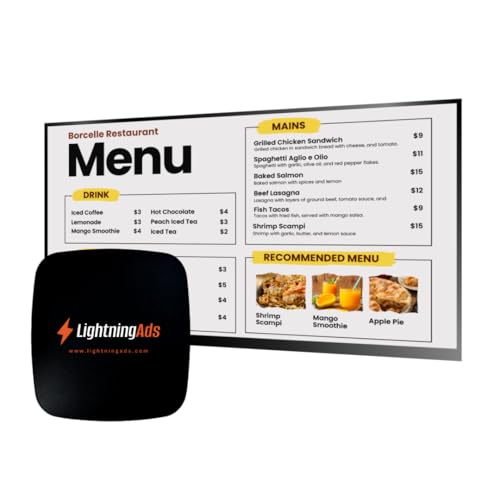
LIGHTNING ADS focuses on restaurant signage with no subscription required, offering free upload and menu scheduling. It’s a plug-and-play solution, where you connect the HDMI and power, join Wi-Fi, and you’re ready. The platform provides remote content management, allowing updates and promotions from anywhere. Optional upgrades unlock a Template Builder and an AI Enhancer to elevate content quality and engagement.
Key considerations: This option is particularly appealing for quick-service or hospitality outlets seeking cost control and easy operation. If your signage requires frequent menu changes or promotions, remote management and scheduling can significantly reduce manual workload. Consider whether you’ll benefit from premium tools like AI enhancements to improve content impact and consistency across locations.
NovaStar Taurus TB40 Multimedia Player

The NovaStar Taurus TB40 is a high-end multimedia player designed for LED display screens, video walls, and smart city signage. It supports up to 1,300,000 pixels and offers robust playback with hardware decoding for H.265/H.264 and 4K formats. It provides flexible connectivity with dual Ethernet, HDMI inputs/outputs, Wi-Fi, and optional 4G/5G modules, enabling both wired and wireless deployments. The TB40 is optimized for asynchronous and synchronous playback, with cloud-based content publishing and scheduling capabilities. Real-time sensor inputs help adjust brightness and temperature for energy efficiency.
Key considerations: If you operate large LED walls or multi-screen video walls, the TB40’s power and flexibility are compelling. Consider your environment’s network stability and whether you require cloud-based scheduling across many screens. The optional 4G/5G modules can be advantageous for outdoor installations or locations with limited fixed networking options.
Buying Guide: Key Purchase Considerations
- Content management and scheduling: Evaluate CMS compatibility and whether the device supports cloud-based publishing, remote scheduling, and multi-screen synchronization.
- Video quality and formats: Check 4K support, hardware decoding, and which formats are natively supported for reliable playback in your signage environment.
- Connectivity options: Consider Ethernet reliability for business environments, Wi-Fi stability, and whether optional cellular modules are needed for remote locations.
- Ease of setup and maintenance: Look for devices with straightforward setup, kiosk mode, and mobile apps for on-the-go management, especially for multiple displays or locations.
- Scalability and integrations: Assess how the player scales across many screens and whether it supports your preferred integrations or app ecosystems (160+ apps, YouTube, Template Builders, etc.).
- Support and updates: Prioritize devices with solid vendor support, regular firmware updates, and documentation to minimize downtime.
- Price and plan structure: Consider upfront hardware costs alongside potential CMS subscriptions or premium feature upgrades to forecast long-term expenses.
- Indoor vs outdoor suitability: If signage is exposed to heat, cold, or moisture, confirm enclosure ratings and environmental specs to ensure stable operation.
- Content security and privacy: For businesses handling sensitive information, review device security, remote management safeguards, and user authentication options.
In summary, selecting a digital signage network player involves balancing ease of use, content richness, and deployment scale. For quick-start setups with strong content ecosystems, options like the Amazon Signage Stick or OptiSigns OptiStick offer reliable cloud management and flexible CMS integration. For scale, high-end LED environments, or video walls, NovaStar Taurus TB40 delivers robust performance and advanced control. Hospitality and quick-service environments may benefit from Lightning Ads’ plug-and-play simplicity and menu scheduling. Businesses should map their content strategy, location types, and future expansion plans to choose a device that aligns with both current needs and long-term signage goals.