Best Cell Phone Detection System for Deaf Alerts and Caregiving
Answering the demand for reliable phone-based alerts, this guide highlights five practical cell phone detection and notification solutions. The best picks are chosen for caregivers, seniors, or anyone who needs instant, phone-linked alerts without complex setup. Each option is explained with who it’s best for, why it was selected, and any practical limitations to consider.
Product Snapshot
- Bellman & Symfon Mobile Phone Sensor — Best for integrated smart-home alerts and reliable visual/audible cues for deaf or hard-of-hearing users.
- WiFi Caregiver Pagers (SanJie) — Best for multi-room and remote alerting via smartphone app and wifi connection.
- SkyAngel Wave — Best for a one-time payment, lifelong alerts with fall detection and no subscription.
- External Phone Ringer (Truedio) — Best for simple, plug-in ringer with visual notifications, no apps needed.
- LVFEIER Security Pouch — Best for privacy and radiation shielding when using mobile devices in public or travel.
| Product | Use Case | Best For |
|---|---|---|
| Bellman & Symfon Mobile Phone Sensor | Smart-home notification integration | Deaf or hard-of-hearing users needing phone activity alerts |
| SanJie WiFi Caregiver Pagers | Remote alerts via smartphone app | Family caregivers checking in from anywhere |
| SkyAngel Wave | Standalone alert device | Users who want a single, unlimited-payment device without a cellphone dependency |
| Truedio External Phone Ringer | Visible and audible call alerts | Homes or offices needing simple notification without setup |
| LVFEIER Security Pouch | Privacy and radiation shielding | Users seeking EMF protection for personal devices |
Bellman & Symfon Mobile Phone Sensor

The Bellman & Symfon mobile phone sensor detects screen light activity from a phone or tablet and connects to a Visit smart home system. This makes it suitable for seniors and others who rely on visual or audible alerts when a phone is active. It integrates with existing Visit transmitters, alarm clocks, or flash receivers for a cohesive notification setup. The sensor’s design emphasizes stability and accessibility, including a low center of gravity to aid users with dexterity or vision challenges.
Who it’s best for: This is ideal for seniors or adults with hearing loss who already have a Visit smart home ecosystem and want dependable phone-based alerts. It suits households prioritizing integrated notification flows across devices.
Why chosen: It demonstrates strong compatibility with a broader smart-home system and focuses on reliable detection of phone activity, which is central to a phone-detection setup.
Caution: As with any smart-home integration, users should confirm compatibility with their existing devices and ensure consistent network connectivity for real-time alerts.
WiFi Smart Wireless Caregiver Pagers (SanJie)

This caregiver pager system connects to a cell phone and uses Wi-Fi to push alerts remotely. When the elderly person needs help, pressing the emergency button can trigger a receiver alarm and immediate smartphone notifications. The setup supports alerts across distances via the internet, making it feasible for caregivers in different rooms or cities to stay informed.
Who it’s best for: Families and professional caregivers who need remote, reliable alerts tied to a central app. It’s particularly useful when there are multiple care receivers in different locations.
Why chosen: Its core strength is remote alerting via smartphone apps and Wi-Fi, enabling quick responses without being physically near the user.
Limitation: Some features, like SMS or phone-call alerts, may involve optional services or fees, depending on the plan and setup.
SkyAngel Wave | One Payment For Life

The SkyAngel Wave provides a life-long mobile cellular alert with built-in fall detection and two-way voice communication. It operates without ongoing subscriptions and is waterproof, allowing use in the shower or bath. The device works anywhere there is cellular service, accepting alerts from any carrier.
Who it’s best for: Individuals who want a standalone alert device with fall detection and no recurring fees. It is particularly suitable for users who want a simple, all-in-one safety solution that doesn’t depend on a smartphone app.
Why chosen: Its one-time payment model and integrated voice calling capability offer a straightforward, maintenance-free option for dependable alerts.
Caution: While it supports cellular signals, coverage can vary by location; ensure the local carrier provides reliable service in the user’s primary living area.
LVFEIER Security Pouch
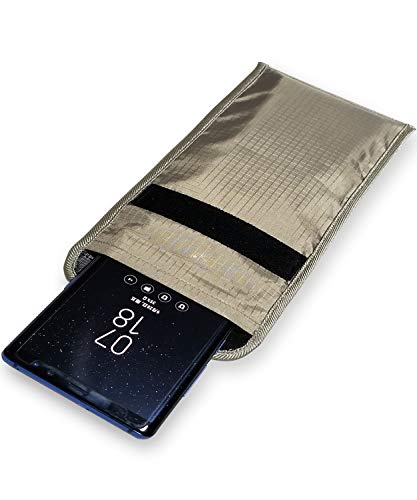
The LVFEIER Security Pouch claims to reduce exposure to cellular radiation by up to 99% and provides RFID blocking and signal shielding. It creates a Faraday Cage around the phone, limiting access to RFID, Bluetooth, GPS, Wi-Fi, and other signals. The pouch is designed to protect privacy and minimize exposure for users who wish to minimize contact with wireless emissions.
Who it’s best for: Individuals seeking privacy and EMF shielding for daily phone use or travel. It’s also suitable for pregnant users or caregivers focusing on reducing exposure for vulnerable users.
Why chosen: It addresses privacy and radiation concerns with a physical shielding solution, distinct from app-based alert systems.
Caution: This pouch blocks signals, so it should be used with care in situations where calls or notifications are needed. Ensure it’s used when intentional signal blocking is appropriate.
Buying Guide: Key Considerations For A Cell Phone Detection System
What problem are you solving?
Clarify whether you need phone-activity alerts integrated into a smart home, remote caregiver alerts, a standalone alert device, or privacy and EMF shielding. Align the device’s core capability with your primary need—instant phone-detection vs. continuous caregiver notifications vs. simple audible/visual alerts.
How will alerts be delivered?
Consider whether alerts should trigger a phone app, a dedicated receiver, a visual LED, or a loud audible alert. If you require mobile monitoring across distances, wifi or cellular connectivity is essential. If a standalone device is preferred, look for built-in alarms and no ongoing fees.
What is the user environment?
Analyze living spaces: a busy kitchen, a multi-room home, a caregiver in another city, or a shower-friendly environment. Waterproofing, large visual alerts, and easy-to-use buttons improve reliability in real-world settings.
Reliability and ease of setup
Choose solutions with straightforward installation, clear pairing steps, and broad compatibility with existing devices. A device that integrates with your current smart home or caregiver ecosystem often reduces setup complexity and improves reliability.
Privacy, safety, and data considerations
If privacy is a priority, consider shielding solutions or devices that minimize data sharing. For alert systems, verify whether data is stored or transmitted securely and whether any ongoing cloud services are optional.
Cost and ongoing fees
Assess up-front costs versus subscription or activation fees. Standalone devices with one-time payments can be cheaper in the long run, but some systems offer enhanced features through subscription plans.
FAQ
- What is a cell phone detection system used for?
- Do these devices require a monthly fee?
- Are stand-alone alert devices better than phone-connected solutions?
- Can these systems work with multiple caregivers?
- Is privacy a concern with phone-detection devices?
- What should I consider if I live in an area with weak cellular signal?
It detects or monitors phone activity or alerts and can integrate with smart-home systems or caregiver networks to notify users or caregivers of events.
Some options are one-time purchases, while others use apps or cloud services that may have optional or recurring fees. Check each product’s feature set.
Stand-alone devices are simpler and don’t rely on a phone or app, which can improve reliability in environments with unstable network coverage.
Many caregiver alert systems are designed to notify via smartphone apps, enabling alert delivery to multiple caregivers across distances.
Privacy depends on the device. Shielding or minimizing data transmission can be part of the design; review privacy policies and data-sharing options for each product.
Standalone devices with non-cellular alert options or devices that use Wi-Fi for alerts can mitigate weak cellular coverage.