Best USB C to TRS Audio Cables for Headphones and Amps
Answering the top buyer question: these USB C to TRS cables let you output audio from USB‑C devices to 3.5mm or 6.35mm (1/4″) audio inputs. They’re ideal for users with modern phones, tablets, or laptops who want to connect to car stereos, home speakers, audio interfaces, or mixing consoles. This guide highlights five reliable options, who they’re best for, and practical limitations. The brief buying table below helps compare core specs at a glance.
| Product | Best For | Key Benefit |
|---|---|---|
| JXMOX USB C to 3.5mm | Mobile users needing 3.5mm output | Hi‑fi DAC and durable nylon braid |
| KAYQINHO USB C to 1/4″ TRS | Home audio setups | High‑fidelity 1/4″ output |
| gudxfj 2 Pack USB C to 1/4″ | Multiple devices / on‑the‑go setups | Dual 1/4″ outputs with solid shielding |
| JSAUX USB C to 3.5mm Female | Compact adapters for travel | Smart DAC and wide compatibility |
| KAYQINHO USB C to Dual 1/4″ | Mixers and amplifiers | Dual 6.35mm outputs with DAC |
JXMOX USB C To 3.5mm Aux Cable
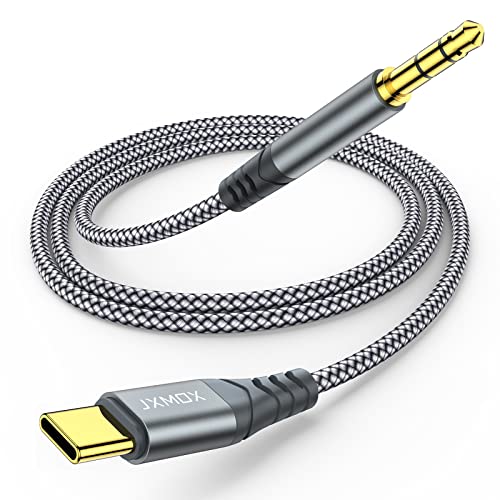
Best for: users who need a simple USB‑C to 3.5mm connection for car stereos, home speakers, or wired headphones. This cable ships with a multi‑function dongle and a built‑in DAC for clearer audio. It’s also designed to withstand thousands of bends for longer life. A note: higher impedance headphones may not reach maximum volume on some devices.
- Multi‑function Dongle: Connects USB‑C devices to any 3.5mm audio jack or Aux‑in port.
- Hi‑Fi Sound Quality: Advanced DAC chip reduces noise for higher fidelity.
- Relief Strain Design: Nylon braided, tested beyond 12,000 bending cycles.
KAYQINHO USB C To 1/4 Inch TRS Cable

Best for: users needing a USB‑C to 1/4″ connection for amplifiers, mixers, or speakers. It includes a built‑in DAC for 16bit/48kHz audio and gold‑plated contacts for stable signal. Choose this if you have a home audio system or a stage setup and require reliable 1/4″ audio output.
- USB C to 1/4 inch Audio Stereo Cable: Connects USB‑C devices to 6.35mm TRS inputs.
- Wide Compatibility: Works with many USB‑C devices and 6.35mm inputs.
- Hi‑Fi Transmission: DAC supports high fidelity with reduced noise and clear tone.
gudxfj 2 Pack USB C To 1/4 Inch Audio Cable

Best for: setups requiring two USB‑C to 1/4″ cables or multi‑device usage. This 2‑pack provides durability with dual shielding and 24K gold connectors for improved contact. It’s better for environments where multiple outputs are needed and space is limited.
- USB C to Dual 6.35mm TS Mono Cable: Dual outputs for 1/4″ inputs.
- DAC Chip For Hi‑Fi Sound: Supports up to 48kHz/16bit with wide soundstage.
- Widely Compatible: Works with USB‑C devices and most 1/4″ inputs.
JSAUX USB Type C To 3.5mm Female Headphone Adapter

Best for: travelers or mobile users who need a compact USB‑C to 3.5mm adapter. The device enables calls and playback controls via the source device’s controls but mic functionality may be limited for certain headphones. Use this if you primarily need playback on the go.
- Multi‑function Dongle: Connects USB‑C only devices to 3.5mm audio devices.
- Smart DAC Chip: Stable decoding up to 16Bit/48kHz.
- Wide Compatibility: Supports many iPhone 17/16/15 lines, Galaxy S series, iPad Pro, Pixel 9/8, and more.
KAYQINHO USB C To Dual 1/4 Inch Audio Cable
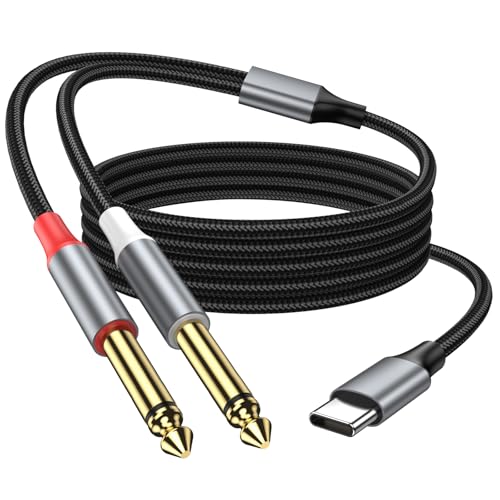
Best for: studio or live sound environments needing two independent 1/4″ outputs from a USB‑C device. This cable supports 48kHz/16bit Hi‑Fi audio and offers robust shielding. Caution: it is designed for audio output and not for recording or data transfer.
- USB C to Dual 6.35mm TS Mono Cable: Dual mono outputs for mixers or speakers.
- DAC Chip For Hi‑Fi Sound: Clear and natural audio with reduced noise.
- Widely Compatible: Works with many USB‑C devices and 1/4″ inputs.
Buying Guide: USB C To TRS Or 3.5mm Connectors
What should you consider when choosing a USB C to TRS/3.5mm adapter? Start with device type and intended use.
- Output Type: Decide between 3.5mm and 1/4″ (6.35mm). 3.5mm is common for headphones and car stereos; 1/4″ is standard on professional audio gear like mixers and amplifiers.
- Built‑in DAC: If you need higher fidelity, look for a model with a DAC chip and support for up to 16bit/48kHz (or higher if available). This helps reduce digital artifacts and improves clarity.
- Durability: Nylon braided jackets and strain relief extend cable life, especially if you travel or move cables often.
- Compatibility: Check device compatibility with your phone, tablet, laptop, or audio equipment. Some adapters only work with certain systems or require extemsions.
- Number of Outputs: If you need to drive two inputs simultaneously, consider a dual 1/4″ or dual 3.5mm adapter. These are common for mixers or stage setups.
- Usage cautions: Some adapters do not support microphone input or inline controls on all devices. If you rely on mic input, verify compatibility with your headset or microphone.
Practical Scenarios
- Car Audio: Use a USB‑C to 3.5mm adapter with a DAC for better car stereo playback from a modern smartphone.
- Home Studio: Choose a USB‑C to 1/4″ TRS cable for connecting a laptop or phone to a mixer or audio interface.
- Travel: A compact USB‑C to 3.5mm adapter is ideal for quick headphone connections on the go.
Frequently Asked Questions
- Can I use USB C to TRS adapters with iPhone or iPad?
– Yes, most USB C to TRS adapters are designed to work with USB‑C devices, including many iPad models and newer iPhone alternatives that support USB‑C accessories. - Do these adapters support microphone input?
– Some do not. Always check the product notes; many are designed for audio output only. - Is a DAC important for all USB C to 3.5mm cables?
– A DAC helps improve audio quality, especially on budget devices or when routed through high‑fidelity systems. If you need simple listening, a basic adapter may suffice. - Are dual 1/4″ USB C to TRS cables better for live sound?
– They’re convenient for sending stereo outputs to two inputs or for connecting to two separate devices. They are best when you need multiple outputs at once. - Will these adapters cause latency?
– Latency is typically negligible for music playback but can be noticeable in professional audio workflows. In most consumer scenarios, latency is not a concern. - Do these cables support high‑resolution audio?
– Many support up to 48kHz/16bit. Some claim higher, but it depends on DAC capabilities and device compatibility.