

Bluetooth Codecs Explained: What Matters for Everyday Listening
A codec is one part of the wireless route. Check what both devices support, what is actually active, and whether the connection stays useful in your normal environment.
In this guide
- The codec handles audio coding, not the whole listening experience
- Both ends need the relevant support
- Read codec names as compatibility information
- Check the active connection rather than only the options list
- Give reliable playback its own vote
- Treat delay as a complete-route question
- Keep LE Audio support distinct from a Bluetooth version number
- Read a lossless claim for the exact route
The codec handles audio coding, not the whole listening experience
A Bluetooth audio codec describes how audio is encoded for a supported wireless route and decoded at the other end. It is one part of a system that also includes the source, headphones or speaker, playback settings, radio environment, and the recording itself.
Start by separating those jobs when a specification sheet lists several codec names. A long list can tell you about compatibility, but it doesn't establish that every listed option is active with your phone or that the headphones automatically suit your preferences.
Your practical questions are simpler: can the two devices use the same option, does the selected route work reliably, and does it provide the functions you need for music or calls? Those checks are more useful than choosing a favorite acronym in isolation.
Both ends need the relevant support 1
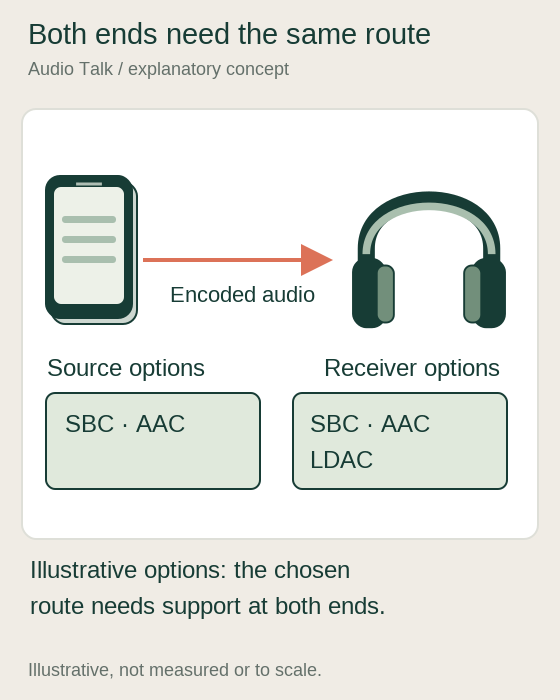
The source sends encoded audio and the receiving device needs a compatible way to decode it. Sony's MHC-V43D guide provides a concrete example: AAC or LDAC reception can be selected only when the connected Bluetooth device supports the corresponding option.
That means buying headphones with a particular codec doesn't add it to a source that lacks support. Check the phone, computer, television, or transmitter documentation as well as the receiving product, including any requirements for the operating system or connection mode.
If you use one pair across several sources, don't assume the same codec is active everywhere. A phone and a work laptop can provide different routes, so evaluate the combination you use most often instead of relying on the headphone's maximum advertised capability.
Read codec names as compatibility information
SBC, AAC, LDAC, aptX-family options, and LC3 can appear in product documentation, but they aren't interchangeable settings on every device. Use the manufacturer's current list for the exact model rather than assuming an app can enable any name you've read online.
An aptX-family label also needs its full version or feature name when you're checking a particular capability. A general family name doesn't prove support for another member's latency, adaptive, or lossless function, so match the exact claim at both ends of the route.
Likewise, a supported sample rate or a hi-res label isn't by itself evidence that the wireless path preserves the original PCM samples unchanged. Keep format capacity, coding method, and an actual lossless claim separate when reading a product comparison.
If the documentation only lists broad Bluetooth support, ask the manufacturer about the codec or feature you require. Avoid turning an undocumented capability into a buying assumption merely because another product from the same brand supports it.
Check the active connection rather than only the options list
A headphone app, system menu, or receiving device may show the active codec, depending on the product. Read that status where available and note the source and connection mode alongside it so you know which combination you're observing.
A setting labeled automatic can choose among supported options according to the device's procedure. Sony's cited guide, for example, distinguishes automatic AAC or LDAC reception from selecting SBC, showing why the currently selected mode matters as well as the specification list.
Don't assume that an available menu item proves the connected receiver accepted it. If you change a documented setting, reconnect as instructed and verify the result rather than assigning a capability from the name of a button alone.
If your product doesn't expose the active codec, use its compatibility documentation and describe that limit honestly. You can still judge whether the routine works without inventing a status reading that the equipment never provides.
Record whether the status changes when you start a call, switch sources, or reconnect the headphones. That small note helps you distinguish a listening-only observation from the different route your equipment may use later in the same day.
Give reliable playback its own vote 1
A codec option is useful only if the actual connection stays usable where you listen. Sony's guide advises trying SBC if playback through AAC or LDAC is interrupted, which illustrates a practical compatibility choice rather than a rule that one option must always win.
Compare using the same source, location, and recording, then note whether interruptions change. Don't alter several wireless and audio settings together, because you want to identify a repeatable improvement rather than attribute every difference to a codec name.
Also consider how the routine changes when you move away from the source or another device takes over a multipoint connection. These are product and environment questions that an advertised maximum bitrate alone doesn't answer.
If a connection is stable and enjoyable, there may be no reason to keep forcing another supported mode. The ordinary day of listening is a better target than maintaining a higher-looking status value while songs repeatedly cut out.
Treat delay as a complete-route question
For video, games, or monitoring, playback delay can matter independently of the tonal balance you prefer. The source application, processing, wireless route, and receiving device all contribute, so a codec description alone doesn't establish the delay of your entire setup.
Check whether your actual source and receiver support the same documented low-latency feature, and identify its limitations. A feature that works on a particular transmitter-headphone combination shouldn't be assumed to appear on a television or phone without corresponding support.
Try the actual activity before buying specifically for timing when a return or demonstration option is available. Lip-sync during a film and live monitoring while speaking are different use cases, so a result in one doesn't guarantee the other will suit you.
A documented wired route may be a practical alternative when wireless timing is unsuitable for your task. Check its audio and microphone functions separately, rather than assuming any charging cable will provide the connection you want.
Keep LE Audio support distinct from a Bluetooth version number 2
Bluetooth SIG describes LE Audio as operating on the Low Energy radio, separate from Classic Audio, and identifies LC3 among its central audio features. That is a system capability, not a promise established by the number printed beside “Bluetooth” on any product box.
Check LE Audio support on both the source and accessory if that's the route you want to use. Hardware, software, drivers, and the particular functions implemented by the products can matter, so the general Bluetooth LE label isn't enough on its own.
Call behavior also deserves its own check rather than assuming a music codec selection settles microphone quality. A two-way audio route can differ from listening-only playback, and compatible newer systems may behave differently from older traditional Bluetooth arrangements.
Use the current manufacturer's instructions for enabling or selecting the supported mode. If an option isn't present on your equipment, investigate its stated requirements instead of following a guide for a different phone or computer and assuming the setting is hidden.
Read a lossless claim for the exact route 3
Lossless describes preserving the audio information through the relevant coding path, so the claim needs a defined source, receiver, mode, and conditions. It shouldn't be inferred from a high-resolution logo or from a music app saying the file is lossless before wireless transmission.
Apple's current support page distinguishes ordinary Bluetooth listening from specific documented lossless arrangements, including particular Vision Pro combinations. That is a useful reminder that exceptions must be checked as complete product-specific routes rather than generalized to every wireless headphone.
If a manufacturer advertises a wireless lossless feature, read the compatibility and operating conditions before making it the reason for a purchase. Keep connection reliability, comfort, controls, and your normal surroundings in the decision as well.
Once those checks are clear, choose the supported mode that makes your actual routine work. You can enjoy a reliable wireless system without pretending that one codec label measures the quality of every recording or guarantees what you'll hear.
Sources & how this guide was prepared
Audio Talk Editorial checked these primary sources on October 14, 2026. This is a research-based guide with original practical examples; it does not report our own equipment tests.
- Sony MHC-V43D: select Bluetooth playback coding
- Bluetooth SIG: LE Audio overview
- Apple: documented lossless listening routes
Manufacturer instructions for your exact model take priority. Read our editorial method · Photo and illustration credits