
Compact Powered Speakers for a Small Desk: A Practical Comparison
Edifier M60 or Kanto ORA? Start with the space behind your monitor, the connections you actually use, and whether a subwoofer belongs in your plans.
In this guide
- The quick answer: choose around your desk
- The documented differences that matter
- Measure the working space, not just the cabinet
- Draw the cable path before choosing the inputs
- Think about where your hand and power strip go
- A subwoofer plan changes the shortlist
- Check computer support without filling in the blanks
- Which one fits your daily routine?
The quick answer: choose around your desk
The Edifier M60 makes sense when you want a compact pair with included angled stands and you can comfortably reach the top controls. The original Kanto ORA deserves a closer look when a front volume knob or a dedicated subwoofer connection would solve a real problem in your setup.
Neither gets an automatic sound-quality win here, because we haven't listened to or measured these speakers. This is a research comparison of two specific models, based on their official US product pages and English manuals checked on October 14, 2026.
Both were listed for sale through their US stores when we checked, although color availability and prices can change. We compare the original ORA throughout; the larger ORA4 has different specifications and shouldn't be substituted just because a listing looks similar.
Before you buy, move the objects that already live beside your monitor into their usual positions. A speaker that fits only after you remove your coffee cup, notebook, and charging dock may be a poor fit for the desk you actually use.
The documented differences that matter 1 2 3 4
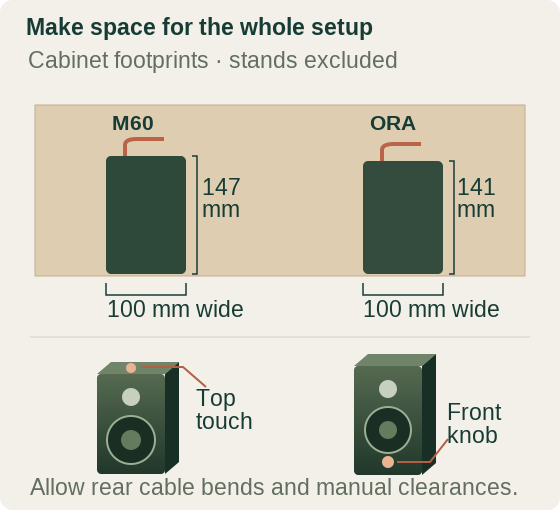
The table below uses cabinet dimensions, not shipping-box measurements or the footprint of added stands. Width, height, and depth are shown in that order for both models, with Edifier's millimeters also converted to approximate inches.
The published power figures are both total RMS ratings, so we haven't compared Edifier's RMS number with Kanto's larger peak number. Those ratings still don't establish which pair sounds cleaner, plays louder at your seat, or produces more useful bass.
| Documented feature | Edifier M60 | Kanto ORA, original model |
|---|---|---|
| Exterior W × H × D, per cabinet | 100 × 168 × 147 mm; about 3.94 × 6.61 × 5.79 inches | 100 × 175 × 141 mm; manufacturer's rounded inches: 3.9 × 6.9 × 5.6 |
| Audio inputs | 3.5mm AUX, USB-C audio, Bluetooth 5.3 | Stereo RCA line input, USB-C audio, Bluetooth 5.0 |
| Power connection | AC power cable to active speaker | External AC/DC power supply to active speaker |
| Main control location | Top touch panel | Front volume/input/power knob; rear Bluetooth pairing button |
| Dedicated subwoofer output | None documented | Single RCA; automatic 100Hz high/low-pass crossover |
| Published total RMS output | 66W | 50W |
| Angled desktop stands | Included | Additional accessory |
| Official US listed price at check | $199.99 | $349.99 |
Measure the working space, not just the cabinet 4
Cut two paper rectangles for each candidate's width and depth, and place them where you want the speakers. That simple mockup makes a crowded mouse area or a speaker hanging over the edge much easier to spot than a number on a shopping page.
Now add room for the rear plugs to bend without being crushed against the wall. A desk pushed tight into a corner can turn a small cabinet into a surprisingly awkward installation, especially when a monitor arm occupies the same patch of space.
Kanto's manual recommends positioning ORA at least 20 to 25 centimeters from the rear wall, roughly eight to ten inches. Include that recommendation in your layout trial instead of assuming its shallow cabinet can sit flush against the wall.
Check height with the screen at your normal working position, too. Keep the speaker faces clear of the monitor rather than buying a pair that disappears neatly behind it, and include any stand when checking whether the arrangement blocks the display.
Draw the cable path before choosing the inputs 1 3
Start by writing down the actual output on each source you want to use. A laptop with USB-C, a desktop headphone jack, and a turntable's line output are three different starting points, even if all of them eventually play through the same speakers.
M60 takes its analog signal through a 3.5mm AUX jack, while ORA uses a stereo RCA line input. An appropriate cable can connect a 3.5mm source to RCA, so the socket shape alone shouldn't decide the purchase.
Both include USB-C audio and Bluetooth as input options, but neither documents HDMI ARC or an optical audio input. If your desk also serves as a TV station, check the TV's outputs before assuming one of these pairs will connect directly.
For a computer that stays on the desk, try the documented wired connection first and save Bluetooth for occasional phone playback. That gives you a straightforward everyday routine without making a blanket claim about wireless latency or sound quality.
Also count the cable between the two speakers and the separate connection to wall power. Wireless audio doesn't turn either pair into cordless speakers, and a tidy desk still needs a route behind the monitor for those permanent connections.
Think about where your hand and power strip go 2 4
M60 connects to AC power with a power cable, while ORA uses the supplied external AC/DC power supply feeding the active speaker's DC input. USB-C carries audio here; neither manual presents USB bus power as the way to run the speakers.
That makes the location of your power strip part of the buying decision. Sketch where the ORA power supply would rest, or where the M60 power cable would drop behind the desk, before committing to a setup that leaves a cable across your feet.
The M60's touch controls sit on top of the active speaker, and ORA's multifunction volume knob sits on its front. Pretend to reach each position from your chair, particularly if a shelf, tall monitor, or desk lamp hangs above the proposed speaker location.
For frequent volume changes, the reachable control matters more than how tidy it looks in a product photograph. On a shared desk, explain the input-selection routine to the next person so a phone session doesn't leave the computer apparently silent.
A subwoofer plan changes the shortlist 4
ORA provides a single RCA subwoofer output and automatically engages a 100Hz crossover when a cable is inserted into that output. Its manual describes filtering for both the main speakers and the subwoofer signal; M60's documented connections don't include a dedicated subwoofer output.
If adding a powered subwoofer is a firm plan, ORA offers the more direct documented route between these two choices. If it's only a vague someday idea, first decide where that extra box, power connection, and signal cable would fit.
A compact desk doesn't necessarily come with a compact listening problem. Your seat may back onto a hallway, the desk may sit in a bedroom, or someone downstairs may hear bass more clearly than you expect, so consider the whole space before adding equipment.
We aren't treating a subwoofer connection as proof that ORA has better bass on its own. We're treating it as a practical expansion feature, which matters only if you'll use it and can accommodate the additional setup.
Check computer support without filling in the blanks 2 4
The M60 English manual explicitly lists Windows 11, 10, 8, and 7 for USB audio streaming, but doesn't name macOS. The ORA manual explains USB playback selection without specifying Windows or macOS versions, so exact operating-system support remains unverified where the manuals are silent.
For a Mac setup or a particular Windows release, ask the manufacturer about your exact computer and connection before ordering if USB compatibility is essential. Don't turn a general picture of a laptop, or a USB-C connector, into a promise about every host.
When the speakers arrive, confirm that your computer actually selects them as the playback device. Then try a familiar track at a modest level before rearranging every cable and accessory, keeping the first setup simple enough that a connection problem is easy to trace.
Which one fits your daily routine? 1 3
Lean toward M60 if the included stands help your layout, the top controls remain accessible, and you want to keep the system to two speakers.
Lean toward ORA if the front knob is easier to reach or a powered subwoofer is already part of the plan. Make that choice after accounting for wall spacing and the external power supply, because the smaller-looking footprint doesn't describe the whole installation.
Choose neither if you need documented optical or HDMI connectivity, a desk with almost no room for rear cables, or speakers that run solely from USB power. Changing the shortlist is more useful than forcing a complicated adapter chain around a pair that doesn't suit the job.
Finally, check the seller's current return terms and compare the complete purchase cost, including any stands or cables you need. Keep the packaging during the initial setup, and judge the arrangement from your usual chair with your usual work on the desk.
Sources & how this guide was prepared
Audio Talk Editorial checked these primary sources on October 14, 2026. This is a research-based guide with original practical examples; it does not report our own equipment tests.
- Edifier M60 — official US product page
- Edifier M60 — official English online manual
- Kanto ORA — official US product page
- Kanto ORA / ORA4 — official English manual, August 1, 2024
Manufacturer instructions for your exact model take priority. Read our editorial method · Photo and illustration credits