
The best 16-channel mixer with effects depends on whether you prioritize hands-on controls, USB recording, built-in sound shaping, or flexible input options. The Mackie ProFX16v3 is suited to bands and venues that want USB multitrack recording, while the Yamaha MG16XU offers SPX digital effects and six buses. For many built-in effects and playback features, consider the MIZISNR, W IN-MIX, or FULODE models. Compare the listed features below and confirm that each mixer’s inputs, recording workflow, and effects meet your setup needs.
| Mixer | Best For | Notable Listed Features |
|---|---|---|
| Mackie ProFX16v3 | Bands that need USB recording | GigFX effects, Onyx preamps, multitrack recording |
| Yamaha MG16XU | Live sound with bus routing | SPX effects, six buses, USB |
| MIZISNR 16 Channel Mixer | Users who want built-in effects and EQ | 99 DSP effects, 7-band master EQ, Bluetooth |
| W IN-MIX DX16 | Podcasting and multi-source setups | 99 DSP effects, USB recording, individual phantom power |
| FULODE 16-Channel Mixer | Live playback and karaoke setups | 99 DSP effects, Bluetooth, USB playback |
Mackie ProFX16v3
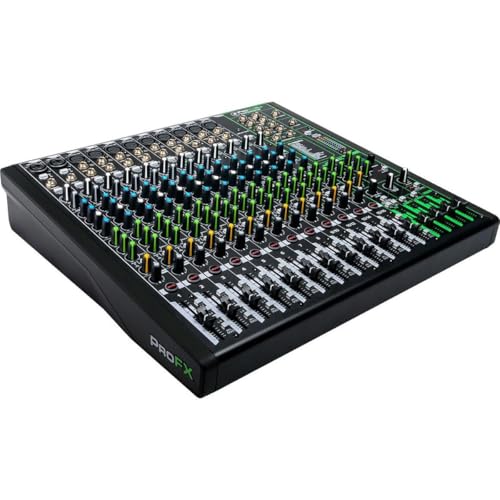
The Mackie ProFX16v3 is a 16-channel analog mixer with USB recording and GigFX effects. Its listed features include Onyx preamps that provide up to 60 dB of gain on every mic channel. The product is described as suitable for bands and venues that need 16 channels without a digital learning curve.
Best for: Bands and small venues that want a hands-on mixer and a way to record performances over USB. It is also a strong option for buyers who value the stated preamp gain and simultaneous room mixing and multitrack recording.
Consideration: The supplied product details do not specify how many GigFX presets are included or provide a full channel-by-channel input breakdown. Check the manufacturer’s specifications if those details affect your setup.
Yamaha MG16XU

The Yamaha MG16XU is a 16-input, six-bus mixer with USB and SPX digital effects. Its listed D-PRE preamps use a discrete class-A design with an inverted Darlington circuit. Three-band EQ and high-pass filters give users controls for shaping channel tone and reducing unwanted low-frequency noise.
Best for: Live sound users who need a 16-input mixer with six buses and built-in digital effects. The EQ and high-pass filters may also suit setups where controlling channel tone and unwanted noise is important.
Consideration: The product information identifies SPX effects but does not state the number or names of effect programs. If you need a specific effect, verify its availability before choosing this mixer.
MIZISNR 16 Channel Mixer

The MIZISNR mixer combines 16 channels with 99 built-in DSP effects, USB, Bluetooth, and MP3 playback. Each channel has independent gain, EQ, AUX, pan, and mute controls, while the main output adds a seven-band EQ. The listed features also include XLR and stereo line inputs and independent 48V power.
Best for: DJs, karaoke hosts, and live performers who want many preset effects and playback options in one console. The combination of channel-level controls and a master graphic EQ gives users separate ways to adjust individual inputs and the overall mix.
Consideration: The product details describe 99 presets but do not identify each effect or explain the USB recording workflow. Confirm that the available effects and USB functions match your intended use.
W IN-MIX DX16 Mixer

The W IN-MIX DX16 offers 16 channels, individual three-band EQ and gain, 99 DSP effects, Bluetooth, and USB recording. Its listed features include 48V phantom power on every channel, a seven-band master EQ, and illuminated mute buttons. The product description names effects such as reverb, delay, and chorus.
Best for: Podcasters, vocalists, and live operators who want built-in effects alongside computer recording and Bluetooth playback. Individual phantom-power switches may be useful when a multi-microphone setup requires condenser microphones on selected channels.
Consideration: The stated features do not provide detailed USB recording specifications or describe the number of stereo inputs. Check those points if your recording setup or source count is exacting.
FULODE 16-Channel Mixer

The FULODE mixer includes 16 channels, Bluetooth streaming, USB-drive playback, a digital display player, and 99 DSP effects. Each channel is listed with gain, three-band EQ, and an individual mute button. The master section has a seven-band graphic EQ, and the hybrid input jack supports several signal sources, including condenser microphones when 48V phantom power is engaged.
Best for: Karaoke, rehearsals, and live setups that need onboard music playback and quick access to preset effects. Its stated playback options can reduce the need for a separate device when playing music from Bluetooth or a USB drive.
Consideration: The supplied details describe USB playback, not USB recording to a computer. Choose another option if computer recording is a required feature unless the manufacturer confirms that capability.
Buying Guide: How to Choose a 16-Channel Mixer With Effects
A 16-channel mixer can accommodate multiple microphones, instruments, and playback sources, but the channel count alone does not tell you how many of each connection type are available. Compare the input layout, effects controls, outputs, and recording features with your actual equipment. A mixer with numerous effects may not be the best fit if you need a particular routing or recording workflow.
What effects do you need?
Built-in effects can add reverb, delay, or other processing without requiring separate effects hardware. The MIZISNR, W IN-MIX, and FULODE models list 99 DSP effects, while the Mackie lists GigFX effects and the Yamaha lists SPX digital effects. A preset count does not reveal which effects are included or how they can be adjusted, so check the available effect list if you have a specific sound in mind.
Also determine whether effects can be applied to individual channels, shared through an effects bus, or used only in another way. The supplied details do not fully describe routing for every model. Confirm the routing options in the product specifications when independent effects for multiple performers are important.
How many microphone and instrument inputs are required?
Count the sources you expect to connect at the same time, including vocal microphones, instruments, wireless receivers, and playback devices. Then compare that number with the mixer’s actual microphone and line inputs. “16-channel” does not necessarily mean 16 identical mic inputs. For example, the listed information for the TKLBLS model describes 16 microphone inputs plus two stereo line inputs, while other models provide different or less detailed input descriptions.
Check connector types and whether your instruments need a direct input, a DI box, or a line connection. Do not assume that every channel accepts every source simply because the mixer has a high channel count.
Do you need phantom power?
Condenser microphones commonly require phantom power. If your setup uses them, verify that the mixer provides the required power and understand how it is switched. The W IN-MIX listing specifies independent 48V switches on every channel, while the MIZISNR and FULODE descriptions also list 48V power. Confirm the manufacturer’s guidance for connecting microphones and other equipment before engaging phantom power.
Will you record to a computer or play audio back?
USB can mean different things on different mixers. Some models list USB recording, while others specify USB-drive playback or a general USB connection. The Mackie ProFX16v3 is described as supporting multitrack recording while mixing, and the W IN-MIX lists USB recording. The FULODE product details emphasize USB-drive playback rather than computer recording. Verify the recording channels, operating requirements, and connection method before buying.
Bluetooth is useful for wireless playback from a compatible device, but it is not a substitute for a clearly specified recording connection. If you need to record separate tracks, look for explicit multitrack or channel-recording details rather than relying on the word “USB.”
Which EQ and routing controls matter?
Channel EQ shapes individual sources, while a master EQ adjusts the overall mix. The MIZISNR and W IN-MIX list three-band channel EQ and seven-band master EQ. The Yamaha lists three-band EQ and high-pass filters. These controls can help balance vocals and instruments or manage low-frequency noise, but the right choice depends on how much adjustment you need during a performance.
Bus count matters when you need separate mixes for monitors, recording, or other destinations. The Yamaha MG16XU is specified as a six-bus mixer. For other models, the supplied details may not fully describe buses or outputs, so check those specifications if you need independent monitor mixes or complex routing.
Is an analog control layout or recording workflow more important?
A mixer with physical channel controls can be straightforward to operate during a live set, especially when several sources need quick level or mute adjustments. The Mackie is described as an analog mixer without a digital learning curve. Built-in digital effects and playback functions can reduce the amount of external gear, but they do not automatically guarantee a simpler workflow.
Before choosing, list the tasks you need to perform at once: mix the room, send a monitor mix, apply effects, stream backing tracks, and record. Select a mixer whose listed controls and connections explicitly support those jobs.
Frequently Asked Questions
What does a 16-channel mixer do?
A 16-channel mixer combines audio from as many as 16 channel sources, depending on the mixer’s input layout. It lets users adjust levels and, depending on the model, change EQ, apply effects, route audio, or send a mix to recording equipment.
Are 99 built-in effects better than a smaller effects collection?
Not necessarily. A larger preset count gives more listed options, but the usefulness depends on which effects are included and how easily they can be selected or adjusted. Check the effect names and controls rather than comparing preset counts alone.
Can a mixer with USB effects record separate tracks?
Not always. USB recording may capture a stereo mix or multiple channels, depending on the mixer. Confirm that the product explicitly supports the number of recording channels you need. The Mackie ProFX16v3 listing describes multitrack recording, while other product details may not specify a multitrack workflow.
Do I need phantom power for every microphone?
No. Phantom power is generally needed for condenser microphones that require it, not for every microphone. Check the microphone’s instructions and the mixer’s guidance before switching phantom power on.
Is Bluetooth enough for live music playback?
Bluetooth can provide convenient wireless playback, but it may not suit every performance workflow. If stable, wired playback or recording is essential, confirm that the mixer has the appropriate physical inputs or USB functions for your needs.
What should I verify before buying a 16-channel mixer?
Confirm the number and type of mic and line inputs, phantom-power controls, effects and routing, bus and output options, and whether USB supports recording or only playback. Match those specifications to the devices and recording tasks you plan to use.