
A 192kHz USB audio interface can capture audio at a high sample rate, but the right choice also depends on inputs, monitoring, and your recording setup. The Focusrite Scarlett Solo is best for a solo musician or podcaster seeking a recognized 24-bit/192kHz option; Tisino and Jolgoo are better suited to buyers who want two combo inputs. Pyle and FIFINE are adjacent alternatives, but their supplied product details do not confirm 192kHz recording.
| Product | Best suited for | 192kHz specified? |
|---|---|---|
| Focusrite Scarlett Solo 3rd Gen | Solo recording | Yes |
| Tisino 24Bit/192kHz Interface | Two-mic or instrument setups | Yes |
| Jolgoo 2×2 USB Interface | Portable two-input recording | Yes |
| Pyle PMUX9 | Users interested in multiple input types and effects | Not stated in supplied details |
| FIFINE AmpliGame SC3 | Gaming and streaming control | Not stated in supplied details |
Focusrite Scarlett Solo 3rd Gen

Best for: A solo musician, singer, or podcaster who wants a compact recording interface with a documented 24-bit/192kHz recording capability. The supplied features identify high-performance mic preamps, an Air mode, and two high-headroom instrument inputs for guitar or bass.
Gain Halos provide a visual indication intended to help users capture a vocal or instrument take without unwanted clipping or distortion. Its converters support recording and mixing at up to 24-bit/192kHz, making this the clearest fit for shoppers specifically seeking that stated resolution. Air mode is described as adding clarity to acoustic instruments.
- Choose this if you mainly record yourself and want a specified high-resolution recording format.
- Why it was selected: Its features explicitly state recording and mixing up to 24-bit/192kHz, alongside useful recording-focused controls.
Limitation: The product name and supplied description identify it as the Solo model, so buyers who need several simultaneous microphone preamps should compare input counts and connection needs before choosing.
Tisino 24Bit/192kHz USB Interface

Best for: Beginning podcasters and musicians who want two combo inputs, instrument support, and direct monitoring in one interface. The listed features specify 24-bit/192kHz audio, two XLR/TRS combo inputs, and a 60dB gain preamp.
Its inputs support microphones and high-impedance instruments using a HI-Z switch. The interface also includes 48V phantom power for compatible condenser microphones, balanced TRS main outputs, and a separate headphone volume control. Zero-latency monitoring is listed as a feature, which can help performers hear a live input without relying entirely on playback through recording software.
- Choose this if you need two inputs for a microphone and instrument, or want the option of connecting two sources.
- Why it was selected: The supplied information confirms 192kHz capability and describes a useful combination of mic, instrument, output, and monitoring features.
Limitation: The feature list describes the product as suitable for PC and Mac but does not provide detailed operating-system versions or software requirements. Check current setup details before purchase.
Jolgoo 2×2 USB Audio Interface

Best for: A portable recording setup that needs two inputs, independent gain controls, and direct monitoring. Jolgoo’s listed features specify 24-bit/192kHz conversion, USB power, dual XLR/line combo inputs, and +48V phantom power.
Each input has independent gain control and an LED peak indicator, which can help users monitor input levels while recording. The direct-monitor switch is described as providing real-time listening without distracting delay. The manufacturer’s feature list says the interface is USB-powered and does not require a wall outlet or complex driver setup; verify the connection and software requirements for your own computer before relying on that description.
- Choose this if you want a two-input interface for vocals, acoustic guitar, or podcast recording, with portable USB-powered operation.
- Why it was selected: It explicitly states 24-bit/192kHz audio and includes input-level and monitoring controls suited to home recording.
Limitation: The supplied details do not identify supported operating systems or list specific output connections. Confirm those requirements if you need to connect particular speakers or recording equipment.
Pyle PMUX9 USB Audio Interface
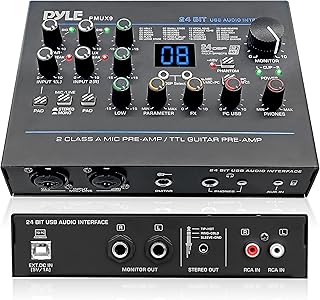
Best for: Buyers exploring a USB recording and playback unit with a range of connection types and built-in digital effects. The supplied product description lists MIC/LINE, guitar, AUX stereo, and RCA inputs, along with phantom power and phone, stereo, monitor, and headphone outputs.
The PMUX9 is a relevant adjacent option for users whose priority is flexible routing or the listed 24 digital effects. However, the product information provided here does not state a 192kHz sample rate or a 24-bit/192kHz recording specification. That distinction matters: a product described as a USB audio interface is not automatically confirmed to support the specific resolution in this search.
- Choose this if its listed input types, outputs, and effects match your setup better than a basic recording interface.
- Why it was selected: It is a USB recording interface with several audio connections, making it a useful comparison for buyers weighing features beyond sample rate.
Limitation: Do not select it specifically for 192kHz recording unless the manufacturer or current product listing confirms that capability.
FIFINE AmpliGame SC3 Gaming Mixer

Best for: Gamers or streamers comparing a dedicated gaming audio mixer with traditional recording interfaces. The supplied name identifies the SC3 as a gaming audio mixer with an individual fader and volume control.
This product is included as an adjacent option because streaming buyers may be comparing audio-control equipment alongside USB interfaces. The available details do not specify a sample rate, bit depth, input configuration, phantom power, or recording capability. Therefore, the supplied information does not establish that the SC3 supports 192kHz recording.
- Choose this if your main need is the gaming-mixer category and its stated fader and volume controls.
- Why it was selected: It is relevant to streaming and audio control, though not confirmed as a 192kHz recording interface.
Limitation: Avoid treating the word “audio” in the product name as proof of 192kHz conversion. Check its current specifications if high-resolution recording is essential.
Buying Guide: How To Choose A 192kHz USB Audio Interface
Does 192kHz mean better recordings?
A 192kHz sample rate describes how frequently an interface samples the incoming audio signal. It is a technical recording specification, not a guarantee of better-sounding results by itself. Microphone quality, performance, room acoustics, gain settings, and the recording software workflow also affect the final audio. Choose 192kHz when your production needs or workflow call for it, rather than assuming the highest number automatically improves every recording.
Check both sample rate and bit depth in the product specifications. In this group, Focusrite, Tisino, and Jolgoo explicitly list 24-bit/192kHz or recording up to 24-bit/192kHz. The supplied information for Pyle and FIFINE does not confirm that combination.
How many inputs do you need?
Count the sources you need to record at the same time. A solo singer who records one microphone or instrument at a time may prefer a simpler interface such as the Scarlett Solo. For two simultaneous sources, the Tisino and Jolgoo listings specify dual inputs. Check the input type as well as the number: XLR is commonly used for microphones, while combo inputs can accept more than one connector type.
If you plan to record a microphone and guitar together, confirm that the interface provides the appropriate microphone and instrument connections. Tisino lists a HI-Z switch for high-impedance instruments; Jolgoo describes XLR/line combo inputs. Match these features to your instruments and intended recording method.
Do you need phantom power or direct monitoring?
Phantom power supplies power to microphones that require it. Tisino and Jolgoo list 48V or +48V phantom power. Confirm that your microphone needs phantom power before switching it on, and follow the interface instructions. Direct monitoring lets a performer hear an input through the interface while recording. Tisino and Jolgoo list zero-latency or direct monitoring, which can be useful when monitoring software playback introduces a distracting delay.
Which connections and controls matter?
Review the full signal path: source inputs, headphone output, speaker or monitor outputs, and any extra connections your setup requires. A unit with multiple input types may suit a complex routing task, while a straightforward interface may be easier to compare for basic recording. Pyle lists MIC/LINE, guitar, AUX stereo, and RCA inputs, plus several output types, but its supplied details do not confirm 192kHz support.
Also consider gain controls and level indicators. Jolgoo lists independent input gain and LED peak indicators; Focusrite lists Gain Halos to help monitor levels. These controls can assist with setting recording levels, but they do not replace careful adjustment to avoid clipping.
Will it work with your computer and software?
Before buying, verify the current product listing for operating-system support, connection requirements, and any required drivers or software. The supplied Tisino details mention PC and Mac. Jolgoo describes USB-powered use and says complex driver setup is not required, but the information here does not specify supported computer versions. Do not assume that every USB interface works with every computer, phone, or recording program.
Finally, consider your actual recording format. A project may not need to run at 192kHz, and files recorded at higher sample rates can require more storage and processing capacity. A flexible interface can be useful, but select a rate that matches your project and equipment.
Frequently Asked Questions
What does 192kHz mean on a USB audio interface?
It means the interface supports sampling audio at 192,000 samples per second. Check the listed bit depth and supported recording modes as well as the sample rate.
Which listed products explicitly state 24-bit/192kHz?
Focusrite Scarlett Solo 3rd Gen, Tisino 24Bit/192kHz, and Jolgoo 2×2 USB Audio Interface explicitly list 24-bit/192kHz recording or conversion in the supplied features.
Is a 192kHz interface necessary for podcasting?
Not necessarily. The best choice depends on your production requirements, input needs, monitoring, and software. A 192kHz specification alone does not determine podcast sound quality.
Can I connect a condenser microphone to these interfaces?
Tisino and Jolgoo list 48V phantom power for microphones. Check your microphone’s power requirements and the interface instructions before connecting or enabling phantom power.
Does the Pyle PMUX9 support 192kHz recording?
The supplied Pyle product details do not state a 192kHz sample rate. Confirm the current manufacturer or product specifications before purchasing it for that requirement.
Is the FIFINE AmpliGame SC3 a 192kHz interface?
The supplied details identify it as a gaming audio mixer with an individual fader and volume control, but do not confirm 192kHz recording capability.