
Best 2 in 1 Audio Jack Headphone and Mic Adapters for PC and Laptop
These 2 in 1 adapters convert a single 3.5mm jack into separate headphone and microphone inputs, making it easier to use headsets with PCs, laptops, and VOIP apps. They’re ideal for gamers, remote workers, students, and travelers who need reliable mic and audio sharing or a simple setup with multiple devices. The following five selections balance compatibility, durability, and clear signal paths, helping you pick the best option for your setup.
Buying guide snapshot: The table below highlights five suitable adapters with key strengths to help quick comparison.
| Product | Best For | Connector Type | Notable Strength |
|---|---|---|---|
| D & K Exclusives Headphone Splitter | VOIP apps on laptops and Windows PCs | 3.5mm Male x2 to Female | Gold-plated, compact, dual ports |
| IIISOGNO 3.5mm TRRS Splitter (2-Pack) | Sharing mic and audio with a friend | 2x TRRS Female | Widely compatible, gold-plated |
| Kxable 1/8″ Aux Headphone Splitter 2-Way | CTIA CTIA compatibility, versatile use | 1x Male to 2x Female | 24K gold-plated plugs, durable |
| DUKABEL 3.5mm TRRS to Dual 3.5mm | Online gaming, VOIP on PC or laptop | 1x Female to 2x Male | Quality build, secure-fit design |
| MillSO Headphone Splitter | CTIA-compatible devices, PC or tablet | 1x TRRS to 2x TRS | Clear mic and audio separation |
D & K Exclusives Headphone Splitter For Computer

D & K Exclusives offers a headseat-to-PC adapter that splits a 3.5mm speaker and mic into two distinct male connections. It is designed for use with VOIP apps like Skype or Google Voice on laptops or desktops. Best for users who need a compact, plug-and-play solution to connect newer headsets to PCs. Consider this when you want a straightforward, gold-plated option with durable copper conductors. A potential limitation is that it relies on a PC or laptop with separate mic and speaker jacks.
Best for: Professionals and students using VOIP on Windows laptops without a single combined mic/audio jack.
IIISOGNO 3.5mm TRRS Splitter (2-Pack)

This dual 3.5mm female splitter supports two TRRS headsets for both mic and sound at the same time. It’s compatible with most TRRS devices across phones, tablets, laptops, and PCs, and works with TRS devices for audio only. It’s best for sharing audio and mic with a friend or using multiple devices in tandem. A limitation is that mic use requires a TRRS headset with an integrated mic; some adapters only carry audio for TRS devices.
Best for: Shared audio and mic sessions on laptops or tablets when both users need mic input.
Kxable 1/8inch Aux Headphone Splitter 2 Way
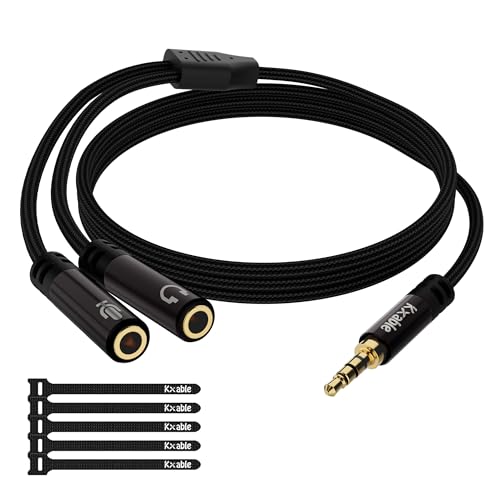
Kxable provides a 3.5mm CTIA-friendly adapter that splits headphone and microphone inputs to a PC or laptop. The unit features 24K gold-plated plugs and a durable black cotton jacket for protection. It’s best for users who want a rugged, high-conductivity interface with clear audio and mic paths. The note warns about compatibility: CTIA standard Android headsets are supported, while some iPhone setups (OMTP) require caution. Use this when you need a robust, portable splitter that travels well.
Best for: On-the-go users who prioritize build quality and universal CTIA compatibility with PCs and Android devices.
DUKABEL Headphone Splitter For PC
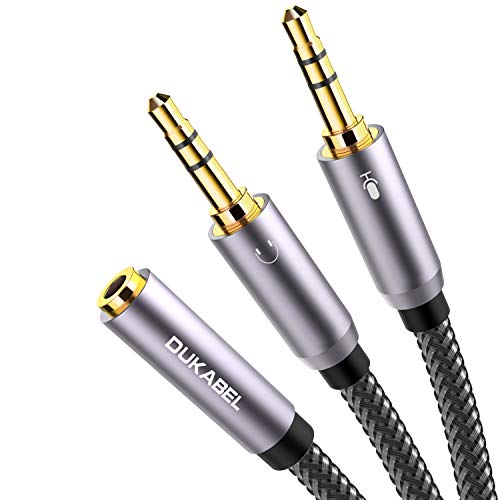
DUKABEL’s adapter converts a single 3.5mm TRRS port into dual outputs for audio and microphone. It’s tailored for online gaming and VOIP apps on PCs or laptops, with a 24K gold-plated contact system and oxygen-free copper wiring to minimize signal loss. Best for gamers or remote workers who need reliable mic and voice clarity. A limitation is that it’s not compatible with certain iOS earphones or specific Beats devices, so confirm device compatibility before use.
Best for: Gamers and VOIP users seeking a sturdy, high-quality splitter with durable construction.
MillSO Headphone Splitter for Computer

MillSO’s splitter maps a 4-pole TRRS jack to two TRS jacks, enabling headphone audio and mic input on PCs, tablets, or older laptops. It’s best for CTIA-standard devices and VOIP programs, offering a simple two-to-one path that preserves mic and audio separation. A potential drawback is that it may not work with some iOS devices that require different wiring standards (OMTP), so verify headset compatibility first.
Best for: Users with CTIA-compliant headsets who want a compact solution for PC or tablet VOIP use.
Buying Guide
What to consider when choosing a 2 in 1 audio jack splitter:
- Device compatibility: Ensure CTIA vs OMTP compatibility with your headset. Many adapters support CTIA headsets but may fail with OMTP-based devices.
- Plug and jack quality: Gold-plated connectors and oxygen-free copper wiring improve signal clarity and durability, especially for frequent travel.
- Port configuration: Confirm whether you need two male outputs or one female and two male connectors. Pick the layout that matches your PC or laptop’s jacks.
- Durability and portability: Look for a robust jacket or braided cable if you travel often. Compact designs fit easily in laptop bags.
- Use case: For VOIP calls, choose adapters that clearly separate mic and audio with minimal latency. For gaming, prioritize low signal loss and stable mic input.
Frequently Asked Questions
- What is a 2 in 1 audio jack splitter best used for?
Answer: It enables a single 3.5mm jack to serve both microphone input and headphone audio on PCs, laptops, and VOIP apps. - Will these adapters work with all headsets?
Answer: Most CTIA-standard headsets work well. Some OMTP or specialized headsets may require a different wiring arrangement. - Are gold-plated connectors better?
Answer: Yes, they reduce signal resistance and corrosion, improving durability and sound quality over time. - Can I use these with gaming consoles or tablets?
Answer: Many are compatible with tablets and some game consoles, but check device-specific compatibility first. - Do these adapters affect microphone quality?
Answer: They preserve mic input quality when properly connected and compatible with the device’s mic jack. - Is there a difference between single- and dual-output adapters?
Answer: Dual-output adapters separate mic and audio into distinct ports; single-output designs may combine features differently or require adapters for mic input.