
A 2-to-1 3.5mm adapter usually means one male plug that connects to an audio source and two female jacks for headphones or speakers. The UGREEN splitter is best for a durable everyday audio-sharing cable, while the 11-inch splitter is suited to two listeners who want extra cable length. For sharing microphone input as well as sound, choose the TRRS model and check your headset plugs. The PC headset adapter below has the opposite connector layout and serves a different purpose.
| Product | Best for | Key distinction |
|---|---|---|
| UGREEN Headphone Splitter | Frequent use and travel | Braided cable and aluminum alloy casings |
| 11-Inch Headphone Splitter | Two listeners needing more reach | 11-inch cable; stereo audio to both outputs |
| IIISOGNO TRRS Splitter | Sharing audio and microphone input | Supports two TRRS headsets; two-pack |
| ienza Headphone Splitter | Simple audio-only sharing | Explicitly does not split microphone signals |
| D & K PC Headset Adapter | Connecting a headset to separate PC ports | One female jack to two male plugs |
UGREEN Headphone Splitter

This 1-to-2 stereo splitter sends audio from one 3.5mm source to two female aux ports. UGREEN describes it for connecting two headphones or a headphone and speaker to a phone, laptop, or TV. Both outputs carry stereo sound, so it is a practical choice when two people want to listen to the same source.
Best for: Buyers who want a splitter for regular sharing or travel. The product features a braided nylon cable, aluminum alloy casings, and shielding intended to help protect the audio signal. The stated 10,000-plus bend-test result is a listed durability detail, not a guarantee for every use.
Limitation: The listed features describe audio splitting, not microphone sharing. Choose another model if two headset microphones must work through the adapter.
11-Inch Stereo Headphone Splitter

This adapter turns one 3.5mm headphone jack into two headphone outputs. Its 11-inch cable gives the two connected listeners more space than a very short splitter, while remaining compact for travel, school, or everyday carry. The product lists full left-and-right stereo audio at both outputs.
Best for: Two people sharing music, movies, lessons, or gaming audio from one device, especially when a little extra distance between headphones is useful. The listed 24K gold-plated connectors and oxygen-free copper wires are intended to support a stable connection.
Limitation: The features describe sharing audio, not microphone input. Choose this if sound sharing is the goal; do not assume both headset microphones will function.
IIISOGNO TRRS Audio And Mic Splitter
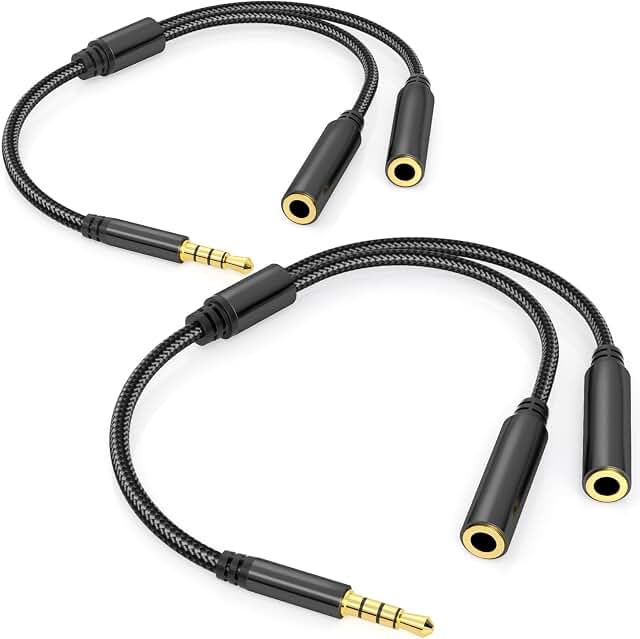
Unlike audio-only splitters, this 1-foot adapter is listed as supporting audio and microphone signals for two TRRS headsets at the same time. It comes as a two-pack and is described for use with many 3.5mm TRRS devices, including phones, tablets, laptops, computers, and game consoles.
Best for: Buyers who need two compatible headsets to share both sound and microphone input. Its dual female outputs accept TRRS headsets with built-in microphones. The product also states that TRS headphones or speakers can be used for sound only.
Limitation: Microphone use depends on having TRRS headsets with built-in mics. The compatibility description says “most” compatible devices, so check the source device’s port and headset requirements before buying.
ienza Audio-Only Headphone Splitter

This 3.5mm TRS male-to-two-TRS-female adapter connects two headphones or speakers to one audio jack. It is a straightforward option for sharing audio while traveling or at home. The listed design is specifically for splitting sound, rather than routing a microphone signal.
Best for: Buyers who want a simple audio-only splitter and do not need headset microphone support. Its connector description makes the direction clear: one male plug goes into the source, and two female jacks accept headphones or speakers.
Limitation: The product explicitly warns that it splits audio only and does not split the mic. Avoid it if you need to use microphones through both connected headsets.
D & K PC Headset Adapter

This cable is not the usual 1-male-to-2-female headphone sharing splitter. It has one 3.5mm female headset connection and two 3.5mm male plugs: one for a computer’s headphone port and one for its microphone port. It is intended to connect a newer headset with a combined audio-and-mic plug to a PC or laptop with separate audio and mic jacks.
Best for: Someone whose computer has separate headphone and microphone ports but whose headset uses a single 3.5mm connection. Its compact design is intended for carrying in a laptop bag, and the product lists gold-plated connectors and oxygen-free copper.
Limitation: Its connector direction and purpose differ from a two-headphone splitter. Do not choose it to connect two headphones to one audio source.
Buying Guide: How To Choose A 2-To-1 3.5mm Adapter
What Does “2-To-1” Mean For A Headphone Splitter?
Product titles use “2-to-1” and “1-to-2” inconsistently. Check the connector layout rather than relying on the wording. For two headphones sharing one device, look for one 3.5mm male plug and two 3.5mm female jacks. The male plug connects to the device; the headphones connect to the female outputs.
A cable with one female jack and two male plugs has the reverse layout. It may be made to connect a headset to separate computer headphone and microphone ports, as with the D & K adapter. It is not the right connector arrangement for sharing a source with two headphones.
Do You Need Audio Only Or Audio And Microphone?
For music, movies, or other playback, an audio splitter is usually the relevant type. The UGREEN, 11-inch, and ienza models are described for sending sound to two outputs; the ienza product specifically says that microphone signals are not split. Do not infer microphone support from the fact that a headset has a microphone.
If both connected headsets need microphone input, look for a splitter that explicitly supports TRRS headsets and mic signals. The IIISOGNO model lists audio and mic support for two TRRS headsets. Check the device and headset requirements because plug wiring and port design can affect whether microphone functions work.
What Is The Difference Between TRS And TRRS?
TRS and TRRS refer to the conductive sections on a 3.5mm plug. In the products listed here, TRS models are presented for stereo audio, while the TRRS splitter is the model specifically described as supporting both microphone and audio. These labels help narrow the choice, but they do not replace checking the device’s port and the product’s stated use.
For ordinary headphones without microphones, a stereo splitter may be sufficient. For headsets with microphones, confirm whether the source device accepts a combined headset plug and whether the splitter explicitly supports microphone routing. A mismatch can leave audio working while the microphone does not.
How Much Cable Length Do You Need?
A short adapter is easier to pack and can reduce cable clutter when the listeners sit close together. The 11-inch model is a better match when two people need more room to sit comfortably, such as during a trip. The IIISOGNO cable is listed as 1 foot long. Compare stated cable lengths with how the listeners will sit and where the source device will be placed.
What Should You Check For Travel Or Frequent Use?
Consider cable construction, connector housing, and the amount of space the splitter will take in a bag. UGREEN lists a braided nylon cable and aluminum alloy casings. The 11-inch model emphasizes compact portability and a longer sharing cable. These listed construction details can help compare products, but they do not establish how a cable will perform under every condition.
For a shared device on a plane or in a car, also consider whether your source has a standard 3.5mm audio jack. These products use 3.5mm connections; the provided product information does not establish compatibility with every device or port configuration.
Will Two Headphones Have Separate Volume Controls?
The listed splitters send audio from one source to two outputs. Their features do not state that each output has an independent volume control. If listeners need different volume levels, check whether the headphones or source device provide individual controls rather than assuming the splitter does.
Can I Connect A Headphone And A Speaker?
UGREEN describes connecting a headphone and a speaker to one source at the same time, and the ienza product also lists speakers as an option. Confirm that each device uses a compatible 3.5mm connection. When two output devices are connected, the product information does not specify how their individual volume levels will compare.
Frequently Asked Questions
What 3.5mm adapter lets two people use headphones from one device?
Choose a 1-male-to-2-female 3.5mm stereo splitter. The male plug connects to the device, and each pair of headphones connects to a female output.
Does a headphone splitter also split the microphone?
Not necessarily. Many splitters in this category are for audio playback only. Choose a model that explicitly states it supports microphone signals if mic use is required.
Can I use two regular headphones with a TRRS splitter?
The IIISOGNO listing says TRS headphones or speakers can be used for sound, while microphone support requires TRRS headsets with built-in microphones. Check the product’s stated connection requirements.
Is the D & K adapter a headphone-sharing splitter?
No. It has one female headset jack and two male plugs for separate computer headphone and microphone ports. Its layout is intended for connecting a combined headset to a PC with separate ports.
Will a splitter give each listener independent volume control?
The listed product features do not promise independent volume controls. Use controls on the headphones or source device if separate adjustments are needed.