
The best choice for a 24-channel setup depends on whether you need multitrack USB recording, onboard effects, or a straightforward analog mixing workflow. The Mackie Onyx Series is best suited to buyers who want a 24-channel mixer with multitrack USB, while the Mackie 2404VLZ4 offers a 24-channel, 4-bus format with effects. The Behringer XENYX X2442USB is another 24-input option; the Mackie ProFX22v3 and LZSIG mini mixer are smaller alternatives, not 24-channel replacements.
| Product | Best suited for | Key distinction |
|---|---|---|
| Mackie Onyx Series | Recording and live mixing | 24 channels and multitrack USB |
| Mackie 2404VLZ4 | Live setups needing bus routing | 24 channels and 4 buses |
| Behringer XENYX X2442USB | Analog mixing with USB audio | 24 inputs and 4/2-bus design |
| Mackie ProFX22v3 | Smaller recording and streaming rigs | 22 channels and USB I/O |
| LZSIG Mini Audio Mixer | Basic source combining | Four inputs in a compact unit |
Mackie Onyx Series 24-Channel Mixer

Best for: Buyers who need a 24-channel analog mixer and want USB multitrack recording for a studio, live performance, or content-creation workflow. Its listed product name identifies Onyx preamps and multi-track USB as central features.
Choose this if capturing separate tracks over USB is important alongside mixing multiple sources. Multitrack recording can support a workflow where individual channels are recorded for later editing, rather than relying only on a finished stereo mix. The product is also described for both studio and live use, making it a relevant fit for users moving between those settings.
Limitation: The supplied product information does not specify USB track counts, routing details, or effects. Check the manufacturer’s current specifications if those details determine whether it fits a particular recording setup.
Mackie 2404VLZ4 24-Channel 4-Bus Mixer
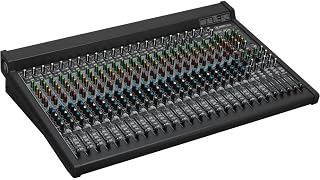
Best for: Buyers looking for a 24-channel analog mixer with a four-bus layout. The listed name also identifies Onyx preamps, USB, and FX, giving this model a relevant mix of channel capacity and processing-related features.
Choose this if separate bus groups are part of your live or studio routing plan. A 4-bus design can be useful when you want to organize channel signals into groups rather than send every channel directly into one main mix. The model is a better match than a compact line mixer when a larger channel count and bus-based operation are priorities.
Limitation: The supplied information does not explain the specific USB functions, onboard FX options, or routing limits. Confirm the detailed specifications against your intended input and output setup before buying.
Behringer XENYX X2442USB 24-Input Mixer

Best for: Buyers comparing 24-input analog mixers who want a 4/2-bus configuration and USB audio connectivity. The listed features include XENYX mic preamps, compressors, British EQ, and a 24-bit multi-effects processor.
This model is a practical option to consider when onboard EQ, compression, and effects are part of the requested feature set. Its stated design is a low-noise, high-headroom analog mixer, and the USB/audio-interface feature supports computer-based audio workflows. Compare its input and bus arrangement with your equipment list, especially if you need a particular number of microphone or line sources at once.
Limitation: The supplied feature information does not provide detailed channel-by-channel connectivity or USB routing specifications. Verify those details before relying on it for a specific recording configuration.
Mackie ProFX22v3 22-Channel Mixer

Best for: Buyers who can work with 22 channels and want a mixer aimed at live sound, home recording, content creation, or streaming. It has 17 Onyx mic preamps, a GigFX effects engine, and 2×4 USB I/O.
The product information specifies recording at up to 24-bit/192kHz and sending two custom mixes from a computer back into the mixer. That makes it a better fit for users who need computer playback monitoring and a smaller channel count than the 24-channel options here. The listed preamps offer up to 60 dB of gain, which the product description identifies as useful for microphones that need high gain.
Limitation: This is a 22-channel model, so choose a 24-channel alternative if that input capacity is essential. Its USB I/O is specified as 2×4, not multitrack USB input capture.
LZSIG Mini Four-Channel Line Mixer

Best for: Buyers combining a few audio sources in a compact setup, not buyers who need 24 channels. The product description lists four inputs and one output, mono/stereo switching, and support for 3.5 mm and 6.35 mm TS/TRS connections.
It can combine sources such as electronic drums, keyboards, guitars, computers, CD players, or gaming consoles into a single stereo or mono output. The listing also describes a power-management chip and low-noise op-amps intended to help reduce noise. Choose it if you need a small sub-mixer for a limited number of sources.
Limitation: Four inputs are far fewer than 24. Avoid this if you need a full-size mixer for a band, venue, or multichannel recording session.
Buying Guide: How To Choose A 24-Channel Mixer
Do you need exactly 24 channels?
Start by counting every source that must be connected at the same time. Include microphones, instruments, playback devices, and any other audio sources. Then check whether the product’s stated channel count refers to inputs, channels, or a combination of input types. The supplied listings identify the Onyx and 2404VLZ4 as 24-channel models and the X2442USB as a 24-input model; the ProFX22v3 is a 22-channel mixer, while the LZSIG unit has four inputs.
Do not select a mixer based only on the number in its product name. Confirm how many inputs are usable simultaneously and whether the connections match your sources. A mixer with fewer channels may still suit a smaller streaming desk, but it is not a direct replacement when a setup requires 24 concurrent inputs.
Should you prioritize USB recording or analog mixing?
USB features differ between mixers, so identify the computer workflow you need. The Mackie Onyx Series is described as having multitrack USB, which makes it the clearest listed option for recording separate tracks. The ProFX22v3 has 2×4 USB I/O and is described as supporting two custom mixes sent from a computer back into the mixer. The X2442USB listing identifies USB/audio-interface connectivity but does not provide detailed routing information.
If you only need to send a stereo mix to a computer, a simpler USB arrangement may be enough. If you need to record or return individual tracks, confirm the number of channels and routing paths supported by the specific model. Do not assume that every mixer with USB supports multitrack recording.
When do buses matter?
Buses let you organize or route groups of channel signals. They can help with setups where separate groups need to be managed as part of the overall mix. The Mackie 2404VLZ4 is identified as a 4-bus mixer, and the Behringer X2442USB is listed as a 4/2-bus design. Compare these layouts with your planned routing, such as whether you need to group sources or manage separate mixes.
Bus count alone does not describe every routing capability. Check the manual or detailed specifications for the exact outputs and routing options before making a decision. If your setup is basic, a complex bus layout may not be necessary; if you need distinct groups, it can be an important comparison point.
Are onboard effects and EQ important?
Built-in processing can reduce the need for separate devices, but the available tools vary. The ProFX22v3 lists a GigFX effects engine. The X2442USB lists British EQ, compressors, and a 24-bit multi-effects processor. The 2404VLZ4 product name identifies FX, but the supplied details do not describe the effects. Compare the specific processing functions you need rather than treating all effects sections as equivalent.
For a clean, simple source-combining task, onboard effects may not be essential. For live sound or content creation, processing on the mixer may be convenient. Verify whether a particular effect or control is included before buying; the product names alone do not establish the full feature set.
What connections should you check?
Make a list of source and destination connections before choosing a mixer. Check whether each instrument or device uses a microphone, line-level, 1/4-inch, or 3.5 mm connection, and confirm that the mixer supports the required cables and signal types. The LZSIG listing specifically describes 3.5 mm and 6.35 mm TS/TRS connections. The other supplied product information does not provide enough detail to compare every connector.
Also consider where the mixed signal needs to go: speakers, a recorder, a computer, or another mixer. Check output types and routing in the current product specifications. Connector adapters may address some physical differences, but they do not automatically solve differences in signal level or routing.
How should you compare mixers for live use and studio use?
For live sound, prioritize the channel count, group routing, and the inputs and outputs required at the venue. For studio use, focus on whether USB supports the desired recording workflow and how computer playback returns to the mixer. A hybrid setup may need both. The Onyx Series is described for studio and live performance, while the ProFX22v3 is listed for live sound, home recording, content creation, and streaming.
Finally, distinguish a full-size mixer from a line sub-mixer. The LZSIG model combines a small number of sources into one output; it is useful for a limited setup but does not provide the channel capacity of a 24-channel console.
Frequently Asked Questions
What is the best listed option for multitrack USB?
The Mackie Onyx Series is the clearest match because its product name specifies multi-track USB recording and 24 channels. Confirm the detailed USB track and routing specifications for your intended computer setup.
Which listed mixers have 24 channels or inputs?
The Mackie Onyx Series and Mackie 2404VLZ4 are described as 24-channel mixers. The Behringer XENYX X2442USB is described as a 24-input mixer. Check each model’s specifications to confirm how its inputs are counted and used.
Is the Mackie ProFX22v3 a 24-channel mixer?
No. Its product name identifies it as a 22-channel mixer. It may suit a setup that can use fewer channels, but it does not meet a strict 24-channel requirement.
Can the LZSIG mini mixer replace a 24-channel mixer?
No. The LZSIG is a four-input line mixer designed to combine a small number of sources into one output. It is better suited to basic sub-mixing than to a setup requiring 24 channels.
Which listed model includes a four-bus design?
The Mackie 2404VLZ4 is identified as a 4-bus mixer. The Behringer XENYX X2442USB is listed as a 4/2-bus mixer. Compare the detailed routing specifications to determine which layout fits your needs.