
A 24-channel mixing desk gives a band, venue, or production setup room to manage multiple microphones and instruments in one place. The Mackie Onyx Series is best for multitrack recording, the Mackie 2404VLZ4 suits users who want a 4-bus analog mixer, and the Allen & Heath ZED-24 offers flexible auxiliary mixes. The ProFX22v3 is a smaller alternative, while the ProFX30v3 provides more than 24 channels for setups that may expand.
| Product | Channel fit | Best suited for |
|---|---|---|
| Mackie Onyx Series | 24-channel model | Multitrack recording and effects |
| Mackie 2404VLZ4 | 24-channel, 4-bus | Analog routing and broadcast use |
| Allen & Heath ZED-24 | 24-channel | Monitor and auxiliary mixes |
| Mackie ProFX22v3 | 22-channel | Smaller live and recording setups |
| Mackie ProFX30v3 | 30-channel | Expandable live setups |
Mackie Onyx Series 24-Channel Mixer

Best for: Bands, studios, and production teams that need a 24-channel analog desk with multitrack recording features. This model combines physical mixer controls with recording and playback options, making it a strong choice for users who want to capture more than a stereo mix.
Its listed features include 96 kHz, 24-bit multitrack recording to a Mac or PC over USB, plus stereo recording and playback directly to an SD card. The Onyx mic preamps provide up to 60 dB of gain. Perkins-style EQ includes a sweepable midrange, and the digital effects engine offers user-customizable reverbs, delays, and other effects.
Choose this mixer if recording flexibility and onboard effects matter alongside channel count. It can serve live sound and recording workflows without relying only on a computer for capture. Limitation: The listed SD-card function is stereo recording and playback, not multitrack SD recording; choose based on the recording format you need.
Mackie 2404VLZ4 24-Channel 4-Bus Mixer
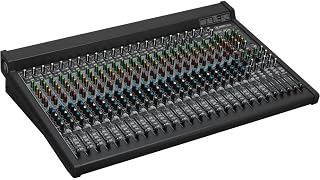
Best for: Users who want a 24-channel analog mixer with four buses for routing. The 2404VLZ4 is a practical fit for live setups and installations where a straightforward physical mixing workflow is more important than a specified multitrack recording feature.
The listed design emphasizes high headroom and low noise. It includes 20 Onyx mic preamps and improved RF rejection, which the product description identifies as useful for broadcast applications. Its four-bus layout can help organize channel signals into subgroups rather than treating every input as part of one undivided mix.
Choose this model if your setup benefits from 4-bus routing and you want a mixer identified for broadcast use. It is also a direct match for buyers specifically searching for a 24-channel Mackie analog desk. Limitation: The provided feature list does not specify multitrack USB recording or onboard effects, so confirm those requirements before choosing it for a computer-based production workflow.
Allen & Heath ZED-24 Touring Mixer

Best for: Live operators who need separate monitor feeds, external effects routing, or a mix for another destination. The ZED-24 is a 24-channel mixer with USB I/O, and its auxiliary outputs make it especially relevant for more involved stage and production setups.
Its DuoPre XLR preamps include 48V phantom power and offer up to 69 dB of gain, according to the listed features. Each mono input also has a 100 Hz high-pass filter and three-band MusiQ EQ with a swept mid frequency. Two pre-fade auxiliary outputs can send mixes independent of the main mix; two post-fade auxiliary outputs follow the channel send level to the main mix.
Choose this mixer if you need distinct pre-fade monitor mixes as well as post-fade sends for external effects, subwoofers, or other feeds. The swept-mid EQ and input filtering provide channel-level tone-shaping options. Limitation: The feature list identifies USB I/O but does not state its recording resolution or multitrack capabilities; check the exact USB workflow you need.
Mackie ProFX22v3 22-Channel Mixer

Best for: Content creators, home recording users, and live-sound operators who can work with 22 channels rather than requiring a full 24. Its listed applications include live sound, home recording, content creation, and live streaming.
The ProFX22v3 includes 17 Onyx mic preamps with up to 60 dB of gain. The product features specify 24-bit, 192 kHz recording and 2×4 USB I/O. The USB connection can create two custom mixes on a computer and send them back to the mixer, which can help when monitoring specific playback tracks as well as the full mix.
Choose this option if recording quality and computer-based monitoring are central to your workflow and two fewer channels will not restrict the input list. It is also a reasonable alternative when a strict 24-channel count is not essential. Limitation: This is a 22-channel mixer, not a 24-channel model, so it may not suit a setup that needs all 24 inputs at once.
Mackie ProFX30v3 30-Channel Mixer

Best for: Bands, small venues, and operators who want more than 24 channels for a larger input list or future expansion. This mixer provides 30 channels of analog control, making it the highest-capacity option in this selection.
The listed features describe it as suitable for full bands and small venues, with Onyx preamps for clean gain across every mic channel. Its analog controls are presented as a big-desk workflow without a digital menu. The product name also identifies USB recording and GigFX effects, which may make it worth comparing with simpler analog desks when those functions are relevant.
Choose this model if your current or expected channel needs exceed 24 and you prefer hands-on analog controls. The extra channel capacity provides more room for a larger setup than the exact 24-channel options. Limitation: Its 30-channel layout may be more capacity than a compact setup requires; the listed features do not provide detailed USB recording specifications.
Buying Guide: How To Choose A 24-Channel Mixing Desk
A channel count is only one part of choosing a mixer. Compare the number of inputs you will use at the same time, the number of independent mixes you need, and whether the desk must record to a computer or storage card. A mixer that is close to 24 channels may not meet a strict input requirement, while a 30-channel model can provide room for growth.
How many channels do you actually need?
Make an input list before comparing models. Include vocals, instruments, drum microphones, playback sources, and any other signals that need their own channel. Count simultaneous sources rather than the total number of devices you own. If you require 24 available channels, the 22-channel ProFX22v3 is not an exact match. If you expect to add sources, the 30-channel ProFX30v3 offers more listed channel capacity.
Also check how a manufacturer describes channel count. A product name may include a channel number, but the number of microphone preamps can be different. For example, the Mackie 2404VLZ4 is listed as a 24-channel mixer with 20 Onyx mic preamps. If all of your sources need microphone inputs, compare the preamp count as well as the overall channel count.
Do you need buses or auxiliary outputs?
Buses and auxiliary sends help route signals to destinations beyond the main mix. A 4-bus mixer can group channels for separate control. Auxiliary outputs can send monitor mixes, effects feeds, or other mixes, depending on their design and setup. The ZED-24 stands out in this selection for its two pre-fade and two post-fade auxiliary outputs.
Think about how many independent monitor mixes performers need. Pre-fade outputs can provide a mix that does not follow the main mix fader levels, while post-fade outputs follow the send level to the main mix, according to the ZED-24 feature description. Match the routing options to your actual stage or recording plan rather than selecting a desk based only on its channel count.
Which recording connection fits your workflow?
For computer recording, verify the mixer’s USB functions, not just the presence of a USB connection. Check whether the device supports stereo or multitrack recording, what audio quality is specified, and whether playback returns can be routed as needed. The Onyx Series lists 96 kHz, 24-bit multitrack USB recording and stereo SD-card recording. The ProFX22v3 lists 24-bit, 192 kHz recording and 2×4 USB I/O.
If you record without a computer, confirm whether a mixer supports direct recording to storage and whether that capture is stereo or multitrack. The Onyx Series feature list specifies stereo recording and playback to SD card. Do not assume that every USB-equipped mixer offers the same recording format or number of tracks.
How important are mic preamps and EQ?
When connecting microphones directly, review the number of mic preamps, their stated gain range, and any phantom-power information provided. Phantom power is relevant for condenser microphones that require it, and the ZED-24 lists 48V phantom power. The Onyx Series and ProFX22v3 list preamps with up to 60 dB of gain; the ZED-24 lists up to 69 dB.
EQ and filtering can help shape a channel before it reaches the main mix. The ZED-24 includes a 100 Hz high-pass filter on every mono input and three-band EQ with a swept mid frequency. The Onyx Series lists Perkins-style EQ with a sweepable midrange. Compare these controls with the types of sources you mix, such as vocals, guitars, and instruments with prominent midrange content.
Should you choose an exact 24-channel model?
Choose an exact 24-channel desk when you have a defined input list and want to avoid paying for capacity you will not use. The Mackie Onyx Series, Mackie 2404VLZ4, and Allen & Heath ZED-24 are the direct 24-channel choices represented here. Their feature priorities differ: recording and effects for the Onyx Series, four-bus routing for the 2404VLZ4, and auxiliary-mix flexibility for the ZED-24.
Choose a nearby channel count when another feature matters more than an exact number. The ProFX22v3 may suit a smaller setup that prioritizes its specified USB recording features. The ProFX30v3 is a better fit when an input list is likely to grow beyond 24. In either case, confirm the complete signal path and input requirements before selecting a model.
What else should you verify before buying?
- Input needs: Compare total channels with the number of simultaneous sources, and separately check the number of microphone preamps.
- Routing: Identify the number and type of buses, auxiliary sends, and monitor mixes needed for the room or stage.
- Recording: Confirm USB recording format, supported resolution, playback routing, and whether direct storage recording is available.
- Effects and EQ: Decide whether onboard effects, sweepable mids, or high-pass filters are important to your signal workflow.
- Operating style: Consider whether you prefer hands-on analog controls or need a specific computer-based workflow.
- Space and expansion: Compare the physical desk and capacity with your setup, leaving room for likely additional sources when practical.
Frequently Asked Questions
What is a 24-channel mixing desk used for?
A 24-channel mixing desk combines and routes audio from multiple sources, such as microphones and instruments. It can be used for live sound, recording, or production, depending on its inputs, routing, and recording features.
Which mixer in this list supports multitrack USB recording?
The Mackie Onyx Series feature list specifies 96 kHz, 24-bit multitrack recording to a Mac or PC over USB. The other product descriptions should be checked for their exact USB recording capabilities before purchase.
Is a 22-channel mixer enough for a 24-channel setup?
Not if the setup needs 24 channels in use at the same time. The Mackie ProFX22v3 is a 22-channel option, so it is better suited to a smaller input list or a workflow where all 24 channels are not required simultaneously.
What is the advantage of auxiliary outputs?
Auxiliary outputs send channel signals to other destinations, such as monitor speakers or external effects. The ZED-24 lists two pre-fade and two post-fade auxiliary outputs, which support different routing needs.
Does a 24-channel mixer always have 24 mic preamps?
No. Channel count and microphone preamp count can differ. The Mackie 2404VLZ4 is described as a 24-channel mixer with 20 Onyx mic preamps, so check both figures when planning microphone inputs.
When should I choose a 30-channel mixer instead?
Choose a 30-channel mixer if you need more than 24 inputs or expect your setup to expand. The Mackie ProFX30v3 offers 30 channels of analog control, while an exact 24-channel model may be a closer fit for a fixed, smaller input list.