
If you need hands-on control across 24 DAW channels, the iCON V1-M is the clearest fit in this group because its eight motorized faders can be expanded to control up to 64 channels with V1-X expanders. The listed products do not provide 24 physical faders on their own. The Behringer X-TOUCH offers nine motorized faders, while the remaining options suit smaller or more compact workflows. Compare channel count, expandability, and the amount of physical control you need before choosing.
| Product | Best suited for | Fader and channel details |
|---|---|---|
| iCON V1-M | Expandable, layered DAW control | 8 motorized faders; expandable to 64 channels with V1-X |
| Behringer X-TOUCH | More physical faders in one unit | 9 touch-sensitive motorized faders |
| iCON P1-M | Buyers considering a motorized DAW surface | Motorized faders; quantity not specified in the supplied details |
| Behringer X-TOUCH ONE | Single-fader control | 1 touch-sensitive motor fader |
| Akai MIDImix | Compact, non-motorized MIDI mixing control | Physical fader count not specified in the supplied details |
iCON V1-M DAW Control Surface
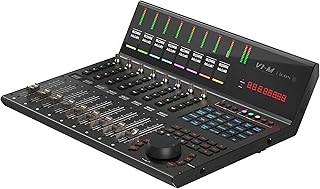
Best for: Producers who want a motorized control surface that can scale beyond its onboard faders. The V1-M has eight touch-sensitive motorized faders with 12-bit resolution. With V1-X DAW Control Expanders, the system can expand to control as many as 64 channels, making it the strongest listed choice for a workflow that may eventually need 24 or more channels.
The 7-inch customizable touchscreen has five color-coded layers and can provide access to as many as 120 DAW functions. Those features support a layered approach to controlling a session without requiring a separate physical control for every function. The product is selected for its stated expansion capacity and touchscreen workflow, not because the base unit has 24 faders.
Choose this if you are comfortable building a larger setup with expansion units and want multiple channel banks. Limitation: the base V1-M has eight faders, so 24 physical faders require additional hardware. The supplied information does not specify the exact number of expanders needed for a particular layout.
Behringer X-TOUCH Universal Control Surface
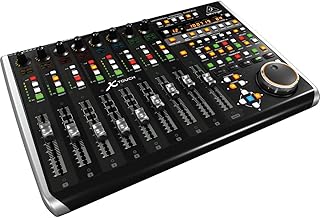
Best for: Users who want a larger bank of physical motorized faders in a single listed product. The X-TOUCH has nine touch-sensitive motor faders, LCD scribble strips, and Ethernet, USB, and MIDI interfaces, according to its product name. Its nine-fader layout provides more immediate physical channel control than the single-fader X-TOUCH ONE.
This model is relevant to a 24-channel workflow when the goal is to work with multiple channels at a time, rather than to have 24 faders on one surface. The listed connection types may matter when comparing how a control surface can fit into an existing studio setup, but confirm the required connection method and DAW support before buying.
Choose this if you value nine motorized faders and channel-identifying scribble strips on the controller. Limitation: nine faders are fewer than 24, and the supplied product information does not state an expansion capacity. Do not assume that it can be expanded to a 24-fader physical arrangement without checking current manufacturer documentation.
iCON P1-M DAW Control Surface

Best for: Buyers seeking a DAW control surface with motorized faders who are comparing iCON options. The supplied product name identifies the P1-M as a DAW control surface with motorized faders. Motorization can be an important selection criterion when you want the physical fader positions to reflect changes made through a DAW or control operation, but the provided listing details do not describe the specific behavior or supported software.
The P1-M is included as an option for shoppers who may want a dedicated motorized surface without choosing solely by the V1-M’s touchscreen and stated expansion features. Compare its documented fader count, connection options, and DAW compatibility with your setup before treating it as a candidate for a 24-channel rig.
Choose this if motorized faders are a priority and you are prepared to verify the technical details that matter to your workflow. Limitation: the supplied information does not specify the number of faders or an expansion path, so it cannot be confirmed here as a 24-fader solution.
Behringer X-TOUCH ONE Control Surface

Best for: Compact workflows centered on one channel or one fader at a time. The product name specifies a touch-sensitive motor fader and an LCD scribble strip. These are useful distinctions when comparing it with a larger multi-fader surface: the X-TOUCH ONE emphasizes a single motorized fader rather than a bank intended to cover many channels simultaneously.
For a 24-channel session, a one-fader controller may still be considered when the user prefers to select channels in the DAW and adjust them individually. That approach is different from having a bank of physical faders available together, so it is important to match the controller style to the way you mix or automate.
Choose this if desk space and single-channel control matter more than simultaneous access to many tracks. Limitation: one fader does not provide 24-channel physical control, and the supplied details do not state whether this model supports expansion.
Akai Professional MIDImix USB MIDI Controller

Best for: Buyers looking for a compact USB MIDI mixer controller rather than a listed 24-fader motorized surface. The product name identifies the MIDImix as a USB MIDI mixer controller. That makes it a relevant comparison for users who want hands-on MIDI mixing control and do not require the motorized faders specified for the iCON P1-M, iCON V1-M, or Behringer X-TOUCH models.
The MIDImix may be worth comparing when a straightforward controller format is more important than a large, expandable control-surface system. However, the supplied product information contains no detailed feature list, so shoppers should check the manufacturer’s current specifications for the exact controls, fader count, mapping options, and DAW support.
Choose this if you are shopping for a USB MIDI mixer controller and are willing to confirm its control layout against your requirements. Limitation: the provided details do not confirm motorized faders, a 24-channel layout, or expansion to 24 physical faders.
Buying Guide: How to Choose a 24-Fader Control Surface
Do you need 24 physical faders or control over 24 channels?
These are different requirements. A controller with 24 physical faders can provide a separate fader for each of 24 channels at the same time. A smaller surface may control 24 or more DAW channels by switching banks, selecting tracks, or using expansion hardware. If you specifically need every channel within reach at once, confirm that the complete system has 24 physical faders. The base iCON V1-M has eight, and the Behringer X-TOUCH has nine.
If your priority is reaching all 24 channels rather than seeing 24 faders at once, a smaller controller with clearly documented channel banking or an expansion system may be sufficient. Ask how channel selection works, whether the channel assignment is visible, and whether fader positions follow the selected bank. These details affect how easily a compact surface can support a large session.
How should you compare motorized and non-motorized options?
Motorized faders can move to reflect a selected track or parameter when the control surface and DAW support that behavior. This can help when switching between channel banks because the physical controls can correspond to the active DAW state. The listed iCON P1-M, iCON V1-M, and Behringer X-TOUCH product names specify motorized faders. The X-TOUCH ONE specifies one touch-sensitive motor fader.
The Akai MIDImix is described as a USB MIDI mixer controller, but the supplied details do not confirm whether its faders are motorized. Do not treat it as equivalent to a motorized control surface without checking its current specifications. If automation or frequent bank switching is central to your workflow, verify how the controller handles fader position and DAW updates.
Is an expandable system better than one large surface?
An expandable system can let you start with a smaller control surface and add hardware as channel needs grow. The iCON V1-M is the only listed product with a stated expansion capacity: it can expand to as many as 64 channels with V1-X DAW Control Expanders. That makes it a relevant choice for a 24-channel target, but its base unit remains an eight-fader surface.
A larger single unit may provide more controls in one footprint and avoid assembling a multi-part system. The Behringer X-TOUCH supplies nine motorized faders, but the product information provided here does not specify its expansion capability. Compare total physical fader count, expansion requirements, desk space, and cable or connection needs before deciding.
What connection and DAW details should you verify?
Check the manufacturer’s current compatibility information for your DAW, operating system, and computer before purchase. A product name that says “USB MIDI” or lists USB, Ethernet, and MIDI interfaces does not by itself establish compatibility with every DAW or setup. Confirm the supported control protocols, setup process, and any required software or configuration steps.
Also determine how the surface connects to your system and whether the connection type matches your available ports and studio network. The Behringer X-TOUCH product name lists Ethernet, USB, and MIDI interfaces. The Akai MIDImix product name identifies USB MIDI. For the other listed options, connection details are not included in the supplied product information, so verify them directly.
Which features improve large-session visibility?
Channel labels, displays, and clear banking can reduce uncertainty when controlling many tracks. The Behringer X-TOUCH is identified as having LCD scribble strips. The iCON V1-M has a customizable 7-inch touchscreen with five color-coded layers and access to up to 120 DAW functions, according to its listed features. These details may matter if you want labels or functions available directly on the surface.
Compare what the displays actually show in your DAW. A screen or scribble strip is most useful when it identifies the active track or control clearly. The supplied information does not describe the display functions of every product, so avoid assuming that similarly named controllers offer the same visual feedback.
How can you assess desk space and workflow fit?
Consider whether the controller will sit beside a keyboard, mixer, or other studio equipment, and whether you need all faders visible during a session. A single-fader surface such as the X-TOUCH ONE prioritizes a different working style from a nine-fader surface or an expandable eight-fader system. Your preferred method of selecting tracks is as important as the number of available controls.
Before buying, write down the minimum number of physical faders you need, the number of channels you must reach, whether motorization is required, and the DAW functions you use most. Then compare those requirements with the manufacturer’s complete specifications. This prevents a compact MIDI controller from being mistaken for a 24-fader surface.
Frequently Asked Questions
Which listed control surface can expand beyond 24 channels?
The iCON V1-M is listed as expandable to as many as 64 channels with V1-X DAW Control Expanders. Its base unit has eight touch-sensitive motorized faders, so expansion hardware is needed for a larger setup.
Does any listed product have 24 physical faders by itself?
No. The supplied information identifies eight motorized faders on the iCON V1-M, nine on the Behringer X-TOUCH, and one on the Behringer X-TOUCH ONE. The supplied details do not establish a 24-fader layout for the other products.
Which option has the most specified motorized faders?
The Behringer X-TOUCH has nine touch-sensitive motorized faders in its product name. The iCON V1-M has eight motorized faders and a stated expansion path for controlling more channels.
Is the Akai MIDImix confirmed to have motorized faders?
The supplied product information describes it as a USB MIDI mixer controller but does not confirm motorized faders. Check the manufacturer’s current specifications if motorization is a requirement.
What should I verify before buying for a specific DAW?
Confirm DAW and operating-system compatibility, supported control protocols, connection requirements, fader count, channel-banking behavior, and expansion options. These details determine whether the surface fits both your software and your preferred workflow.