
The best 3.5mm audio cable with a mic and volume control depends on your headphones and how you plan to use it. NewFantasia’s 3.5mm-to-3.5mm cable is best for listed Skullcandy models, while its 3.5mm-to-2.5mm cable is designed for listed Bose headphones. For gaming, choose a boom-mic cable with mute and volume controls. Check the connector type and device requirements before buying, because matching the plug to your headphones is essential.
| Product | Best For | Connector Or Feature |
|---|---|---|
| NewFantasia 3.5mm to 3.5mm | Listed Skullcandy headphones | Inline mic and media controls |
| MEIRIYFA Boom Mic Cable | Gaming, calls, and voice chat | Detachable boom microphone |
| EARLA TEC Replacement Cable | Listed Bose and JBL headphones | 3.5mm-to-2.5mm connection |
| NewFantasia 3.5mm to 2.5mm | Listed Bose headphones | Braided cable and inline controls |
| DUNGZDUZ Gaming Boom Mic Cable | Gaming and streaming | Mute slider and volume wheel |
NewFantasia 3.5mm Cable for Skullcandy
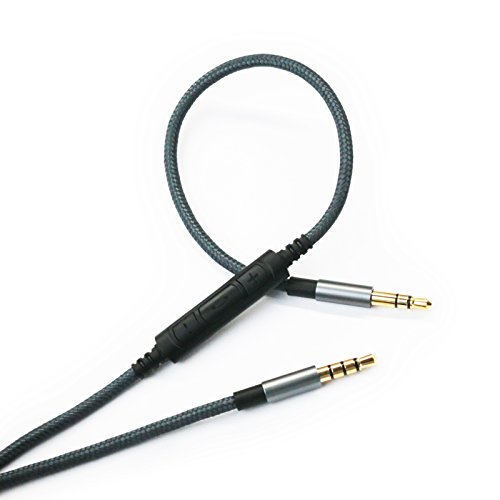
This NewFantasia replacement cable has a 3.5mm male plug at each end and is listed as compatible with Skullcandy Hesh, Hesh 2, Hesh 3, Hesh ANC, Hesh Evo, Venue, Crusher, Crusher Evo, Crusher ANC, Grind, and Grind Wireless headphones. Verify the exact headphone model and its cable port before choosing it.
The 4.3-foot cable has an OFC wire interior and a tangle-free nylon-braided exterior. Its inline controls support volume up and down, play or pause, track changes, and answering or ending calls. A built-in microphone supports calls when the connected device and headphone setup allow it.
- Best for: Owners of the listed Skullcandy models who need a replacement cable with call and playback controls.
- Why it stands out: It combines a 3.5mm-to-3.5mm connection, a microphone, multiple remote functions, and a braided cable.
- Limitation: The listed compatibility is model-specific, and the 4.3-foot length may not suit every desk or room setup.
Choose this cable if your headphones use the stated 3.5mm connection and appear on the compatibility list. Avoid assuming that a 3.5mm plug makes it suitable for every headphone with an audio jack.
MEIRIYFA Boom Mic Cable for Gaming

MEIRIYFA’s cable adds a boom microphone to compatible headphones with a 3.5mm input. The product description lists use with Mac, Windows PC, PlayStation 4, Xbox One, iPhone, and Android devices. It is intended for gaming, online work, Skype, podcasts, VOIP, live chat, and other voice communication.
The cable includes an inline control switch for volume adjustment and microphone mute. The listed length is 4.4 feet, and the product is described as plug and play. Its boom-mic design is more suited to voice-focused use than a basic replacement cord with a small inline microphone.
- Best for: People who want a boom microphone for gaming, calls, or voice chat without replacing their headphones.
- Why it stands out: It combines a microphone, mute function, and volume adjustment in one cable.
- Limitation: The product description does not identify specific headphone models, so check the headphone jack and device input arrangement before ordering.
Choose this option when voice pickup and an accessible mute switch matter more than a compact cable. For a PC with separate microphone and headphone jacks, check whether an adapter or splitter is needed; the listing does not specify a splitter.
EARLA TEC 3.5mm-to-2.5mm Replacement Cable

EARLA TEC’s replacement cable uses a 3.5mm-to-2.5mm connection and lists compatibility with Bose QuietComfort QC45, QC35 II, QC35, QC25, NC700, OE2, OE2i, SoundLink, and SoundTrue headphones. It also lists several JBL models, including E45BT, E55BT, E50, E35, and E30. Confirm that your exact headphone model uses the 2.5mm connection before buying.
The cable has an inline microphone and control button for hands-free calls, music play or pause, and volume adjustment on compatible devices. The listing also identifies use with phones, tablets, computers, gaming systems, and other devices that have a 3.5mm jack.
- Best for: Owners of listed Bose or JBL headphones who need a replacement cord with an inline mic and controls.
- Why it stands out: The stated compatibility list covers several headphone families, and the cable supports calls and music controls.
- Limitation: Its 2.5mm headphone-side plug is not interchangeable with a 3.5mm headphone port.
Choose this cable when your headphone port is 2.5mm and the model appears in the product listing. Check the connector at the headphone end rather than relying only on the device’s 3.5mm socket.
NewFantasia 3.5mm-to-2.5mm Bose Cable

This NewFantasia cable is listed for Bose Noise Canceling 700, QC35, QC35 II, QC45, OE2, and OE2i headphones. It connects a 3.5mm audio source to a 2.5mm headphone port. Its stated functions include volume up and down, play or pause, track changes, answering or ending calls, and an inline microphone.
The 4.3-foot cable has an OFC wire interior and a tangle-free nylon-braided exterior. Those details make it a practical option for replacing a compatible cable while retaining basic playback and call controls.
- Best for: Owners of the listed Bose models who specifically need a 3.5mm-to-2.5mm replacement cord.
- Why it stands out: It offers several inline remote functions and a braided exterior in a clearly specified connector configuration.
- Limitation: It is not a 3.5mm-to-3.5mm cable, and the listed headphone compatibility should be checked against the exact model.
Choose this cable if your Bose headphones have the matching 2.5mm port. Compare it with the EARLA TEC option by checking the specific headphone model listed for each rather than treating all Bose cables as interchangeable.
DUNGZDUZ Gaming Boom Mic Cable

The DUNGZDUZ cable is designed to add a boom microphone to headphones with a compatible 3.5mm connection. The listed devices include PS4, PS5, Xbox systems with a 3.5mm jack, PC, Mac, Switch, smartphones, tablets, and laptops. Its inline control box has a mute slider and a rolling volume wheel.
This setup is aimed at gaming, streaming, and calls where a boom mic and quick mute access are useful. The product description specifies that devices with separate PC microphone and audio jacks require a Y-splitter, which is not included.
- Best for: Gamers and streamers who want a boom mic, a physical mute control, and an adjustable volume wheel.
- Why it stands out: The separate mute slider and volume wheel make the main controls easy to distinguish.
- Limitation: A Y-splitter is required for a PC with separate audio and microphone jacks, and it is not included.
Choose this cable if your headphones and device have a compatible 3.5mm TRRS connection. Check the port configuration before purchase, especially for desktop computers and consoles using separate audio accessories.
Buying Guide: How to Choose a 3.5mm Cable With Mic
Which connector does your headphone need?
Start by checking the headphone-side port. A cable may connect a 3.5mm source to a 2.5mm headphone port, or it may use 3.5mm plugs at both ends. These are different configurations. A plug that fits the phone or computer does not guarantee that the other end will fit the headphones.
Look up the exact headphone model and compare it with the cable’s stated compatibility. Some replacement cables are made for named headphone families rather than universal use. If the product lists a specific model, treat that information as more reliable than a general assumption based on connector size.
Do you need a regular inline mic or a boom mic?
A conventional inline microphone sits on the cable and is often suitable for calls and everyday listening. A boom microphone extends toward the user’s mouth and is designed for voice-focused activities such as gaming, meetings, or streaming. MEIRIYFA and DUNGZDUZ provide boom-mic options in this group; the NewFantasia and EARLA TEC cables use inline microphones.
Consider where you will use the cable. A boom mic may offer a more headset-like setup, while a standard inline mic can be simpler for carrying with headphones. Product details provided here do not establish microphone performance, so do not assume that one design will sound better in every environment.
Which controls should the cable include?
Check whether you need volume adjustment, playback buttons, call controls, or a dedicated mute switch. NewFantasia lists volume, track, play or pause, and call functions. The boom-mic cables emphasize mute and volume controls. A cable with more buttons may be useful for managing music and calls, while a physical mute control can be especially convenient during voice chat.
Remote functions can depend on the connected device and software. The product descriptions state supported functions, but do not guarantee that every button works on every phone, computer, or application. If a specific function is essential, verify device support before purchase.
Will the cable work with your computer or console?
Identify whether your device has one combined headset port or separate headphone and microphone ports. The DUNGZDUZ listing specifically says a Y-splitter is needed for separate PC jacks and that the splitter is not included. MEIRIYFA lists several computer and gaming platforms, but buyers should still check the exact port arrangement on their equipment.
Also confirm whether the headphone itself has the right input. A cable described as compatible with a console does not remove the need to match the cable’s headphone-side connector to the headset.
How much cable length do you need?
Compare the stated length with the distance between your headphones and the audio source. The two NewFantasia cables are listed at 4.3 feet, and the MEIRIYFA cable is listed at 4.4 feet. A short cable can be easier to manage when a phone is nearby, but it may limit movement at a desk. The other supplied product descriptions do not state a cable length.
For portable use, a braided exterior may appeal to buyers who want a cord described as tangle-free. NewFantasia specifies a nylon-braided exterior on both cables. This feature does not establish how long a cable will last, so avoid treating material descriptions as a durability guarantee.
When should you choose a replacement cable over a volume adapter?
Choose a replacement cable with a microphone when you need both audio and voice input, or when you need a cable made for a particular headphone model. A simple volume-control extension may adjust listening level but may not provide a microphone. Confirm that the product description explicitly lists a mic if hands-free calls or voice chat are required.
Before ordering, compare four details: the headphone model, the headphone-side plug, the device-side port, and the controls you need. This quick check helps narrow the choice between a model-specific replacement cable and a boom-mic cable for gaming or communication.
Frequently Asked Questions
Can any 3.5mm audio cable work with headphones that have a 3.5mm jack?
No. The plug size is only one compatibility factor. Check the cable’s connector arrangement, the headphone model, and whether the cable supports microphone functions required by your device.
What is the difference between a 3.5mm-to-3.5mm and a 3.5mm-to-2.5mm cable?
The numbers describe the plug sizes at the cable’s ends. A 3.5mm-to-2.5mm cable is intended for headphones with a matching 2.5mm port, while a 3.5mm-to-3.5mm cable has 3.5mm plugs at both ends.
Are boom-mic cables better for gaming?
A boom-mic cable is a suitable choice when you want a microphone positioned near your mouth and controls such as mute and volume adjustment. Confirm that the cable matches the headphone port and the gaming device’s audio connection.
Will inline volume and call buttons work on every device?
Not necessarily. The listed functions can depend on device and software support. Check the product’s stated compatibility and confirm that your phone, computer, or other device supports the controls you plan to use.
Do I need a splitter for a desktop PC?
You may need one if the PC has separate headphone and microphone jacks. The DUNGZDUZ listing specifies that a Y-splitter is needed for separate PC audio and mic ports and is not included. Check your computer’s ports before buying.