
The best 3.5mm audio Y splitter depends on what you need to connect: choose a one-male-to-two-female splitter to share audio through two headphones, or a headset-to-PC adapter to separate headphone and microphone plugs. The SYNCWIRE and Belkin cables are suited to sharing sound; the UGREEN and similar PC adapters are for headsets with separate audio and mic connections. Check the connector layout before buying, because these splitter types serve different purposes.
| Product | Best For | Connection Type |
|---|---|---|
| SYNCWIRE Headphone Splitter | Sharing audio with two listeners | One 3.5mm male to two female |
| Belkin AUX Audio Cable Splitter | Simple audio sharing | One 3.5mm male to two female |
| 3.5mm TRRS Splitter, 2-Pack | Two-headphone sharing with mic support | One input to two headset outputs |
| UGREEN Computer Headset Adapter | Connecting a headset to separate PC ports | One female to two male plugs |
| Headphone Splitter for Computer | Adapting a headset for separate audio and mic ports | One female to two male plugs |
SYNCWIRE Headphone Splitter

The SYNCWIRE splitter is a one-male-to-two-female 3.5mm Y cable for sending audio from one source to two headphone connections. Its listing describes stereo audio and a nylon-braided cable. It is positioned for use with Apple and Samsung devices, tablets, and other devices with a compatible 3.5mm audio connection.
Best for: Two people who want to listen to the same source through separate headphones. The two female ports make it the right style for sharing an audio output, rather than separating a headset microphone and headphone signal for a computer.
Limitation: The product name specifies “No Mic.” Choose another option if microphone support is required. Confirm that the source device has a 3.5mm audio jack before choosing this cable.
Belkin AUX Audio Cable Splitter

The Belkin AUX splitter divides one audio source between two headphones. The listing identifies it as a 3.5mm splitter for phones, tablets, laptops, and MP3 players. This is a straightforward option for shared listening when both headphones use compatible 3.5mm plugs.
Best for: Buyers seeking a simple audio-sharing cable for supported devices. It is better suited to two-listener playback than to a headset setup that needs separate microphone and headphone plugs.
Limitation: The supplied product details do not specify microphone support or cable construction. Do not assume it will carry microphone input; select a clearly described headset adapter if voice communication is the goal.
3.5mm TRRS Splitter, 2-Pack
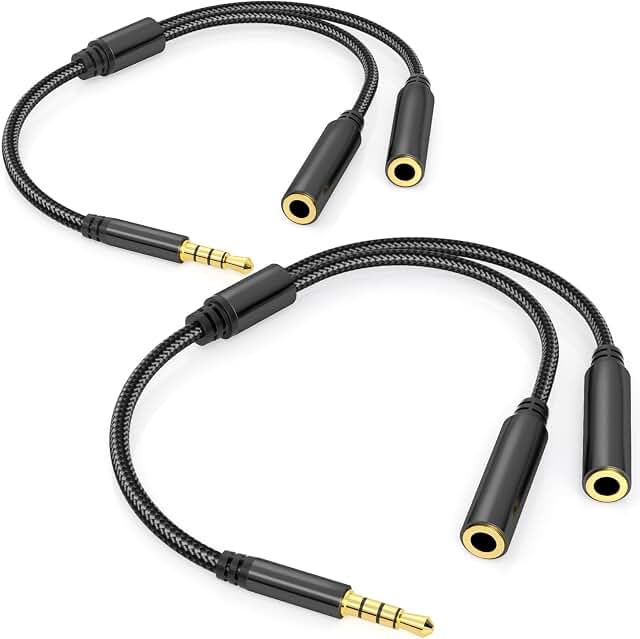
This listing describes two 1-foot 3.5mm TRRS splitter cables for connecting two headphones, with audio and microphone support. It is presented as a one-input, two-output adapter for phones, tablets, laptops, PCs, and MP3 players. The stated support for audio and mic makes it distinct from basic audio-only splitters.
Best for: Buyers who want two splitter cables and need a product listing that specifically mentions microphone support. It may be a better fit than an audio-only Y cable when headset microphone use matters.
Limitation: The product information does not explain how microphone signals behave when two headsets are connected at once. Check the intended device connection and use case before relying on both microphones simultaneously.
UGREEN Computer Headset Adapter

The UGREEN adapter has a 3.5mm female connector and two 3.5mm male plugs. Its listing describes it as a computer headset adapter for connecting a headset to a laptop with separate audio and microphone ports. It also identifies a braided audio cable and a gaming-headset use case.
Best for: Someone whose headset has a single 3.5mm plug and whose computer has separate headphone and microphone jacks. The two male plugs are the key distinction: they connect to separate PC ports rather than providing two headphone outputs.
Limitation: This is not the right choice for sharing one audio source with two listeners. Check that the computer has the separate audio and mic ports described in the listing.
Headphone Splitter For Computer

This computer adapter is described as a 3.5mm female-to-two-male Y splitter for connecting a smartphone headset to a PC. The listing identifies separate headphone and microphone plugs, making it a headset-to-computer adapter rather than an audio-sharing cable.
Best for: Buyers who need to connect a headset with one 3.5mm plug to a computer with distinct audio and microphone inputs. Compare it with the UGREEN option by checking the plug arrangement and the ports on the computer.
Limitation: The product details do not specify cable material or microphone behavior beyond its headset-to-PC purpose. Avoid choosing it if you need two female headphone ports for shared listening.
Buying Guide: How To Choose A 3.5mm Y Splitter
Do you want to share audio or connect a headset to a computer?
This is the most important question. A splitter with one male plug and two female sockets typically lets two headphones connect to one audio output. SYNCWIRE and Belkin are examples in this group. A splitter with one female socket and two male plugs is designed for the opposite arrangement: a single-plug headset connects to separate headphone and microphone ports on a computer. The UGREEN adapter and the computer splitter fit this second use.
These two cable types may both be called “Y splitters,” but they are not interchangeable. Compare the plugs at each end with the jacks on your devices. Do not select a cable based only on the words “3.5mm splitter” in a listing.
Do you need microphone support?
For music or other shared playback, an audio splitter may be sufficient. If you need to use a headset microphone, choose a listing that explicitly describes microphone support and confirm that the connector layout matches your device. The SYNCWIRE listing says “No Mic,” so it is not the choice for a microphone-dependent setup. The two computer adapters are described for separate audio and mic ports; the 2-pack listing specifically mentions audio and mic support.
Microphone support in a product description does not automatically answer every setup question. If you intend to connect two headsets and use both microphones, check whether the listing explains that use. The supplied details for the 2-pack do not clarify simultaneous microphone operation.
What connector layout does your device have?
Inspect the headset and the device before buying. A single headset plug and separate computer ports call for a female-to-dual-male adapter. A device audio output and two headphones call for a male-to-dual-female splitter. If your device does not have a 3.5mm jack, the products listed here may not connect directly without another appropriate adapter.
For PC use, identify which port is for headphones and which is for the microphone. For shared listening, make sure each headphone plug fits the splitter’s female sockets. Connector count and direction are more useful selection details than a product title that simply says “Y cable.”
Should you choose a braided cable or a two-pack?
Some listings call out construction or quantity. SYNCWIRE describes a nylon-braided cable, while UGREEN describes a braided audio cable. The 3.5mm TRRS option is listed as a 2-pack with 1-foot cables. These details can help you choose based on the stated cable construction or whether you want a spare, but they do not change the fundamental connection type.
Length can also matter for placement. The 2-pack listing specifies a 1-foot cable. The other supplied product information does not state cable length, so confirm the listing details if the distance between your devices is important.
How should you compare audio-sharing splitters?
For sharing sound, compare the number of headphone outputs, the source-device connection, and whether the listing describes microphone support. The SYNCWIRE and Belkin products are both described for splitting one audio source to two headphones. SYNCWIRE’s listing specifies no microphone, while Belkin’s supplied description focuses on audio sharing and does not state mic support.
Choose the 3.5mm TRRS 2-pack if you want two cables and value its explicit audio-and-mic description. However, verify that its connector format matches the source and headphones you plan to use. A product’s stated feature is not a substitute for checking the physical plugs and intended signal path.
What should you check before ordering?
- Identify whether you need two headphone outputs or separate computer audio and microphone plugs.
- Count the 3.5mm jacks on the source device and the plugs on your headset.
- Check whether microphone support is required and explicitly described.
- Review cable length, quantity, and construction when those details matter.
- Confirm that the device has a compatible 3.5mm connection.
Frequently Asked Questions
What does a 3.5mm audio Y splitter do?
It connects one 3.5mm audio connection to multiple connections, but the exact function depends on its plug layout. A one-male-to-two-female cable can share audio with two headphones. A one-female-to-two-male adapter can connect a single-plug headset to separate computer audio and mic ports.
Can I use any headphone splitter to connect a headset microphone?
No. Many audio-sharing splitters are intended for playback and may not support microphone input. Check for an explicit microphone-support description and confirm that the splitter has the right connector arrangement for your device.
Which splitter should I use for two headphones?
Choose a one-male-to-two-female splitter when one audio source needs to feed two headphones. The SYNCWIRE and Belkin products are described for this purpose. Check whether microphone support is needed before selecting one.
Which splitter connects a gaming headset to a PC?
For a headset with one 3.5mm plug and a computer with separate headphone and microphone ports, choose a female-to-dual-male headset adapter. The UGREEN and Headphone Splitter For Computer listings describe this type of setup.
Are a headphone splitter and a PC headset adapter the same thing?
No. Both may have a Y-shaped cable, but a headphone splitter usually sends audio to two headphones, while a PC headset adapter separates audio and microphone connections. Check the connectors at each end to distinguish them.
Can two people use microphones through one splitter?
The supplied product information does not confirm that two microphones will work simultaneously through these splitters. Choose a product that explicitly supports the intended setup and verify its connection requirements before relying on multiple microphones.