
The right 3.5mm headset splitter depends on which direction your audio needs to travel. For a headset with one combined plug and a computer with separate speaker and microphone jacks, choose a female-to-two-male adapter such as the UGREEN adapter or D & K Exclusives cable. For a headset with separate plugs and a device with one combo jack, choose a two-female-to-one-male adapter, such as KINGTOP or the second UGREEN model.
| Product | Best for | Connector direction |
|---|---|---|
| UGREEN Headphone Splitter for Computer | Durability and PC use | One female to two male |
| D & K Exclusives Headphone Splitter | Portable PC and laptop use | One female to two male |
| KINGTOP Headphone Mic Splitter | Gaming headsets with separate plugs | Two female to one male |
| DUKABEL Headphone Mic Splitter | Longer cable reach and PC use | One female to two male |
| UGREEN 2-Female-to-1-Male Splitter | Headsets with separate audio and mic plugs | Two female to one male |
UGREEN Headphone Splitter for Computer

This UGREEN adapter connects a headset with a single four-pole 3.5mm TRRS plug to a computer or laptop with separate headphone and microphone jacks. Its female TRRS socket accepts the headset plug, while the two male plugs connect to the computer’s audio and mic ports.
- Best for: People who need to use a combined-plug headset with separate PC audio and microphone ports.
- Why it was selected: The listing describes use for voice calls, online gaming, classes, and meetings. It also specifies gold-plated connectors, oxygen-free copper wire, an aluminum-alloy casing, and a braided jacket.
- Compatibility note: The listing says microphone output requires a CTIA-compliant TRRS cable; OMTP or other wiring standards can prevent mic function.
Choose this model if you want a clearly specified adapter for connecting a single-plug headset to separate computer ports. Check the headset’s wiring standard before buying if microphone input matters.
D & K Exclusives Headphone Splitter

The D & K Exclusives cable is a one-female-to-two-male 3.5mm splitter for connecting a newer headset with combined audio and microphone to a computer or laptop that has separate jacks. The two male connectors are intended for the computer’s headphone and microphone ports.
- Best for: Laptop and desktop users who want a compact adapter for calls, chat programs, or other VOIP applications.
- Why it was selected: Its listed features include a portable design, gold-plated connectors, and oxygen-free copper conductors.
- Limitation: The product details do not state a specific headset wiring standard. Confirm that the headset and computer ports match the adapter’s intended setup.
Choose this cable if portability and a straightforward connection to separate PC audio and mic jacks are priorities. Avoid it if your headset has two separate plugs and your device has only one combo jack; that requires the opposite connector direction.
KINGTOP Headphone Mic Splitter Adapter

The KINGTOP adapter has one male 3.5mm plug and two female jacks, one for audio and one for a microphone. This configuration combines separate headset plugs into a single 3.5mm combo port on a compatible device. The listing identifies it as a CTIA combo-port adapter.
- Best for: People with a dual-plug gaming headset who need to connect it to a compatible single-port device.
- Why it was selected: The product information names gaming headsets and devices including PS4, PS5, Xbox One, Switch controllers, newer laptops, and Android phones. It also lists gold-plated connectors and compact portability.
- Limitation: It is not the right direction for connecting a one-plug headset to a computer’s separate mic and headphone ports.
Choose this model when your headset has separate audio and microphone plugs and the device has one CTIA combo jack. Check your device’s port type before purchase, because connector shape alone does not confirm wiring compatibility.
DUKABEL Headphone Mic Splitter

This 30-centimeter DUKABEL adapter connects a four-position headset plug to a computer or laptop with distinct audio and microphone inputs. It has one 3.5mm female connector and two male connectors, so it follows the one-headset-plug-to-two-computer-ports arrangement.
- Best for: Users who want a longer adapter cable for PC gaming or VOIP applications.
- Why it was selected: The listed construction includes gold-plated contacts, a metal housing, shielding, a nylon-braided exterior, and oxygen-free copper wiring. The listing also describes a step-down design intended to fit with many device cases.
- Limitation: The product listing says it is not for iOS earphones or Beats headsets. Check the headset type before choosing it.
Choose this model if you need to split a combined headset connection into separate computer audio and mic plugs and want the listed 30-centimeter cable length. It is not suitable for the reverse connection direction.
UGREEN Two-Female-to-One-Male Splitter
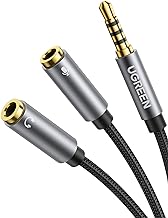
This UGREEN splitter combines a separate headphone plug and microphone plug into one male 3.5mm connector for a device with a single compatible combo jack. Its two female inputs are intended for a headset with separate audio and mic connectors.
- Best for: Users whose headset has separate headphone and microphone plugs but whose computer, laptop, or tablet has one 3.5mm combo port.
- Why it was selected: The listing specifies CTIA-standard headphone compatibility and describes a flexible TPE cable, braided protection, copper core, and gold-plated connectors.
- Limitation: The product details say it does not support iPhone headsets or OMTP headphones. They also advise connecting the headset and microphone to the splitter before plugging the adapter into the device.
Choose this adapter for the reverse of a typical PC headset splitter setup. Confirm that the headset plugs and device port match the stated CTIA configuration.
Buying Guide: How To Choose A 3.5mm Headset Splitter
Which connector direction do you need?
Connector direction is the first decision. A splitter with one female socket and two male plugs is generally used when a headset has one combined 3.5mm plug and a computer has separate headphone and microphone ports. The female socket receives the headset plug; the two male ends connect to the computer.
A splitter with two female sockets and one male plug serves the reverse purpose. It accepts separate headphone and microphone plugs from a headset and connects them to a device with one combo audio port. Check the product’s connector diagram or description rather than relying on the word “splitter,” which can describe either arrangement.
Does your headset have one plug or two?
Count the headset’s 3.5mm plugs. A single plug that carries both audio and microphone signals usually needs a one-female-to-two-male adapter when connecting to separate PC ports. Two headset plugs usually need a two-female-to-one-male adapter when connecting to one combo port.
Also check the number of black insulating rings on the plug and the manufacturer’s description if available. A four-pole TRRS plug is commonly used for combined audio and microphone, while the exact wiring standard can affect whether the microphone works through an adapter.
Will the microphone work with your device?
Audio and microphone compatibility are separate considerations. The UGREEN one-female-to-two-male listing specifies CTIA-compliant TRRS wiring for microphone output and warns that OMTP or other standards may cause microphone failure. The two-female-to-one-male UGREEN listing also specifies CTIA compatibility and excludes OMTP headphones.
If sound works but the microphone does not, confirm that the plugs are in the correct jacks, the adapter direction is correct, and the headset and device use compatible wiring. A splitter cannot correct an incompatible headset standard or turn a non-combo port into a microphone input.
What cable features matter?
For frequent packing or daily use, consider the construction described in the listing. Braided jackets, metal housings, flexible cable materials, and reinforced connectors can be useful features to compare. These details describe the product construction, but they do not establish that a cable will fit every headset or port.
Cable length matters when the headset and device are not close together. The DUKABEL model lists a 30-centimeter length. Other listings describe compact or portable designs without providing a cable length in the supplied details, so check the current product information if reach is important.
What should you check before ordering?
- Identify whether the headset has one combined plug or separate audio and microphone plugs.
- Check whether the device has one combo jack or separate headphone and mic jacks.
- Match the adapter’s female and male connector arrangement to your setup.
- Check CTIA or OMTP wiring requirements if microphone input is essential.
- Review any stated headset exclusions and the listed cable length or construction.
Frequently Asked Questions
What does a 3.5mm headset splitter do?
It adapts headset audio and microphone connections between devices with different port arrangements. Depending on its connector direction, it can connect one combined headset plug to separate computer ports or combine separate headset plugs for one combo port.
How do I connect a single-plug headset to a PC with separate jacks?
Use a one-female-to-two-male splitter designed for a combined TRRS headset. Connect the headset to the female socket, then connect the two male plugs to the computer’s headphone and microphone ports.
How do I connect a headset with two plugs to one combo jack?
Use a two-female-to-one-male adapter. Connect the headset’s headphone and microphone plugs to the matching female sockets, then insert the adapter’s male plug into the device’s compatible combo port.
Why does my microphone not work through the splitter?
Possible causes include the wrong splitter direction, incorrect plug placement, an incompatible CTIA or OMTP wiring standard, or a device port that does not support microphone input. Check the product’s compatibility notes and the headset and device specifications.
Can any 3.5mm splitter work with any headset?
No. Splitters differ in connector direction and wiring support. Check the headset’s plug arrangement, the device’s port arrangement, and any stated CTIA, OMTP, or headset exclusions before buying.