
The best 3.5mm audio splitter depends on whether you need to connect multiple listening devices, separate a headset’s microphone and headphone plugs, or share audio between two people. The three-output TRS cable is best for distributing stereo audio to several devices; the UGREEN adapter is best for connecting a compatible headset to separate computer audio and microphone jacks; and the SYNCWIRE cable is best for two-person listening without microphone support. Check the plug type and intended direction before choosing.
| Product | Best for | Connection type |
|---|---|---|
| Three-output stereo splitter | Sending one audio input to three outputs | 3-pole TRS, one male to three female |
| DUKABEL TRRS Y cable | Sharing audio with a TRRS connection | TRRS male to two female |
| UGREEN headset adapter | Separating headset audio and microphone plugs | One headset connection to separate audio and mic jacks |
| SYNCWIRE stereo Y splitter | Two-person listening without a mic | One male to two female, no mic |
| Four-pole mic-and-audio adapter | Splitting a headset connection into mic and audio | 4-pole male to two female |
Three-Output 3.5mm TRS Stereo Splitter

This cable is designed to distribute stereo audio from one 3.5mm input connection to three 3.5mm output connections. Its listed configuration is one male TRS plug to three female ports, and the product name identifies it as a three-pole, gold-plated splitter.
- Best for: People who need one audio source connected to as many as three output devices.
- Why it stands out: It is the only option in this group explicitly described as a one-input, three-output stereo distributor.
- Choose this if: Your goal is to route stereo audio to several outputs rather than separate a headset microphone from its headphone plug.
Limitation: This is a 3-pole TRS splitter, not a dedicated microphone-and-headphone separation adapter. The listing does not specify how microphone signals behave across the three outputs, so do not select it when mic routing is essential.
DUKABEL TRRS Headphone Sharing Y Cable

The DUKABEL is a 3.5mm TRRS male-to-two-female Y cable. The product name lists Hi-Fi stereo sound, 24K gold-plated connectors, TRRS microphone support, and a 30-centimeter cable. Its stated uses include music sharing and connections involving phones, PCs, headsets, Nintendo Switch, PlayStation, and Xbox.
- Best for: Buyers seeking a two-connection TRRS splitter for sharing audio or connecting compatible headset equipment.
- Why it stands out: The product specifically identifies TRRS and microphone support, unlike the stereo-only SYNCWIRE option.
- Choose this if: Your devices and intended setup use a TRRS connection and you need a short Y cable.
Limitation: The listing does not explain in detail how the microphone signal is routed through both female ports. Confirm the required connection arrangement before relying on it for calls or gaming chat.
UGREEN Headset Mic and Audio Adapter
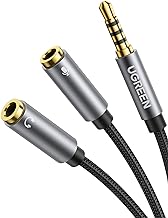
UGREEN’s adapter is made for a headset with separate headphone and microphone plugs that needs to connect to a computer, laptop, or tablet with one 3.5mm earphone jack. The listing specifies CTIA headphone compatibility and says it does not support iPhone headsets or OMTP headphones. It also says to plug the headset and microphone into the adapter before plugging the adapter into the computer to help the mic be picked up.
- Best for: A buyer converting separate headset audio and mic plugs for a single-jack device.
- Why it stands out: The listing clearly describes the connection purpose, CTIA requirement, and an important setup instruction.
- Build details: The cable is described as flexible TPE with nylon braiding, a copper core, and gold-plated connectors.
Limitation: It is not a general-purpose adapter for every headset standard. Avoid it if your headset is OMTP or an unsupported iPhone headset, and note that it is a 3.5mm adapter rather than a Lightning adapter.
SYNCWIRE Stereo Y Splitter Without Mic

This SYNCWIRE cable is a 3.5mm male-to-two-female stereo Y splitter. Its product name describes a nylon-braided cable, Hi-Fi sound, and use with Apple, Samsung, tablets, and other devices. The listing also explicitly says “No Mic,” which makes its intended use easier to distinguish from headset adapters.
- Best for: Sharing stereo listening between two sets of headphones when microphone support is not needed.
- Why it stands out: It provides two female connections and clearly states that it is a no-mic splitter.
- Choose this if: You want a straightforward headphone-sharing cable and do not need to use a headset microphone through it.
Limitation: Do not choose this for voice chat, calls, or a setup that depends on a microphone signal. The listing identifies the cable as having no mic.
Four-Pole Headset Mic and Audio Y Adapter

This 3-foot adapter has a 3.5mm four-pole male plug and two female ports. Its product name describes one port for microphone and one for audio, and lists use with headsets, earphones, PS4, Xbox, PC, laptops, MP3 players, phones, and tablets.
- Best for: Buyers who need a headset connection separated into distinct audio and microphone ports.
- Why it stands out: Its four-pole male plug and two labeled connection purposes match a common headset-to-separate-jacks arrangement.
- Choose this if: Your source headset has one combined 3.5mm connection and the destination has separate mic and headphone ports.
Limitation: The listing does not identify a headset wiring standard such as CTIA or OMTP. Check the headset and device requirements before purchasing, especially if microphone operation is necessary.
Buying Guide: How to Choose a 3.5mm Audio Splitter
What does “3 ring” mean on an audio plug?
People often use “3 ring” to describe a plug with three insulating bands. That plug generally has four conductive sections and is commonly called TRRS: tip, ring, ring, and sleeve. A plug with two insulating bands has three conductive sections and is generally called TRS. Product listings may instead use terms such as “3-pole” or “4-pole,” so compare the stated configuration rather than relying only on an informal search phrase.
The distinction matters because a TRRS plug can carry a microphone signal along with audio, while a TRS stereo plug is commonly used for left and right audio channels plus ground. However, the number of poles alone does not establish exactly how every splitter routes signals. Check the product’s described input and output purpose.
Do you want to share audio or split microphone and headphone plugs?
These are different jobs. A headphone-sharing splitter connects one source to two listening connections, while a multi-output distributor can send one source to three outputs. A headset adapter instead separates or combines microphone and headphone connections. Choose the product based on the direction and purpose of the ports, not simply because the plugs are all 3.5mm.
- One source to three stereo outputs: Consider the three-female-port TRS distributor.
- One audio source shared by two listeners: Consider a two-female stereo splitter such as the SYNCWIRE, if no mic is needed.
- Headset mic and headphone plugs to one jack: Consider the UGREEN adapter if the headset is CTIA-compatible.
- One combined headset plug to separate mic and audio jacks: Compare the four-pole adapter’s stated purpose and confirm the headset wiring standard.
How should you check plug and port compatibility?
Look at both ends of the connection. Identify whether the headset has one combined plug or separate microphone and headphone plugs. Then check whether the computer, controller, phone, or other source has one combined jack or separate ports. A splitter with two female connectors is not automatically interchangeable with an adapter that separates mic and audio.
Also check for explicit wiring-standard information. The UGREEN listing specifies CTIA support and excludes OMTP headphones and iPhone headsets. The four-pole adapter’s supplied description does not specify a standard, so a buyer who needs dependable mic operation should verify that detail before selecting it.
When does microphone support matter?
Microphone support matters for calls, voice recording, and multiplayer chat. If you only want two people to hear the same music or video, a stereo splitter without mic support may meet the need. If you want to speak through a headset, choose an adapter that specifically describes microphone routing and matches the headset’s wiring standard.
Do not infer microphone support from the words “headphone splitter” or “audio splitter.” The SYNCWIRE product explicitly says no mic. The DUKABEL title says TRRS mic support, while the UGREEN listing describes a headset mic-and-audio use case with a CTIA limitation.
Does cable length or construction affect the choice?
Choose a cable length that suits the distance between the source and connected devices. The DUKABEL is listed as 30 centimeters, while the four-pole adapter is listed as 3 feet. UGREEN describes a flexible TPE cable with nylon braiding, and SYNCWIRE also identifies a nylon-braided cable. These details can help with placement and handling, but they do not replace checking the connection layout.
What should you verify before ordering?
- Count the poles or insulating bands on the plug, when visible.
- Confirm whether you need one-to-two, one-to-three, or mic-and-audio separation.
- Check whether the cable supports a microphone if voice input is required.
- Match the adapter’s male and female ends to the plugs and ports in your setup.
- Check for stated wiring standards such as CTIA or OMTP.
- Remember that a 3.5mm adapter does not itself provide a Lightning or other non-3.5mm connection.
Frequently Asked Questions
Is a 3-pole plug the same as a 3-ring plug?
Not necessarily. A three-pole TRS plug has three conductive sections and usually two insulating bands. A plug with three insulating bands generally has four conductive sections and is called TRRS or four-pole.
Can I use a headphone splitter to connect a microphone?
Only if the splitter is designed to route microphone signals and is compatible with the headset’s wiring. A stereo-only splitter, including the SYNCWIRE option described as “No Mic,” should not be selected for microphone use.
Which product is best for two people listening?
The SYNCWIRE is described as a stereo male-to-two-female splitter for listening without a mic. The DUKABEL is another two-female option, but its TRRS and microphone-support description makes it a different choice; check the intended signal routing for your setup.
Which adapter connects separate headset plugs to one computer jack?
The UGREEN adapter is described for connecting separate headphone and microphone plugs to a single 3.5mm jack. Its listing specifies CTIA compatibility and says it does not support OMTP headphones or iPhone headsets.
Does every 3.5mm splitter work with a phone?
No. A 3.5mm plug must match the device’s port and the splitter’s wiring purpose. Some devices may require a different connector, and adapters designed for one headset standard may not work with another.