
The best 30-watt computer speakers depend on whether you prioritize simple desktop connections, adjustable sound, or a compact stereo setup. BESTISAN is best for flexible Bluetooth, AUX, and USB-C connections; LITTOAK suits buyers who want selectable sound modes; and Sanyun is better for people seeking bookshelf-style speakers with USB audio. The five options below include close-power alternatives, so you can compare output and features before choosing.
| Product | Best For | Listed Output |
|---|---|---|
| BESTISAN Computer Gaming Speakers | Flexible connections and lighting | 30W |
| LITTOAK Computer Speakers | Selectable sound modes | 30W peak |
| Sanyun SW208 | Bookshelf-style USB audio | 30W × 2 |
| Monster SD100 | Stereo sound and wireless pairing | 28W |
| Logitech Z313 | Subwoofer-based desktop sound | 25W RMS |
BESTISAN 30W Computer Gaming Speakers
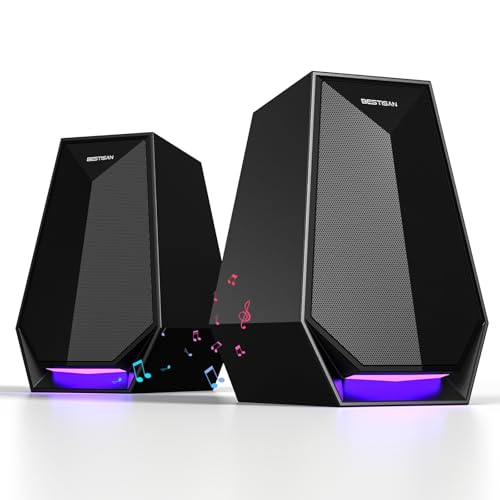
BESTISAN’s desktop speakers are listed with 30W drivers and are designed for gaming, movies, and computer calls. The feature list highlights clear treble and rich bass, along with Bluetooth, AUX, and Type-C connections. Six adjustable lighting modes offer a choice between a calmer glow and more colorful desktop effects.
Best for: Buyers who want a 30W speaker set with multiple connection options and adjustable lighting. The choice of Bluetooth, AUX, and Type-C makes it suitable for people who switch between compatible devices or prefer different connection methods.
- Listed output: 30W.
- Connections: Bluetooth, AUX, and Type-C.
- Lighting: six adjustable LED modes.
Consideration: The product description does not specify a separate subwoofer or a headphone output. Choose another option if either feature is essential to your setup.
LITTOAK 30W Desktop Speakers

LITTOAK lists these computer speakers at 30W peak and specifies DC-adapter power. They offer Music, Movie, and Game EQ modes, letting listeners select a sound profile for different kinds of content. For connections, the feature list includes Bluetooth 5.3, AUX-in, Type-C audio input, and a headphone output.
Best for: Desktop users who want convenient sound-mode selection and a headphone port. The three EQ presets are a practical differentiator for someone who uses one speaker set for music, films, and games.
- Listed output: 30W peak.
- Power: DC adapter.
- Connections: Bluetooth 5.3, AUX-in, Type-C, and headphone output.
- Sound settings: Music, Movie, and Game modes.
Consideration: The listed 30W figure is peak output, so do not assume it is directly comparable to a product specified using another power measure. Confirm the included input and power requirements suit your desk before buying.
Sanyun SW208 Bookshelf Speakers

The Sanyun SW208 is a bookshelf-style active speaker set with Bluetooth 5.0 and USB connectivity. Its feature list specifies 30W × 2 carbon-fiber speaker units, so its stated per-channel figure differs from products described as 30W total. USB connection uses a built-in 24-bit DAC to receive digital audio from a connected device.
Best for: Buyers seeking a larger bookshelf-style alternative to compact desktop speakers, especially if they want USB audio or Bluetooth. Its stated 30W × 2 output makes it a useful comparison for shoppers who want more listed power than a 30W-total model.
- Speaker units: 30W × 2, as listed.
- Connections: USB with built-in 24-bit DAC and Bluetooth 5.0.
- Design: bookshelf-style cabinet with a wood finish.
Consideration: These are bookshelf-style speakers rather than a small single-piece desktop soundbar. Check the available desk or shelf space and compare the product’s power wording carefully with total-output ratings.
Monster SD100 28W Computer Speakers
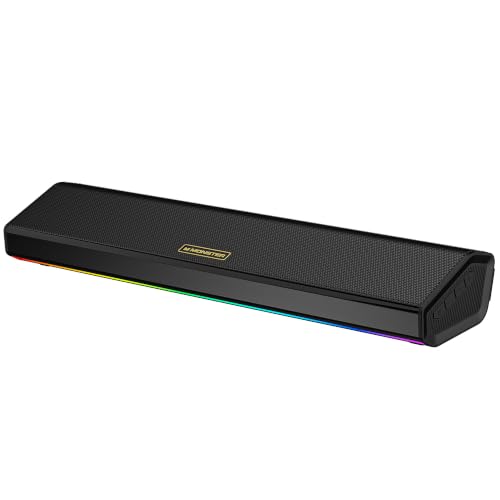
The Monster SD100 is a close-power alternative for shoppers comparing speakers around the 30W range. Its listed output is 28W, delivered through dual 14W drivers. The product description also includes Bluetooth 6.0, a 3.5mm AUX input, a built-in microphone, and TWS wireless pairing for pairing two SD100 speakers.
Best for: Buyers who can accept slightly less listed output than 30W and value the stated TWS pairing feature. It is also worth comparing for users who want both Bluetooth and AUX connections in a desktop speaker.
- Listed output: 28W total from dual 14W drivers.
- Connections and pairing: Bluetooth 6.0, AUX, and TWS wireless pairing.
- Other listed feature: built-in microphone.
Consideration: This is not a 30W model; the stated output is 28W. Choose a product with a specified 30W rating if matching that exact figure is more important than the Monster’s listed pairing features.
Logitech Z313 2.1 Speaker System

The Logitech Z313 is a 2.1 multimedia speaker system with a compact subwoofer and a convenient control pod. Its listed output is 25W RMS, which is below 30W, but the separate subwoofer makes it a distinct option for shoppers who want to compare a subwoofer-based arrangement with two-speaker desktop sets.
Best for: Buyers who prefer a system that includes a subwoofer and a separate control pod. It is a useful alternative when those elements matter more than reaching a 30W output figure.
- Configuration: 2.1 speaker system with compact subwoofer.
- Listed output: 25W RMS.
- Control: convenient control pod.
Consideration: The listed RMS output is 25W, not 30W, and the subwoofer takes additional space. Avoid this option if the exact power target or a minimal desktop footprint is your main requirement.
Buying Guide: How To Choose 30-Watt Computer Speakers
Start by checking how each manufacturer describes output. A 30W total rating, 30W peak rating, and 30W × 2 specification are not identical descriptions. The figures in this comparison come from the product information and should not be treated as perfectly equivalent measurements. If a precise power target matters, check the full product specifications before ordering.
Do you need exactly 30 watts?
For a product explicitly listed at 30W, compare BESTISAN and LITTOAK. LITTOAK specifies 30W peak, while BESTISAN describes 30W drivers. Sanyun lists 30W × 2, so its stated figure is per speaker unit rather than simply 30W total. Monster’s 28W and Logitech’s 25W RMS are nearby alternatives, not exact 30W matches.
Which connections fit your computer?
Check the ports and wireless options against the devices you plan to use. BESTISAN lists Bluetooth, AUX, and Type-C. LITTOAK adds a headphone output and lists Bluetooth 5.3, AUX-in, and Type-C audio input. Sanyun offers USB audio with a built-in DAC and Bluetooth 5.0. Monster lists Bluetooth and 3.5mm AUX.
USB-C and Type-C audio features should not be assumed to mean the same thing across every setup. Review the product’s connection details and your computer’s available ports. If you prefer wired audio, confirm the input type and any required cable before choosing.
Would a subwoofer or bookshelf design suit your desk?
A separate subwoofer can be a deciding feature if you want a 2.1 layout. Logitech’s Z313 includes a compact subwoofer, but it uses more space than a pair of speakers without one. Sanyun’s bookshelf-style cabinets are another consideration: they may suit a desk or shelf with room for larger speakers, while compact desktop models can be easier to fit in a tight workspace.
Measure the intended placement area before buying. Consider space for the speakers, power connections, and any subwoofer. Product information here does not provide exact dimensions for every option, so consult the full listing when fit is important.
Which features matter for gaming and everyday use?
For sound settings aimed at different activities, LITTOAK offers Music, Movie, and Game modes. BESTISAN includes adjustable lighting modes, which may suit buyers coordinating a gaming or work setup. Monster lists TWS wireless pairing, while Logitech offers a control pod. These are different conveniences; compare them against your actual routine rather than treating them as substitutes for output or connection compatibility.
For calls, note that Monster lists a built-in microphone. The other product descriptions in this comparison do not establish that they include microphones, so do not assume they can replace a dedicated headset or microphone.
How should you compare power and sound claims?
Use output ratings as one selection factor, not as a complete prediction of sound quality or loudness in your room. The listings use different terms, including peak, RMS, and per-unit output. Driver size, cabinet design, placement, and source settings can also affect listening results, but the supplied product information does not provide a consistent measurement for comparing all five options.
Choose the model whose stated output and features match your needs, then verify its complete specifications. For a compact desk, prioritize fit and controls. For more input choices, compare connection lists. For a subwoofer arrangement, consider the Logitech option while recognizing its lower 25W RMS rating.
Frequently Asked Questions
Are 30-watt computer speakers loud enough for a desk?
A 30W rating is a useful starting point for comparing desktop speakers, but it does not guarantee a specific loudness. Power measurements and speaker designs differ, and room conditions affect listening. Check the rating type and the product’s other specifications.
What is the difference between 30W peak and 30W RMS?
Peak and RMS describe output using different rating approaches, so the figures should not be compared as if they were the same measurement. LITTOAK lists 30W peak; Logitech lists 25W RMS. Check the manufacturer’s full specifications when comparing models.
Which option has a subwoofer?
The Logitech Z313 is the product in this comparison explicitly described as a 2.1 system with a compact subwoofer. Its listed output is 25W RMS, so it is an alternative to—not an exact match for—a 30W speaker set.
Which speakers offer Bluetooth and wired inputs?
BESTISAN lists Bluetooth, AUX, and Type-C; LITTOAK lists Bluetooth 5.3, AUX-in, and Type-C; Sanyun lists Bluetooth 5.0 and USB; and Monster lists Bluetooth and 3.5mm AUX. Confirm the exact connection requirements for your devices before purchasing.
Are the Monster SD100 and Logitech Z313 30-watt speakers?
No. Monster lists 28W total, while Logitech lists 25W RMS. They are included as nearby-power alternatives with different features, not as exact 30W models.