
The Yamaha URX22C and Zoom UAC-232 are the clearest choices here for recording at 32-bit resolution and sample rates up to 192 kHz. The Yamaha suits musicians who need MIDI and two combo inputs, while the Zoom is a 32-bit-float option for recording and streaming. The other picks offer different trade-offs: a simple vocal interface, an XLR-to-USB-C adapter, and a 24-bit/192kHz 2×2 interface.
| Interface | Best For | Listed Recording Format |
|---|---|---|
| Yamaha URX22C | Two-input recording with MIDI | 32-bit integer, up to 192 kHz |
| Zoom UAC-232 | 32-bit-float recording and streaming | 32-bit float, up to 192 kHz |
| Focusrite Scarlett Solo 3rd Gen | Solo vocals or guitar | 24-bit, up to 192 kHz |
| Shure MVX2U Gen 2 | Connecting an XLR microphone by USB-C | Not specified in the supplied product details |
| 2×2 Alloy Red Interface | Basic two-input recording and loopback | 24-bit, up to 192 kHz |
Yamaha URX22C
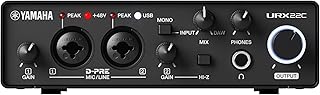
The Yamaha URX22C is a 2-in/2-out USB-C interface listed with 32-bit integer conversion and support for sample rates up to 192 kHz. It has two XLR/TRS combo inputs with Class-A D-PRE microphone preamps, +48 V phantom power, one Hi-Z input, two TRS main outputs, and MIDI I/O.
Best for: Musicians who need two microphone or line inputs, MIDI connections, or a dedicated Hi-Z input for an instrument. Its stated recording format makes it the strongest match for buyers specifically seeking 32-bit/192kHz support.
The listing also identifies DSP-powered mixing and effects, Steinberg software, and a full-metal housing. Limitation: The listed format is 32-bit integer, not 32-bit float; buyers seeking a float-recording workflow should compare it with the Zoom UAC-232.
Zoom UAC-232
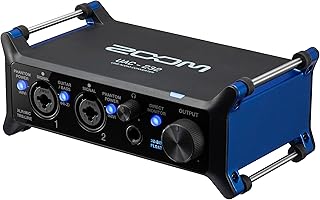
The Zoom UAC-232 is described as a 32-bit-float audio interface with a sample rate of up to 192 kHz. Its listed connections include two XLR inputs and a headphone output. The product name also identifies music and streaming use with Mac, PC, iOS, and Android devices.
Best for: Buyers who specifically want 32-bit-float recording and need an interface for music or streaming across the device platforms named in the listing. It is a closer format match than the 24-bit alternatives in this guide.
Limitation: The supplied product information does not detail the input preamps, phantom power, MIDI, or main monitor outputs. Check the complete listing and setup requirements if those connections are important to your recording workflow.
Focusrite Scarlett Solo 3rd Gen

The Scarlett Solo 3rd Gen is a compact option for recording a microphone and an instrument. The listing specifies one XLR microphone preamp, one Hi-Z instrument input, a 56 dB gain range, and conversion up to 24-bit/192kHz. It also names switchable Air mode and Gain Halos.
Best for: Solo vocalists, podcasters, or guitarists who need a straightforward interface and value the listed Mac, Windows, and iPadOS compatibility. Air mode is described as adding clarity to acoustic instruments, and Gain Halos help users monitor input levels.
Limitation: This model is 24-bit, so it does not meet a strict requirement for 32-bit recording. Choose it for its one-mic-and-one-instrument layout rather than as a direct substitute for a 32-bit interface.
Shure MVX2U Gen 2

The Shure MVX2U Gen 2 is an XLR-to-USB-C audio interface intended for use with an XLR microphone. The supplied description calls it MFi-certified and highlights a portable setup and clean, noise-free recording. It is a different type of option from a multi-input studio interface: its stated purpose centers on connecting an XLR mic through USB-C.
Best for: A user who wants a portable XLR-microphone connection for a USB-C setup rather than a traditional 2×2 interface. Its compact, single-microphone focus may suit a simple voice-recording or streaming arrangement.
Limitation: The provided details do not state a bit depth, sample rate, input count beyond the XLR-to-USB-C function, or monitor connections. Do not assume it supports 32-bit/192kHz recording without confirming those specifications in the full product information.
2×2 Alloy Red Interface

This 2×2 interface is listed for PC, Mac, and iOS recording at 24-bit/192kHz. Its product name identifies an XLR/TRS combo input, monitor mix, loopback function, and one-cable setup. These features make it relevant for recording and streaming, although its stated bit depth differs from the 32-bit models above.
Best for: Buyers who need a two-channel interface with monitor mix and loopback features and are comfortable with 24-bit recording. Loopback can be useful in streaming workflows where computer audio needs to be incorporated, subject to the product’s full setup details.
Limitation: It is not a 32-bit interface according to the supplied product name. The listing information provided here does not specify detailed preamp, phantom-power, or output characteristics.
Buying Guide: How to Choose a 32-Bit/192kHz Audio Interface
Does 32-bit mean 32-bit integer or 32-bit float?
Check the exact format named by the manufacturer. The Yamaha URX22C is listed as 32-bit integer, while the Zoom UAC-232 is described as 32-bit float. These are distinct formats, so “32-bit” alone may not answer whether a product fits a particular recording workflow. If your software, project, or production process requires one format, verify that exact specification before buying.
Also separate bit depth from sample rate. Bit depth describes digital audio resolution, while sample rate describes how many samples are captured per second. A product described as 32-bit does not automatically support 192 kHz. Confirm both specifications independently.
How many inputs do you need at once?
Count the sources you intend to record simultaneously, not just the instruments you own. A singer recording one microphone and one guitar may need only a simple two-source setup. Recording two microphones, a stereo source, or several performers can require a different input arrangement.
- One microphone plus one instrument: The Scarlett Solo lists one XLR mic preamp and one Hi-Z instrument input.
- Two combo inputs and MIDI: The Yamaha URX22C lists two XLR/TRS combo inputs and MIDI I/O.
- Two XLR inputs: The Zoom UAC-232 product name specifies two XLR inputs.
- One XLR microphone over USB-C: The Shure MVX2U Gen 2 is described as an XLR-to-USB-C interface.
Which connections matter for your setup?
Check the input and output types against your equipment. Combo inputs accept XLR or TRS connections, while a Hi-Z input is intended for instruments such as a guitar or bass that need an instrument-level connection. If you use condenser microphones, verify that the interface provides phantom power; the Yamaha listing explicitly identifies +48 V phantom power.
For monitoring, look for the output arrangement you need, such as headphone and main monitor connections. The Zoom listing names a headphone output, and the Yamaha listing identifies two TRS main outputs. Do not assume an interface has a connection just because a similar model does.
Are 24-bit/192kHz alternatives worth considering?
A 24-bit interface may be suitable if your priority is a 192kHz sample rate, a particular input layout, or a feature such as loopback. The Scarlett Solo and Alloy Red interface are both listed as 24-bit/192kHz products. They are alternatives for buyers who do not require 32-bit recording, but they should not be described as 32-bit models.
Compare the format against the actual recording task. A solo recording setup may benefit more from the right microphone and instrument inputs than from a format specification that is not needed for the project. For a strict 32-bit requirement, focus on products that state 32-bit directly.
What should streamers and mobile users check?
Confirm that the product supports the device and connection method you plan to use. The Zoom UAC-232 listing names Mac, PC, iOS, and Android. The Scarlett Solo listing names macOS, Windows, and iPadOS. Those details are useful starting points, but users should still verify operating-system requirements, cables, power needs, and software support in the complete product information.
For streaming, determine whether you need loopback, monitor mixing, headphone monitoring, or multiple microphone inputs. The Alloy Red product name specifically mentions monitor mix and loopback. The Shure adapter is described as a portable XLR-to-USB-C option, but the supplied details do not establish its sample rate or monitoring facilities.
Frequently Asked Questions
What is the best listed choice for 32-bit/192kHz recording?
The Yamaha URX22C and Zoom UAC-232 both match the stated 32-bit and 192kHz criteria. Yamaha specifies 32-bit integer, while Zoom specifies 32-bit float. Choose between them based on the format and connections you need.
Is 32-bit float the same as 32-bit integer?
No. They are different digital audio formats. The supplied product information identifies the Yamaha URX22C as 32-bit integer and the Zoom UAC-232 as 32-bit float, so buyers should confirm which format their workflow requires.
Does a 192kHz interface have to be 32-bit?
No. Sample rate and bit depth are separate specifications. The Scarlett Solo and Alloy Red interface are listed as 24-bit/192kHz, while the Yamaha and Zoom models are listed with 32-bit support and 192kHz capability.
Which option is suited to recording one voice and one guitar?
The Focusrite Scarlett Solo 3rd Gen lists one XLR microphone preamp and one Hi-Z instrument input, making it a direct fit for that source combination. It records up to 24-bit/192kHz rather than 32-bit.
Which listed interface includes MIDI I/O?
The Yamaha URX22C is the product in this selection whose supplied features explicitly list MIDI I/O. Check the full product specifications if MIDI connections are essential to your setup.
Can I assume the Shure MVX2U supports 192kHz?
No. The supplied description does not specify its sample rate or bit depth. Confirm those specifications in the full product information before purchasing if 192kHz or 32-bit recording is a requirement.