
A 32-bit USB DAC can add a wired headphone connection to a computer or mobile device and convert digital audio for listening. The Cubilux USB-A adapter is best for users who need 32-bit playback and a headset microphone; the StarTech USB-C adapter is better for broad device and operating-system support; and the USB-C dongle with a 4.4mm output suits listeners with compatible balanced headphones. The UGREEN option is a practical alternative if 24-bit/96kHz is sufficient.
| Product | Connection and output | Best for |
|---|---|---|
| Cubilux USB-A DAC | USB-A to 3.5mm | Headsets and headphones up to 100 ohms, according to the listing |
| USB-C 32-bit/384kHz dongle | USB-C to 3.5mm | IEM users seeking a compact DAC |
| StarTech USB-C adapter | USB-C to 3.5mm TRRS | Cross-platform headset use |
| UGREEN USB audio adapter | USB-A to 3.5mm | Listening and microphone use without requiring 32-bit playback |
| The Lord of the Tools adapter | USB-C to 4.4mm balanced | Devices and headphones with matching 4.4mm connections |
Cubilux USB-A 32-Bit DAC

This Cubilux adapter converts a USB-A port to a 3.5mm audio connection. Its listed maximum audio support is 384kHz/32-bit, and it includes a built-in amplifier with a stated 1Vrms output. The maker says the output can drive headphones with impedance up to 100 ohms.
Best for: Computer users who want a USB-A DAC for listening and compatible headset microphone use. The adapter supports 4-pole TRRS headphones and microphones, which can suit calls, meetings, and voice recording. It is selected for combining the advertised 32-bit format support with microphone functionality.
Limitation: The listing says it is not compatible with TS or TRS microphones. Check the plug type of a standalone microphone before choosing it.
USB-C 32-Bit/384kHz DAC Dongle

This compact USB-C-to-3.5mm dongle is listed with 32-bit/384kHz audio support and DSD128 capability. Its product name also identifies a KT02H20 chip and a silver-plated cable. It is presented for use with Android, iPhone, PC, and Mac, though buyers should confirm that their particular device supports audio output over USB-C.
Best for: Listeners using USB-C devices and 3.5mm earphones or in-ear monitors who want a small adapter with high-resolution format support. It is included because it matches the 32-bit USB DAC search closely and offers a conventional headphone jack.
Limitation: The supplied product information does not specify microphone support, output power, or detailed operating-system requirements. Choose another option if those details are essential to your setup.
StarTech USB-C TRRS DAC Adapter
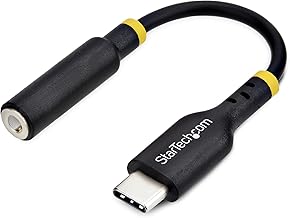
The StarTech adapter provides a USB-C-to-3.5mm TRRS connection for wired headphones, headsets, or speakers. Its built-in 32-bit DAC supports listed playback sample rates from 44.1kHz to 384kHz at 16-, 24-, or 32-bit. The product listing names a Realtek ALC4030U chipset and gives a 105dBA SNR for audio output.
Best for: Buyers who need both stereo playback and microphone input through a wired headset. It is also a strong choice when operating-system flexibility matters: the listing describes it as driverless and names Windows, macOS, Linux, iOS, and Android, along with USB-C and Thunderbolt hosts.
The listed microphone input uses a stereo ADC with 94dB SNR and supports 48kHz/16-bit sampling. The adapter also supports in-line headset controls.
Limitation: It requires a USB-C connection, so it is not the direct choice for a computer or device that only has USB-A.
UGREEN USB-A Audio Adapter

This UGREEN adapter connects a USB-A port to a 3.5mm headphone or headset jack. Its DAC is specified for headphone playback up to 24-bit/96kHz, and the product supports listening and talking through a compatible headset. The listing names Windows, Mac, Linux, PS5, PS4, and Switch 2 among its intended uses.
Best for: Buyers who want a USB-A audio adapter for everyday computer listening, gaming chat, or headset use and do not require 32-bit playback. It is selected as a lower-specification comparison: maximum bit depth and sample rate are clearly stated, making it easier to distinguish from the 32-bit options.
The adapter has an aluminum-alloy shell and a nylon-braided cable. The listing says it supports CTIA and OMTP headset standards and in-line controls. It notes that the microphone does not operate at 24-bit/96kHz; that rate applies to headphone playback.
Limitation: This is a 24-bit/96kHz product, not a 32-bit DAC. Its microphone connection also has a TRRS requirement, so check the headset plug before buying.
The Lord of the Tools USB-C 4.4mm DAC

This cable-style adapter converts USB-C audio to a 4.4mm output. Its listing states support for 32-bit/384kHz and identifies a built-in ALC5686 DAC chip. It also describes a 5N single-crystal copper, silver-plated wire and a gold-plated pure-copper base.
Best for: Buyers who specifically need USB-C input and a 4.4mm balanced headphone connection. It adds a different output type to this comparison and may suit a compatible audio setup better than a standard 3.5mm dongle.
The product description claims noise reduction and signal-transmission benefits from its materials and DAC design. Those are listing claims rather than independently verified performance results.
Limitation: Its 4.4mm connector is not the same as a standard 3.5mm headphone jack. Avoid it if your headphones have only a 3.5mm plug or if you need headset microphone support, which is not specified in the supplied features.
Buying Guide: How to Choose a 32-Bit USB DAC
Which USB connector does your device have?
Start by matching the DAC’s input to the host device. USB-A models such as the Cubilux and UGREEN adapters are suited to USB-A ports. USB-C models, including StarTech and the 3.5mm dongle, require a USB-C connection. A matching plug is necessary, but it does not by itself guarantee that every phone, tablet, or computer supports USB audio output. Check the device’s specifications if support is uncertain.
Do you need a 3.5mm or 4.4mm headphone output?
Most ordinary wired headphones and headsets use a 3.5mm plug, making a 3.5mm DAC the more direct option for those products. The Lord of the Tools adapter has a 4.4mm output instead. Select it only when the headphones or audio equipment you intend to connect use that connector. Plug size and wiring matter independently of the DAC’s advertised bit depth.
Will you use a microphone or headset controls?
For calls, gaming, and voice input, look for explicit microphone support and verify the headset plug standard. The Cubilux listing specifies 4-pole TRRS microphone and headset support, while StarTech lists microphone input and in-line controls. UGREEN also supports headset microphone use, with a TRRS requirement stated in its listing. The supplied features for the other two dongles do not confirm microphone functionality.
Does 32-bit audio support matter for your setup?
A 32-bit specification describes a supported audio format; it does not alone establish that a DAC will sound better in every system. The source, playback software, headphones, and device settings all affect the result. If your main need is simply to add a headphone jack or headset connection, a 24-bit/96kHz adapter such as UGREEN may meet that requirement. If a 32-bit maximum is a firm requirement, compare the Cubilux, StarTech, USB-C dongle, and 4.4mm model.
How much headphone output do you need?
Output power and headphone impedance can influence whether a DAC is suitable for a particular headphone. The Cubilux listing gives a 1Vrms output and says it can drive headphones up to 100 ohms. Comparable output-power information is not included for the other products in the supplied details. If your headphones need a specific output level, check the full product specifications rather than relying on bit-depth figures alone.
What should you compare before checkout?
- Input: Confirm USB-A or USB-C matches the device port.
- Output: Choose a 3.5mm or 4.4mm connection that matches your headphones.
- Microphone: Confirm that the adapter supports your headset and its plug standard.
- Format: Compare the maximum bit depth and sample rate with your actual playback needs.
- Operating system: Review stated compatibility and driver requirements for your device.
- Output power: Look for an output rating if you plan to use headphones with higher power needs.
Frequently Asked Questions
What does a 32-bit USB DAC do?
A USB DAC converts digital audio received over USB into an analog signal for wired headphones, speakers, or another audio output. A 32-bit rating identifies a supported digital audio format; it does not guarantee a particular listening result by itself.
Can I use a USB DAC with a phone?
Some listed adapters are intended for USB-C phones, but device support depends on the phone and its USB audio capabilities. Check the manufacturer’s specifications for both the phone and the DAC before buying.
Can a 32-bit USB DAC support a headset microphone?
Some can, but microphone support is product-specific. The Cubilux and StarTech listings describe microphone functionality. Check the plug type and microphone specifications, as a 3.5mm headphone output does not automatically mean microphone input is supported.
Is 384kHz better than 96kHz?
A higher maximum sample rate does not automatically mean audible improvement. It indicates the formats a device claims to support. Choose based on your audio sources, equipment, and connection requirements rather than the largest number alone.
Should I buy a 3.5mm or 4.4mm DAC?
Choose the output that matches your headphone plug. A 3.5mm DAC fits standard 3.5mm headphones and many headsets. A 4.4mm model is for compatible equipment and is not a direct substitute for a 3.5mm adapter.