
The best match for a 5.1 analog speaker system is a set of three color-coded 3.5 mm stereo cables, such as the Logitech-compatible replacement cable or SummitLink cable below. The other products serve different roles: a digital coaxial cable carries a digital signal, an optical converter provides stereo analog output, and a stereo RCA cable carries two-channel analog audio. Check your source and speaker inputs before choosing, because these products are not interchangeable.
| Product | Best for | Connection type |
|---|---|---|
| Replacement 3-to-3 Mini Jack Cable | Compatible Logitech 5.1 speaker systems | Three 3.5 mm TRS analog connections |
| TODN Digital Coaxial Cable | Digital coaxial audio connections | 75-ohm SPDIF digital coax |
| PROZOR Optical Audio Converter | Optical digital sources needing analog stereo output | Toslink/SPDIF to RCA or 3.5 mm |
| 5FT RCA Stereo Audio Cable, 2-Pack | Two-channel RCA connections | Stereo analog RCA |
| SummitLink 3-to-3 Minijack Cable | Compatible Logitech 5.1 computer speakers | Three color-coded minijack connections |
Replacement 3-to-3 Mini Jack Cable
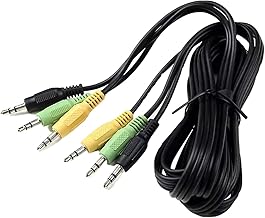
This 5-foot replacement cable is described as a color-coded set of three 3.5 mm, 1/8-inch TRS stereo mini-jack connections. Its listed compatibility includes several Logitech 5.1 computer speaker models, including Z-5500, Z-5450, Z-5400, Z-5300, Z-906, Z-680, and X540.
Best for: Owners of a listed Logitech speaker system who need the three analog connections between a compatible audio source and speakers. The three-plug design is the relevant feature for systems that use separate analog connections for surround channels.
Why it stands out: The listing identifies both the connector format and several speaker models, making it easier to compare against an existing cable or the labels on your equipment. The five-foot length may suit a nearby computer and speaker setup.
Limitation: Compatibility is not universal just because a system has 5.1 sound. Check the model and confirm that the source and speakers use three 3.5 mm analog outputs and inputs. This is not a single-cable digital surround connection.
TODN Digital Coaxial Audio Cable

This 3-foot cable is a digital coaxial SPDIF cable, not an analog 5.1 cable. The listing specifies 75-ohm construction, shielding, a ferrite bead, 99.99% OFC conductors, and 24K gold-plated connectors. It is described for home audio components such as subwoofers, amplifiers, DACs, and CD players, and lists Dolby, DTS, 2.1, 5.1, and 7.1 formats.
Best for: Buyers connecting components with compatible digital coaxial SPDIF ports. Choose it if your audio source and receiver both provide the matching coaxial digital connection and you want a short cable run.
Why it is included: It can be relevant to a 5.1 setup when the equipment uses a digital coax connection. Its format support describes the intended digital-audio use, not an analog multichannel output.
Limitation: Avoid this cable if you need three analog minijack connections or RCA analog channel outputs. Confirm that the ports are coaxial SPDIF; an RCA-shaped connector alone does not establish that a device uses the same signal type.
PROZOR Optical Audio Converter

The PROZOR is an adapter rather than a cable. Its listing describes conversion from optical Toslink or SPDIF digital audio to left/right RCA or 3.5 mm analog audio. It is advertised as supporting 192 kHz and 5.1-channel input, and the listed use cases include HDTVs, Blu-ray and DVD players, and PS3 and PS4 systems. A magnetic-ring power cord is also specified.
Best for: A buyer whose source has optical digital audio output and whose destination needs an analog stereo input. It provides a way to connect those different signal types, subject to the source’s audio-output settings and the converter’s supported input formats.
Why it is included: It addresses a common connection mismatch: a digital optical source and an analog RCA or 3.5 mm destination. The product description explicitly names both output connector choices.
Limitation: The listed analog outputs are left/right stereo, not three separate analog connections for front, rear, and center/subwoofer channels. Do not assume that a “5.1CH” input description means the converter supplies discrete 5.1 analog output. Check the manual and audio settings before buying.
5-Foot Stereo RCA Cable, Two-Pack

This listing is for a two-pack of 5-foot male-to-male stereo RCA audio cables. The product name identifies use with a speaker and amplifier, but does not specify multichannel connectors or discrete 5.1 channel wiring. Each stereo RCA connection carries two analog channels, typically left and right.
Best for: Buyers who need standard two-channel analog connections between compatible RCA-equipped audio components. The two-pack may be useful when setting up more than one stereo connection or keeping a spare cable available.
Why it is included: RCA cables are common in analog audio systems, and this product gives buyers a clearly described stereo option. The five-foot length is useful when the components are positioned within that cable distance.
Limitation: A stereo RCA cable or pair does not, by itself, provide all six analog channels in a discrete 5.1 system. Avoid choosing it as a replacement for a three-cable 3.5 mm surround set unless your equipment’s connection layout specifically calls for RCA cables.
SummitLink 3-to-3 Minijack Cable

SummitLink describes this as a color-coded three-to-three minijack audio cable for compatible Logitech 5.1-channel computer speakers. Its multi-connector arrangement is intended for analog surround connections that use three minijack plugs at each end. The listing does not provide a cable length in the supplied product details.
Best for: Owners of compatible Logitech 5.1 computer speakers who need a replacement set of three analog minijack connections. The color coding can help match plugs to corresponding ports during setup.
Why it was selected: Unlike the digital coaxial cable and stereo RCA option in this list, this product is specifically described for Logitech 5.1 speakers and uses three minijack connections. Compare its connector count and intended speaker compatibility with your original cable.
Limitation: The supplied details do not specify cable length or an exact list of compatible speaker models. Confirm both the model and the distance needed before ordering, and do not assume it suits every 5.1 system.
Buying Guide: How To Choose A 5.1 Audio Cable
What does “5.1 analog” mean for cable connections?
In a discrete analog 5.1 setup, audio is carried as six channels: front left, front right, center, subwoofer, surround left, and surround right. A common computer-audio arrangement sends these channels over three stereo analog connections. Those connections may use three 3.5 mm TRS cables, with each cable carrying a pair of channels.
The exact connector layout depends on the source and speaker system. Check the port labels, user manual, and existing cable before buying. A product described as “5.1” may refer to digital format compatibility rather than six analog output channels.
Do you need analog, coaxial digital, or optical?
- Three 3.5 mm analog connections: Choose a three-cable minijack set when both devices have matching analog surround ports.
- Stereo RCA analog: Choose RCA cables for equipment with left/right analog RCA inputs and outputs. A stereo connection is not a complete six-channel 5.1 link.
- Digital coaxial SPDIF: Choose a coaxial digital cable only when both devices have compatible coaxial SPDIF ports.
- Optical Toslink: Choose an optical connection for devices with matching optical ports. A converter may be needed if the receiving equipment accepts only analog RCA or 3.5 mm audio.
Digital and analog are different signal types. A cable with a familiar-looking plug will not convert one type into the other. Use a converter when required, and verify that it supports the source format and the output connection you need.
How many cables are needed for discrete analog 5.1?
For a common three-minijack arrangement, three stereo cables carry the six channels as three pairs. Follow the labels or manual for the particular sound card, receiver, and speaker system, because port assignments can vary. Do not substitute one stereo RCA cable for a three-connection surround set unless the equipment specifically supports that wiring.
How should you check compatibility before buying?
- Identify the exact audio source and speaker or receiver model.
- Count the available ports and note their labels, such as line out, front, rear, center/sub, optical, or coaxial.
- Match analog-to-analog or digital-to-digital connections unless using an appropriate converter.
- Check cable length against the distance between devices, leaving enough slack for routing.
- For a replacement cable, compare the number, size, and arrangement of plugs with the original.
When is a converter the right choice?
A converter is useful when the source and destination have different signal interfaces, such as an optical digital output and an analog stereo input. Read the converter description carefully: stereo RCA and 3.5 mm outputs do not automatically provide discrete 5.1 analog channels. Also check the source’s audio-output mode, because a converter may require a compatible format or setting.
Frequently Asked Questions
Can a stereo RCA cable carry 5.1 analog sound?
One stereo RCA connection carries two analog channels, not all six channels of discrete 5.1. A compatible multichannel system needs an appropriate set of connections or another supported interface.
Is a digital coaxial cable an analog audio cable?
No. A coaxial SPDIF cable carries digital audio. It requires compatible digital coaxial ports and does not directly replace analog RCA or 3.5 mm cables.
Are three 3.5 mm cables used for analog 5.1?
Many computer surround systems use three stereo 3.5 mm connections to carry six analog channels. Confirm the port layout and channel assignments for your specific equipment before connecting.
Does the PROZOR converter provide six analog 5.1 outputs?
The supplied product description lists left/right RCA and 3.5 mm analog outputs. It does not identify six discrete analog outputs, so buyers needing full analog 5.1 should verify the converter’s documentation before purchase.
What should I buy for Logitech 5.1 computer speakers?
Compare your speaker model and original plug layout with the listed compatibility. The replacement cable names several Logitech models, while SummitLink is described generally for compatible Logitech 5.1 speakers.