
The right choice depends on whether you need to switch analog audio sources or convert digital sound into 5.1 analog outputs. For discrete six-channel output, consider the Zopsc or Heayzoki decoder; for HDMI sources and broader input selection, the ATNEDCVH or AllAboutAdapters decoder is a better fit. The BolAAzuL is a straightforward stereo analog switch, but it is not a 5.1-channel switch.
| Product | Best For | Key Distinction |
|---|---|---|
| Zopsc 5.1 Channel Audio Decoder | Optical or coaxial sources | Six discrete analog outputs |
| Heayzoki 5.1 Channel Decoder | Switching between stereo and 5.1 modes | One-touch mode selection |
| ATNEDCVH Surround Sound Decoder | Multiple HDMI and audio sources | HDMI, Bluetooth, USB, and analog inputs |
| AllAboutAdapters HDMI Decoder | HDMI audio and existing surround gear | LPCM 5.1/7.1 analog output |
| BolAAzuL 4-Way Audio Switcher | Switching stereo analog sources | Passive RCA and 3.5mm switching |
Zopsc 5.1 Channel Audio Decoder

Best for: A home theater user who needs to convert a compatible optical or coaxial digital source into six analog channels. This decoder is selected because its listed outputs cover front left and right, center, surround left and right, and subwoofer.
The product description lists DTS and AC-3 decoding and optical and coaxial inputs. That combination can suit a TV, disc player, or set-top box when the source provides a supported digital audio format and the sound system accepts discrete analog connections. It is a decoder, not a simple source selector: its primary job is converting digital audio to analog 5.1.
- Six discrete analog outputs are identified as FL, FR, CEN, SL, SR, and SW.
- Optical and coaxial digital inputs provide two connection options.
- The listed use cases include Blu-ray players, gaming consoles, and streaming devices.
Limitation: Check the source device’s audio-output settings and the speaker system’s input connections before buying. The product information does not establish support for every digital audio format or device.
Heayzoki 5.1 Channel Audio Decoder

Best for: Buyers who want a decoder that lists both stereo and 5.1 channel modes. The Heayzoki is included because its features specifically mention switching between stereo and 5.1 channels, making it relevant to people comparing output modes as well as digital-to-analog conversion.
The listed inputs include host, USB, and optical fiber connections, and the product description names DTS and AC-3 decoding. It is intended to process audio from compatible audio and video players and provide analog output. The one-touch mode feature may be useful when a listener needs to choose between stereo playback and multichannel output.
- Lists DTS and AC-3 decoding.
- Describes analog stereo and analog 5.1-channel output.
- Provides one-touch selection between stereo and 5.1 modes.
Limitation: The feature text does not clearly identify all physical output connectors or specify which USB sources are supported. Confirm the connection layout and audio format requirements before choosing it for a particular system.
ATNEDCVH HDMI 5.1 Surround Decoder

Best for: A system with several source types that needs both audio processing and HDMI video connections. This model stands out for its three HDMI inputs and additional optical, coaxial, USB, AUX, and Bluetooth input options. It also lists 5.1 analog output for supported sources.
The product description states support for HDMI 2.0, HDCP 2.2, 4K at 60Hz, 3D, HDR, and ARC. It says source signals can be decoded to 5.1-channel output. According to the listing, native 5.1 input is hardware-decoded, while 2.0 audio can be processed into virtual 5.1. Those are different kinds of output, so buyers should distinguish discrete surround content from simulated surround.
- Three HDMI inputs plus several digital, USB, AUX, and Bluetooth inputs.
- Lists separate adjustment for each channel and control by unit knob or remote.
- Supports analog 5.1 output and digital optical or coaxial output for listed sources.
Limitation: The listing says TV-remote volume control is unavailable when audio is output from the decoder. It also notes that ARC requires an HDMI 2.0 cable with 19+1 cores.
AllAboutAdapters HDMI Surround Decoder
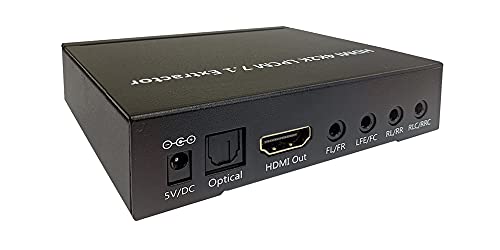
Best for: A buyer connecting HDMI audio to an existing analog surround amplifier or receiver. This decoder is a strong fit when the source sends uncompressed LPCM 5.1 or 7.1 and the downstream system needs multichannel analog connections.
The listed features include analog output for LPCM 7.1, LPCM 5.1, and two-channel LPCM. It can also extract compressed Dolby Digital, AC-3, or DTS audio from HDMI and send that audio through optical output for decoding by another device. EDID dip switches let users select how the HDMI source handles audio format output.
- Converts supported uncompressed LPCM formats to multichannel analog output.
- Provides optical output for listed compressed audio formats and two-channel LPCM.
- Supports HDMI resolutions through 4Kx2K, with output resolution following the input.
Limitation: The product description distinguishes analog LPCM conversion from optical output for compressed formats. Confirm the source’s audio format and the intended output path before purchase.
BolAAzuL 4-Way Analog Audio Switcher

Best for: Someone who wants to select between stereo analog sources, such as a PC, TV, or game console, without converting digital audio. It is included because it is a true analog switch, unlike the decoder products above.
The passive mechanical design supports four-port, bidirectional switching: connect up to four sources to one speaker or route one source to one of four speaker destinations. Only one output plays at a time. Its listed connections accommodate RCA left/right and 3.5mm stereo arrangements, which makes it suitable for stereo routing in a desk or media setup.
- Switches between four analog stereo ports.
- Supports flexible RCA and 3.5mm configurations.
- Uses passive mechanical switching and is described as preserving the original stereo signal.
Limitation: This is a stereo switch, not a six-channel 5.1 analog selector. Avoid it if you need to switch front, center, surround, and subwoofer channels together.
Buying Guide: How To Choose A 5.1 Analog Audio Switch
Do you need a switch or a decoder?
A switch selects between signal sources that already use the same kind of connection. A decoder converts a digital signal, such as optical, coaxial, or HDMI audio, into analog outputs. These products solve different problems. If a TV has optical output and an older speaker system takes six analog inputs, look for a decoder. If multiple devices already have analog outputs, look for a switch with the correct number of channels.
Many items marketed for home theater are decoders rather than switches. A decoder may include input selection, but that does not automatically make it a dedicated multi-source 5.1 analog switch. Check the input list, output list, and supported audio formats as separate specifications.
How many analog channels does your system require?
Discrete 5.1 analog sound uses six channels: front left, front right, center, surround left, surround right, and subwoofer. Confirm that both the source device and the receiving amplifier or powered speaker system have the matching connections. A stereo RCA or 3.5mm switch carries two channels; it cannot independently route all six 5.1 channels.
Some devices provide virtual 5.1 processing from stereo input. That is different from receiving and decoding a discrete 5.1 soundtrack. If you need distinct surround channels, verify that the product supports the source’s native multichannel format and provides the necessary analog outputs.
Which input connection does your source use?
Optical and coaxial digital audio are common connections on televisions, disc players, and other AV equipment. HDMI carries audio alongside video and may require format or EDID settings to ensure a source sends an accepted signal. Analog RCA and 3.5mm connections are typically used for stereo. Match the product’s input to the exact output available on the source device.
For HDMI setups, check both video requirements and audio behavior. Resolution, HDR, ARC, and audio decoding are separate capabilities. A unit’s support for a video resolution does not by itself confirm that it decodes every audio format used by a console, streaming device, or TV.
What audio format does the source send?
Look in the source device’s sound settings for options such as PCM, Dolby Digital, DTS, or multichannel LPCM. Then compare that setting with the decoder’s stated format support. The Zopsc listing, for example, names DTS and AC-3; the AllAboutAdapters model distinguishes LPCM analog output from compressed formats sent through optical.
If a format is unsupported, the source may need to be changed to a supported output mode. Do not assume that a product decodes every format simply because it has a digital input. The format must be supported across the source, converter, and speaker system.
When is a stereo switch the right choice?
A stereo switch is practical when several stereo devices share one amplifier or speaker input, or when one stereo source needs to be routed to one of several destinations. Check whether the switch is bidirectional, how many ports it offers, and whether it accepts RCA, 3.5mm, or both. Also check whether the product allows only one active output at a time.
Do not use a two-channel switch as a substitute for a 5.1 selector. A six-channel system requires the switching hardware to manage all six analog channels, not just a left and right pair. If a product does not explicitly describe six-channel routing, treat it as stereo unless its specifications say otherwise.
What should you check before ordering?
- Count the analog inputs and outputs on the existing equipment.
- Confirm whether the source sends optical, coaxial, HDMI, RCA, or 3.5mm audio.
- Check support for the exact audio format and whether output is discrete or virtual surround.
- For HDMI devices, verify the needed resolution, ARC behavior, and source settings.
- Review stated control methods, channel adjustment, and any connection-specific limitations.
Frequently Asked Questions
Can a stereo audio switch handle 5.1 sound?
No. A typical stereo switch carries left and right audio only. Discrete 5.1 switching requires six channels to be routed together.
Is a 5.1 audio decoder the same as an audio switch?
No. A decoder converts a supported digital audio signal into analog output. A switch selects between existing sources. Some equipment may offer both functions, but the specifications should state each function clearly.
What does 5.1 analog output mean?
It means the audio is provided as six separate analog channels: front left and right, center, surround left and right, and subwoofer. The receiving equipment must have corresponding inputs.
Can a decoder create real 5.1 from stereo?
Not necessarily. A product may create virtual surround from a two-channel source, but that is not the same as decoding a discrete 5.1 soundtrack. Check whether the listing describes native multichannel decoding or virtual processing.
Should I choose optical, coaxial, or HDMI?
Choose the connection that matches the source and the audio format you need. Optical and coaxial carry digital audio, while HDMI can carry audio and video. Confirm supported formats and connection behavior before selecting a converter.
Will every TV send 5.1 audio through its digital output?
Not necessarily. Output behavior depends on the TV, the source content, and the selected audio settings. Check the TV’s audio output options and select a format supported by the decoder and the connected speaker system.