
The right 5.1 surround sound adapter depends on the equipment you need to connect. For a computer, the StarTech adapter is a feature-rich USB option with 5.1 and 7.1 channel support. For an older AV receiver with digital inputs, the SOUTHSKY decoder converts optical or coaxial audio to six RCA outputs. Vantec is a simpler USB alternative, while the Cubilux is another USB surround-sound choice. The SPRODIO is a passive connector for specific RCA-to-3.5mm audio connections, not a digital surround decoder.
| Product | Best suited for | Connection type |
|---|---|---|
| StarTech ICUSBAUDIO7D | Computer users who need several audio connections | USB; analog and SPDIF |
| Cubilux 7.1 USB Sound Card | Users seeking a USB surround sound card | USB |
| Vantec USB External 7.1 Adapter | Users seeking a straightforward USB audio adapter | USB |
| SOUTHSKY 5.1/2.1 Decoder | Connecting digital audio to an older receiver | Optical or coaxial to RCA |
| SPRODIO M5 Adapter | Basic stereo RCA and 3.5mm audio connections | Passive analog connection |
StarTech ICUSBAUDIO7D USB Sound Card
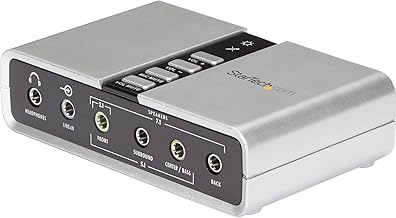
Best for: Desktop and laptop users who want a USB audio upgrade with multiple input and output connections. This adapter supports 5.1, 7.1, and two-channel output, so it is a flexible choice when a computer needs more than basic stereo audio.
It connects through USB and provides 3.5mm jacks, a headphone port, line-in, and stereo microphone inputs. Digital SPDIF output is also included. The listed analog playback and recording rates are 44.1 and 48 kHz. SPDIF output supports 48 kHz playback, while the optical input passthrough is limited to two-channel audio at 48 kHz.
Choose this model if you need analog multichannel output and several audio connections from one USB adapter. Its 1-meter USB cable is included, and the adapter is bus-powered. A limitation to note: the product’s SPDIF input passthrough is not described as multichannel; it supports up to two channels.
Cubilux 7.1 USB Surround Sound Card

Best for: Buyers looking for a USB sound card identified as supporting 7.1 surround sound. The product name also specifies a full aluminum-alloy housing and support for line-in and stereo microphone input, which may matter to users who want audio connections beyond playback.
The listed sample-rate range is 48 kHz to 384 kHz. The product is described as an external USB-A sound card for laptops and PCs. That makes it a candidate for a computer-based setup, rather than a dedicated optical-to-RCA converter for an older home theater receiver.
Choose this if a USB connection, 7.1 positioning, and the stated input options match your intended setup. The provided product information does not specify its output connectors, operating-system support, or detailed channel-routing requirements. Confirm those details before buying, especially if your speakers require several analog outputs or your computer lacks USB-A.
Vantec USB External 7.1 Channel Adapter

Best for: Computer users who want a simple USB adapter described as supporting 7.1-channel surround sound. Its USB 2.0 connection is listed as backward-compatible with USB 1.1, a useful detail when checking the interface against an older computer.
Vantec specifies support for 44.1 and 48 kHz sampling rates for both playback and recording. The stated feature set is comparatively concise: USB connection, multichannel audio support, and those playback and recording rates. It may suit buyers who do not need the additional ports or SPDIF details listed for the StarTech adapter.
Choose this model if its USB connection and stated sampling rates fit your computer-audio needs. The supplied information does not identify specific analog output jacks, microphone inputs, or digital audio connections. Check the connector layout and your computer’s audio configuration before choosing it for a particular 5.1 speaker system.
SOUTHSKY 5.1/2.1 Digital Sound Decoder

Best for: Home theater owners who need to convert a digital optical or coaxial audio signal into analog RCA connections for an older AV receiver. This is the clearest fit in the list for a receiver that needs six analog channels rather than a computer USB sound card.
The decoder has two optical inputs, one coaxial input, and a 3.5mm AUX input. Its six RCA outputs are labeled for front left and right, surround left and right, center, and subwoofer. A switch selects 5.1-channel or 2.1-channel mode. The listed audio support includes LPCM and Dolby, DTS, and AC-3 decoder conversion. It also remembers the selected input signal after restart.
Choose this if your source provides a supported digital signal and your receiver accepts six RCA inputs. Avoid it if you need a USB computer sound card or if your receiver only accepts a different input type. Confirm that the source’s audio format and channel output match the decoder and receiver.
SPRODIO M5 RCA-to-3.5mm Adapter

Best for: Buyers who need a passive connection between stereo RCA and 3.5mm audio connections. The product name describes a stereo RCA-to-three 3.5mm AUX 1/8-inch adapter, with bidirectional conversion, for multimedia speakers.
This is not the same type of device as a USB sound card or a digital surround decoder. The supplied product details identify it as a passive adapter, so it should be considered for connecting compatible analog audio plugs, not for converting optical or coaxial digital audio into decoded 5.1 channels.
Choose this if your equipment’s connectors match the adapter’s stated RCA and 3.5mm arrangement. The provided details do not explain channel mapping or list supported digital formats. Avoid assuming that a passive connector will create discrete 5.1 surround sound from a stereo source; check the equipment manuals and connection requirements first.
Buying Guide: How to Choose a 5.1 Surround Sound Adapter
Are you connecting a computer or a home theater receiver?
Start with the source and destination devices. A USB sound card such as the StarTech, Cubilux, or Vantec is intended for a computer connection. The SOUTHSKY decoder is designed for a different task: accepting optical or coaxial digital audio and providing six RCA analog outputs. A passive RCA-to-3.5mm adapter addresses connector differences but does not perform the same decoding function.
Before buying, check the available ports on both devices. A computer may have USB-A, while a receiver may have optical, coaxial, or multichannel RCA inputs. An adapter cannot solve a connection mismatch unless it explicitly supports the required input and output types.
Do you need discrete 5.1 output or stereo audio?
For discrete 5.1 playback, the source, adapter, and receiver or speaker system must all support the intended multichannel path. Six RCA outputs on a decoder correspond to front, surround, center, and subwoofer connections. A stereo RCA-to-3.5mm adapter alone should not be treated as a 5.1 decoder.
Also distinguish 5.1 from 7.1. A product that supports up to 7.1 channels may offer more channel options, but the rest of the system still needs to support the selected format and connection method. Check the specific output arrangement rather than relying on the channel number in a product name.
Which audio inputs and outputs do you need?
- USB: Consider a USB sound card when adding computer audio connections. Confirm the computer has the required USB port and check the adapter’s output layout.
- Optical or coaxial: Consider a decoder such as SOUTHSKY when the source sends digital audio and the receiver takes analog RCA inputs.
- Analog RCA or 3.5mm: A passive adapter may connect compatible analog plugs, but it does not necessarily decode surround formats.
- Microphone or line input: Check whether you need recording or voice input. The StarTech and Cubilux descriptions list input connections; the Vantec information supplied here does not.
What should you check about audio formats?
Match the source’s output format to the adapter’s supported formats. The SOUTHSKY listing names LPCM and Dolby, DTS, and AC-3 conversion, while the StarTech listing gives separate sample-rate limits for analog and SPDIF functions. A digital input’s presence does not automatically mean every digital format or channel configuration is supported.
For computer adapters, check the stated sampling rates and the output type needed by your speakers. The StarTech and Vantec listings specify support for 44.1 and 48 kHz in relevant functions. The Cubilux name gives a wider sample-rate range, but the supplied details do not specify its output connectors or channel-routing requirements.
How can you reduce setup problems?
- Write down the exact output port on the source and input port on the receiver or speakers.
- Check whether your speaker system expects a USB audio device, six RCA inputs, or another connection.
- Confirm which device handles decoding and channel selection.
- For digital connections, check the source’s audio output settings as well as the decoder’s supported formats.
- Do not assume a passive adapter converts digital signals or creates missing surround channels.
Frequently Asked Questions
What does a 5.1 surround sound adapter do?
It connects or converts audio between devices in a 5.1 system. The exact function depends on the product: a USB sound card adds computer audio connections, while a digital decoder can convert supported digital audio to multichannel analog outputs.
Can a USB sound card connect to an older AV receiver?
Only if the sound card’s outputs match the receiver’s inputs. Check the adapter’s connector layout and the receiver’s available ports. A USB computer adapter and an optical-to-RCA decoder serve different connection needs.
Does a 3.5mm adapter create true 5.1 surround sound?
Not by itself. A passive connector changes or adapts compatible analog connections; it does not necessarily decode a digital surround format or generate discrete surround channels.
What is the difference between optical and RCA audio?
Optical carries digital audio over a Toslink connection. RCA connectors carry analog audio in the configuration specified by the device. A decoder may convert supported optical audio into multiple analog RCA outputs.
Should I choose a 5.1 or 7.1 adapter?
Choose based on the channels your source and audio system support. A 7.1-capable adapter may also support 5.1, but verify its specific output connections and the requirements of the speakers or receiver.
Will every digital source work with a 5.1 decoder?
No. The source format and decoder support must match. Check the decoder’s supported formats and the source device’s audio output settings before connecting the system.